
So, what does it actually mean to automate your social media posts?
At its core, it's about using software to schedule and publish your content across platforms like Instagram, TikTok, Facebook, and even Google Business Profiles without having to do it all by hand, every single time. This approach helps you lock in a consistent posting schedule, frees up a ton of time, and lets you focus on big-picture strategy and talking to your audience instead of the daily grind of publishing.
Why Automating Social Media Posts Is No Longer Optional
Does this sound familiar? You're stuck in a never-ending loop of creating content, then copying and pasting it across all your different social media accounts. This isn’t just a little inefficient; it's a massive bottleneck that’s holding you back.
When you manage everything manually, you’re bound to run into inconsistent posting, last-minute scrambles for content, and—let's be honest—total burnout. It happens to the best of us, whether you're a solo creator, an agency, or a growing business.
The hard truth is that a manual approach just doesn't cut it anymore. It eats up precious hours that you could be using for things that actually move the needle, like engaging with your followers, digging into your analytics, and fine-tuning your content strategy.
The Shift From Inefficiency To Strategy
This is where automation comes in. It transforms that chaotic, manual process into a smooth, strategic workflow. Posting goes from being a daily chore to a "set-it-and-forget-it" task that just runs in the background, powered by a solid tool. It’s not about cutting corners; it’s about working smarter.
For instance, a tool like OneUp completely changes the game. You can:
- Schedule posts in bulk by simply uploading a CSV file. What used to take a whole week can now be done in about 10 minutes.
- Set your evergreen content to recycle automatically, giving your best posts continuous exposure without you lifting a finger.
- Auto-post from RSS feeds, which is perfect for sharing new blog articles or industry news to keep your profiles fresh and valuable. You can even set keywords to filter which articles get posted.
- Schedule YouTube Shorts, Instagram Reels, and TikToks—all from one place, ensuring you're present on the most important video platforms.
This strategic shift isn't just a niche trend. The global market for social media automation tools is expected to hit USD 4.5 billion in 2024 and is projected to skyrocket to USD 12.8 billion by 2033. A whopping 83% of marketing departments are now automating their posting workflows, cutting their content creation time by an average of 30%.
It’s About More Than Just Saving Time
While saving time is the most obvious perk, the real magic is in what you can do with all those hours you get back. When you automate social media posts, you free up the mental and creative space for the high-impact stuff.
Automation isn’t about replacing the human element of social media; it’s about freeing up humans to be more strategic, creative, and engaging. It handles the logistics so you can handle the relationships.
Think about the snowball effect here. Consistent posting builds trust and keeps your brand on your audience's radar. Deeper engagement creates a loyal community. And making smart, data-backed tweaks to your strategy leads to better content and bigger results.
To really tap into these benefits, many businesses are turning to comprehensive solutions like social media management packages that can juggle the complexities of daily posting and community engagement. At the end of the day, automation isn't just a shortcut—it's the foundation for building a successful, scalable social media presence.
Laying the Groundwork for Your Content Automation
Before you jump in and start automating social media posts, you need a plan. A truly effective automation strategy isn't about firing off random posts; it’s built on a solid content foundation. Getting this part right ensures every single automated post has a purpose, stays true to your brand, and actually gives your audience something of value.
Think of it like building a house. You wouldn't just start throwing up walls without first pouring a solid concrete foundation. For social media, that foundation means figuring out your core content pillars, getting your workflow organized, and creating a bank of top-notch assets that can work for you over and over again.
Figure Out Your Core Content Pillars
Your content pillars are simply the main topics or themes you'll talk about consistently. They are the backbone of your entire content strategy, making sure every post reinforces who you are and what you know. Pillars keep your messaging tight and stop your feed from looking like a jumbled mess of unrelated ideas.
For example, a fitness coach’s pillars might look like this:
- Workout Tutorials: Short, easy-to-follow video guides.
- Nutrition Tips: Quick recipes and myth-busting facts.
- Client Success Stories: Real testimonials and transformation journeys.
- Mindset & Motivation: Inspirational quotes and personal stories.
Once you’ve defined these pillars, you’ve created a repeatable structure for your content. It makes coming up with ideas a whole lot easier and ensures your automated schedule is always packed with relevant, on-brand material that your audience will actually care about. No more scrambling for what to post next; you just create content that fits neatly into your strategic buckets.
Get Organized with Categories
Juggling multiple brands or clients can get chaotic, fast. This is where having a structured system is a lifesaver. A tool like OneUp lets you use Categories to group different social media accounts together. For agencies or businesses managing separate brands under one roof, this feature is a total game-changer.
An agency could create different Categories like "Client A – Local Cafe," "Client B – Tech Startup," and "Internal Brand – Agency News." Then, when you're scheduling a post, you just pick the right category, and OneUp automatically lines it up for all the social accounts in that group.
This simple step of categorizing your accounts turns a messy workflow into a clean, efficient machine. It prevents embarrassing cross-posting mistakes, makes scheduling a breeze, and gives you a clear birds-eye view of each client's content calendar.
This level of organization is non-negotiable when you want to automate social media posts at scale. It guarantees the right content always goes to the right channels, protecting brand integrity and making your life a whole lot easier.
Build Your Evergreen Content Library
Let's be real: not all content is created equal. Some posts are timely, but others—your evergreen content—are valuable forever. This is your "greatest hits" collection: your best how-to guides, foundational tips, powerful testimonials, and answers to frequently asked questions. Building a library of this content is one of the smartest moves you can make for your automation strategy.
OneUp is built for this. You can create these high-value posts and save them directly to your library as Drafts. Each one becomes a reusable asset that can be scheduled to repeat automatically, keeping your calendar full and your best work in the spotlight. You’re effectively turning one-off posts into long-term marketing assets that work for you 24/7.
To give these posts an extra punch, especially on visual platforms, it helps to have killer captions ready. You can use an Instagram caption generator to write engaging text that gets people to act, and then save those captions right alongside your evergreen media.
Once your library is stocked, you can set posts to recycle at specific intervals—for instance, automatically reposting a popular blog link every 60 days. This simple piece of automation keeps your profiles active with proven winners, catches new followers who missed it the first time around, and drives traffic back to your site with zero extra effort on your part.
Your Guide to an Effortless Scheduling Workflow
Alright, you've laid the groundwork with your content pillars. Now it's time to put that strategy into motion and build a real, living content calendar. A modern scheduling workflow is so much more than just picking a time and hitting "publish." It’s about using smart features to wring every last drop of value out of each post.
Think of it this way: your content foundation—pillars, organization, and a solid library of evergreen content—is the fuel. Your scheduling workflow is the engine.
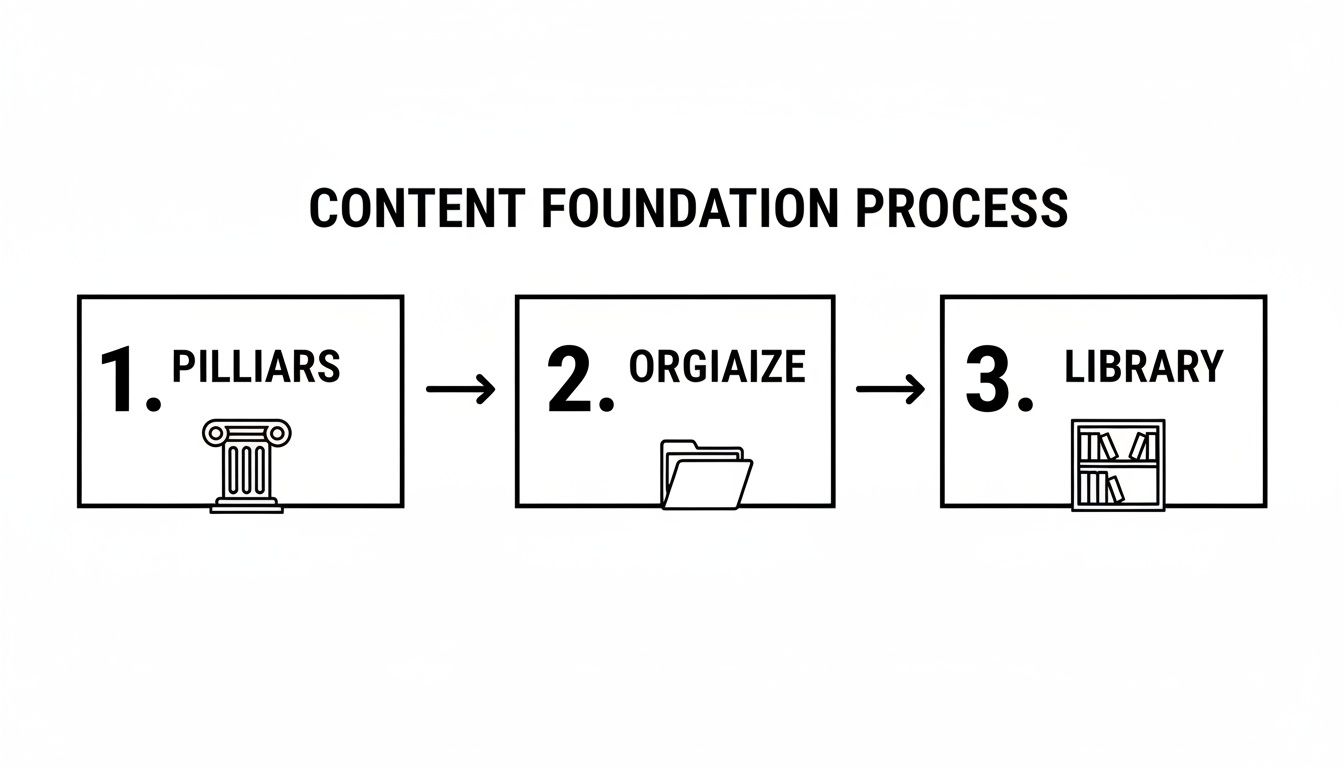
When you have these pieces in place before you start scheduling, the whole process becomes faster, more consistent, and perfectly aligned with what you're trying to achieve.
Beyond Just Scheduling a Single Post
Let's get practical. Imagine you’re an e-commerce brand launching a new product on Instagram. Instead of just scheduling the post, you can use a tool like OneUp to automate the first comment. This is a total game-changer for keeping your caption clean and focused on the message.
You just write your post, then pop your 20-30 relevant hashtags into a separate field. When the post goes live, OneUp automatically drops that block of hashtags into the first comment. It’s a simple trick that boosts discoverability without making your main caption look spammy.
This same level of control applies to video, too. When scheduling a video, you can customize the thumbnail right inside the scheduler. Forget letting the platform pick a random, blurry frame. You can upload a slick, custom-designed graphic to make sure your video grabs attention in the feed. For Google Business Profiles, you can even schedule posts with a Call-To-Action button like "Learn more" or "Book".
Creating Visuals Without Leaving Your Workflow
One of the biggest time-sucks for social media managers is the constant tab-switching between design tools and scheduling platforms. A truly effortless workflow brings these tasks together.
Say you need a quick graphic for a flash sale. The old way involves opening Canva, designing the image, downloading it, then switching back to your scheduler to upload it. It's clunky and kills your momentum.
With OneUp’s direct integration with Canva, Unsplash, and Pixabay, you can design a beautiful graphic or pull from a huge library of stock photos without ever leaving the post composer.
This isn't just about convenience. It’s a massive time-saver that removes friction from the whole creative process. When your tools are integrated, you can create and schedule in a single fluid motion.
Scaling Your Content with Serious Automation
For agencies or any business managing a ton of content, scheduling posts one-by-one just isn’t going to cut it. This is where you bring in the heavy hitters to truly automate social media posts.
- Bulk Uploading via CSV: You can map out hundreds of posts in a simple spreadsheet. Each row has the post text, an image/video URL, and the date you want it to go live. Just upload that CSV file to OneUp, and it will populate your calendar for weeks or even months in a matter of minutes.
- RSS Feed Automation: Keep your channels buzzing by automatically sharing content from sources you trust. Hook up an RSS feed from your own blog or an industry news site, and OneUp will create and publish a post every time a new article drops. You can even add your own custom intro text to every automated post.
- Webhook Integrations: For the ultimate custom setup, you can use webhooks with services like Zapier or Make.com. Imagine setting up a trigger so that every time you add a new product to your Shopify store, a webhook automatically tells OneUp to create and schedule a social media post for it. That's powerful stuff.
When choosing your tools, a detailed Brandwatch vs Hootsuite comparison can be useful for understanding different approaches, but the real key is finding a single platform that consolidates these advanced features. Moving from manual posting to a system that embraces this level of automation is how you unlock the real power of your social media strategy.
Making Collaboration Work for Your Team and Clients
Automating social media posts is one thing, but for agencies and marketing teams, it’s really a team sport. The true magic of automation happens when it smooths out communication, gets rid of the endless email chains, and gives everyone a single source of truth. If your system isn't collaborative, you're just swapping one manual headache for another.
The idea is to create a seamless workflow where content gets created, reviewed, approved by clients, and assigned to team members—all in one spot. This doesn't just save a massive amount of time; it also cuts down on the risk of expensive blunders, like publishing a post that wasn't approved or giving a new hire access to the wrong client’s accounts.
Nail Down a Bulletproof Client Approval Workflow
If you're at an agency, you know the client approval process is often the biggest bottleneck. The old way—emailing spreadsheets, passing around Google Docs, or sending screenshots—is a recipe for disaster. Feedback gets buried, versions get confused, and the whole thing feels like you're constantly chasing people down.
This is where a dedicated approval queue changes the game. With a tool like OneUp, you can whip up a post and, instead of scheduling it, send it straight to your client for approval. They get a simple notification and a unique link. No fuss.
From that point on, it couldn't be easier:
- One-Click Decisions: Clients see the post exactly how it will look live. They can approve or reject it with a single click or leave specific feedback if something needs tweaking.
- No Login Needed: This is a huge win. Clients don't have to create an account, remember another password, or learn a new piece of software. The link takes them right where they need to go.
- Automated Next Steps: If the post is approved, it automatically hops into your scheduled queue. If it's rejected, it goes back to the creator for edits. The system manages the flow so your team doesn't have to.
This simple, automated loop keeps everything moving without you having to constantly follow up. It’s a professional touch that gives clients peace of mind and your team total clarity.
Boost Transparency with Shared Calendars
Beyond approving individual posts, clients and stakeholders often want a 10,000-foot view of your content plan. A read-only shareable calendar is the perfect solution. It gives them the transparency they want without the risk of them accidentally editing or deleting something.
Inside OneUp, you can generate a shareable, read-only calendar link for each client's Category. They get a live link showing exactly what’s planned to go out and when. It’s the easiest way to keep everyone in the loop, build trust, and answer the dreaded "What's posting this week?" question before it's even asked.
This one feature can replace countless status update meetings and weekly summary emails. It empowers clients with visibility while protecting your internal workflow—a perfect balance of transparency and control.
Manage Your Team’s Access with Precision
As your team gets bigger, you need to be smart about who can access what. Giving every team member admin rights to every social account is a security nightmare waiting to happen. You need granular permissions to keep things organized and client assets protected.
This is where you can assign specific roles and access levels. For example, you can restrict team members to only access specific social accounts or Categories in OneUp. A junior creator working on "Client A" will only see and post to Client A's accounts, while a manager might have access to everyone. OneUp's pricing is simple: one flat price for unlimited team members.
This setup ensures people only see what’s relevant to them, which keeps their dashboard clean and dramatically reduces the odds of human error. It’s a must-have for scaling your operations securely.
Give Your Creativity a Boost with an AI Assistant
Finally, good collaboration should also fuel the creative process. Writer's block is a real problem, and coming up with fresh ideas day after day is a grind for any content team. This is where AI can step in as a powerful partner.
OneUp has a built-in AI Assistant that can help your team smash through creative roadblocks. Stuck on a caption? The AI can generate a bunch of options in seconds. Even better, it can create unique AI-generated images, giving you a constant stream of fresh visuals for your posts. It’s not about replacing creativity—it's about augmenting it so your team can produce better content, faster.
Recycling Evergreen Content for Maximum Reach
You just spent hours, maybe even days, crafting the perfect piece of content. The worst thing you can do now is post it once and let it disappear into the social media void. This is where recycling your evergreen content comes in—it’s one of the smartest ways to automate social media posts and get the most bang for your buck.
Instead of your best work collecting digital dust, an automated recycling workflow puts it back in front of your audience again and again. It’s a simple strategy that keeps your calendar full, catches the eye of new followers who missed it the first time, and drives a steady flow of traffic without you lifting a finger.
What Makes a Post Worth Recycling?
Let’s be clear: not everything should be recycled. A flash sale announcement or a post about a current event has a very short shelf life. Evergreen content, on the other hand, stays relevant and valuable over time.
Think about your top-performing posts—the ones that always get clicks, comments, and shares. Those are your golden geese.
Here are some prime candidates for your recycling queue:
- In-depth "How-To" Guides: Step-by-step tutorials that solve a real problem for your audience.
- Powerful Client Testimonials: Nothing builds trust like social proof. Let your happy customers do the selling for you.
- Answers to Frequently Asked Questions: If people are always asking the same questions, a post that answers them will always be useful.
- High-Performing Blog Posts: Got a cornerstone article that drives tons of traffic? Keep sharing it.
Imagine a marketing agency automatically resharing its best case study every quarter. Or a fitness coach who reposts their most popular nutrition guide every 60 days. This isn't being repetitive; it's a system to make sure your most valuable content gets the visibility it deserves.
Setting Up Your Automated Recycling Workflow
The magic of content recycling lies in having precise control. You can't just blast out the same post every Monday morning and call it a day. That’s where a tool like OneUp comes in, giving you the granular control needed for an intelligent schedule.
The process is incredibly simple. When you create a post in OneUp, you just check the box to have it repeat. From there, you can customize the entire cycle to match your strategy perfectly.
Automated recycling turns your content library from a static archive into a dynamic marketing engine. Each recycled post is another opportunity to capture attention, drive a click, or start a conversation, all without manual intervention.
For example, you can set a post to repeat every 30 days, 45 days, or even just once a year. This flexibility is key. You might want to share a killer testimonial every two months but a foundational "how-to" guide just twice a year.
The time savings from this approach are massive. Instead of manually digging through old posts and rescheduling them, you set it up once and let the system handle the rest.
To put it in perspective, let's compare the manual grind with an automated workflow.
Manual Posting vs OneUp Automated Recycling Workflow
| Task | Manual Workflow (Per Post) | OneUp Automated Workflow (Per Post) | Time Saved Over 3 Months (10 Posts) |
|---|---|---|---|
| Find & Prep Content | 5-10 minutes | 5-10 minutes (one time only) | 1.5 – 3 hours |
| Schedule Post | 2 minutes (per share) | 2 minutes (one time only) | ~1 hour |
| Track Reshare Dates | 3 minutes (per share) | 0 minutes | ~1.5 hours |
| Repeat for 3 Months | Constant manual effort | Set it and forget it | 4 – 5.5 hours |
As you can see, even with just 10 evergreen posts, you're saving hours of tedious work every quarter. The system does the heavy lifting, freeing you up to focus on creating new, amazing content.
Fine-Tuning Your Recycling Schedule
To keep your feed fresh and avoid annoying your followers, you need to manage the lifecycle of your recycled content. This is where advanced settings really shine.
With OneUp, you can set a specific number of times you want a post to repeat or establish a hard end date for the entire recycling schedule. This is perfect for seasonal content that's only relevant for a limited time. For instance, a post about "Summer Marketing Tips" could recycle every two weeks from June through August and then stop automatically.
This level of control ensures your automated strategy is always on point. You get a full content calendar without the risk of sharing outdated info. By setting these simple rules, you can truly automate social media posts in a way that works for you long-term, turning a single great post into a recurring asset that delivers value time and time again.
Monitoring Performance and Engaging Your Audience
When you automate social media posts, you’re taking care of the publishing half of the equation. But what about the other side of the coin? Automation handles the heavy lifting of getting content out, but genuine engagement and performance tracking are still very much your job. Closing this loop is what turns a decent automation strategy into an incredible one.
The trick is to bring all your post-publication tasks under one roof. Instead of jumping between five different social media apps to check comments or see how a post is doing, a unified system saves a ton of time and makes sure nothing gets missed.
This is where you graduate from just broadcasting content to actually managing your community and making smarter, data-driven decisions.
Streamline Your Community Management
One of the biggest wins you get from a real social media tool is the unified social inbox. Picture having all your comments, DMs, and even Google Business Profile reviews flowing into a single, manageable feed. That’s exactly what a platform like OneUp delivers.
No more missed questions or replies that are days late. You can see every single interaction from every account in one place and fire off a reply right from the inbox.
Your audience doesn't care that you're juggling five different platforms. They just want a quick, helpful response. A unified inbox makes that level of service possible without all the chaos.
To speed things up even more, you can lean on Saved Replies (sometimes called canned responses). If you find yourself constantly typing out the same answers to questions about business hours or services, just create pre-written responses and deploy them with a single click.
Track What Actually Works
Automating your posts without looking at the analytics is like driving with your eyes closed. You absolutely have to know which posts are landing and which are just taking up space. OneUp gives you detailed, post-level analytics that show you exactly how each piece of content is performing across all your networks.
You can keep an eye on all the important metrics:
- Clicks
- Likes
- Comments
- Shares
This data is gold for tweaking your strategy. When you see which topics, formats, or calls-to-action are getting the most love, you can double down on what works and make better content over time. For example, if you notice posts with certain hashtags are killing it, you can lean into that. If you need some fresh ideas, check out a powerful Instagram hashtag generator to find relevant options.
Automate Your Reporting for Stakeholders
If you're an agency or part of a team that reports to clients or upper management, you know the soul-crushing boredom of manually compiling performance data. There's a much better way: automate the reporting process itself.
Inside OneUp, you can build custom, cross-network reports that pull data from all the platforms you're managing. Then, you can schedule these reports to be automatically emailed to clients or stakeholders on a recurring basis—daily, weekly, or monthly. It keeps everyone in the loop with professional, data-backed insights, and you don't have to lift a finger.
Got Questions About Social Media Automation? We've Got Answers.
Jumping into social media automation brings up a lot of questions. It's totally normal. Let's tackle some of the most common ones I hear so you can get started with confidence.
"Will Automating My Posts Kill My Engagement?"
Honestly, no—when you do it right, it's the exact opposite. Social media algorithms love consistency, and automation is your best friend for staying consistent. Think of it this way: you're automating the scheduling, not the human touch.
Smart tools even let you add those authentic details ahead of time. For example, with OneUp, you can schedule an automated first comment to drop your hashtags on Instagram right after the post goes live. You can even tag users and pages on Facebook, LinkedIn, and X (formerly Twitter) right from the scheduler.
The time you get back is pure gold. Use it to actually talk to your followers, reply to DMs, and jump into conversations. That's where real engagement comes from.
"Which Platforms Can I Actually Automate?"
Just about all of them, if you have the right tool. A solid platform like OneUp lets you manage everything from one spot. We're not just talking about the big players, either. The list is pretty extensive:
- Instagram (Reels, Stories, Carousels)
- TikTok
- Facebook (Pages & Groups)
- LinkedIn (Profiles & Pages)
- X (formerly Twitter)
- YouTube (including Shorts)
- Google Business Profiles
- Threads
- Snapchat
- Bluesky
Having all these under one roof means you can build a truly cohesive strategy without juggling a dozen different apps and logins.
"How Does This Work for an Agency Managing Multiple Clients?"
This is where specialized tools really shine. They're built from the ground up for the agency grind. In OneUp, for instance, you can bundle all of a single client's social accounts into a "Category." This keeps everything neatly organized and completely eliminates the nightmare scenario of posting the wrong content to the wrong client's account.
But the real game-changer for agencies? The client approval workflow. You can create all the content, then send your client a unique link. They can see everything and approve or reject posts with one click—no login, no password, no hassle. Say goodbye to those endless, confusing email chains.
You can also create shared, read-only calendar links. This gives clients a clear, live view of their content schedule, which goes a long way in building transparency and trust.
Ready to stop spending your days copying and pasting, and start building a powerful, automated social media machine? With OneUp, you get unlimited accounts, posts, and team members for one simple price. Give it a try and see just how easy social media can be.