
Automating your social media isn't just about saving a few hours—it's a total game-changer. It turns your social media from a daily grind into a consistent, powerful marketing engine that works for you around the clock. This lets you maintain a constant presence, engage with people all over the world, and frees you up to think about the bigger picture, like strategy and building a real community.
Why Social Media Automation Is a Strategic Advantage
Let's be real: in a crowded online world, posting manually is a massive bottleneck. The constant pressure to come up with content, schedule it, and push it out across a half-dozen platforms is a fast track to burnout and inconsistency. The key is to stop thinking of automation as a shortcut and start seeing it as the foundation for actually growing your brand. Imagine a system that's always on, making sure your brand is active even while you're focused on other parts of your business.
This isn't just a hunch; the numbers back it up. The AI in social media market is expected to rocket from $2.4 billion to a staggering $8.1 billion by 2030. Already, 47% of small and medium businesses are using automation for their social channels, and a whopping 77% of them are seeing higher conversions because of it.
Moving Beyond Just Saving Time
The real win here isn't just getting hours back in your day. It’s about what you do with that time—the stuff automation can't do. We're talking about genuine community engagement, strategic planning, and getting creative. The true advantage comes from being relentlessly consistent.
Here’s where it really makes a difference:
- Global Audience Engagement: You can schedule posts to go live when your audience in different time zones is actually awake and scrolling, maximizing your reach without pulling all-nighters.
- Better Content Quality: When you batch-create content, you can be more thoughtful and build a cohesive brand message instead of just scrambling to post something every single day.
- Data-Driven Decisions: Good automation tools give you analytics that show you what’s working and what’s not. This means you can fine-tune your strategy based on real performance, not just guesswork.
To really see the difference, check out this comparison:
Manual Effort vs Automated Strategy
| Aspect | Manual Posting | Automated Posting |
|---|---|---|
| Consistency | Sporadic, dependent on daily availability. | Flawless, "always-on" presence. |
| Time Investment | High daily effort, reactive. | Low daily effort, proactive. |
| Strategic Focus | Focused on the "now," constant content grind. | Focused on big-picture goals and analysis. |
| Audience Reach | Limited by your personal time zone and schedule. | Global reach, optimized for peak engagement times. |
| Analytics | Basic, requires manual data compilation. | In-depth, actionable insights in one place. |
| Human Error | Prone to typos, missed posts, and inconsistencies. | Minimized; strategy is executed perfectly every time. |
Switching to an automated strategy is about working smarter, not harder. You're building a system that delivers consistent results, freeing you up to do the high-impact work that actually moves the needle.
The Power of Specialized Automation Features
Modern tools like the OneUp social media scheduler do way more than just fire off posts at a set time. For instance, you can automatically add a first comment to your Instagram or Facebook posts. This is perfect for keeping your captions clean while still getting all your hashtags or links in there. OneUp also lets you schedule Twitter (X) threads, tag users, and even upload GIFs and videos directly to your posts.
The real power of automation is its ability to execute a perfect strategy flawlessly, day after day. It removes human error and ensures your brand voice remains consistent across all channels, building trust and reliability with your audience.
If you want to go deeper, check out the real benefits of AI in marketing, which often tie directly into these kinds of advanced automation features. When you embrace these tools, you’re not just scheduling content; you're building a social media machine that’s resilient, scalable, and built for growth.
Building Your Content Strategy Before You Automate
Look, automation is a fantastic tool, but it's only as good as the strategy you feed it. Jumping straight into scheduling without a clear plan is like trying to drive somewhere new without GPS—you’ll definitely be moving, but you probably won't end up where you want to go.
Before you even think about scheduling your first post, you need to lay the groundwork.
Start by figuring out why you're on each platform. Is LinkedIn where you'll build authority and reel in leads? Is Instagram your spot for creating a tight-knit community? Every network has its own vibe and audience, and your content needs to match that. Nailing this down first stops you from just blasting the same generic message everywhere.
Establish Your Content Pillars
Once you know your goals, it's time to define your content pillars. These are simply the 3-5 core topics your brand will own. Think of them as your main conversation starters.
For a fitness coach, for example, the pillars might be "Workout Tutorials," "Nutrition Tips," "Client Wins," and "Mindset Hacks." This simple framework keeps your content focused, relevant, and consistently on-brand. No more waking up and scrambling for an idea.
With pillars in place, you can start batching content like a pro. Block out a few hours to write all your "Nutrition Tips" for the month, then set aside another chunk of time to film all your "Workout Tutorials." It’s so much more efficient than the daily content grind.
And the payoff is real. Businesses that use AI strategically for posting have seen 15-25% boosts in engagement. On a platform like Instagram, with its billion-plus daily users, just automating posts to hit peak times can expand your reach by up to 30%. If you're curious, you can dig into more of these AI-driven social media statistics to see the full picture.
A well-defined content strategy turns your automation tool from a simple scheduler into a strategic asset. It ensures every automated post serves a purpose, contributing to your larger business goals.
Organize for Effortless Automation
Okay, the final piece of the puzzle before you automate is getting your batched content organized. This is where a tool like OneUp really shines. Instead of drowning in a chaotic folder of random images and text files, you can create content categories inside OneUp that line up perfectly with your pillars.
For instance, you could set up categories like "Educational Posts," "Promos," and "Behind-the-Scenes." Just drop your content into these buckets.
From there, OneUp can automatically pull from each category based on your schedule, guaranteeing a balanced and interesting feed without you having to micromanage it. It’s a game-changer for keeping your content mix fresh.
And when you're writing captions for all this great content, you can use OneUp’s built-in Instagram caption generator to get it done faster without sacrificing creativity. By putting in this strategic work upfront, your automation will deliver consistent, high-quality results day in and day out.
Choosing the Right Automation Tool for Your Workflow
Picking the right platform to automate your social media is a huge decision. It's easy to get lost in a sea of options, but here's the secret: the best tool is one that fits your workflow like a glove, not one that makes you jump through hoops. You're looking for a command center that makes your life easier, not more complicated.
First things first, let’s talk about the absolute must-haves. Any tool you're seriously considering needs to handle multiple platforms, let you schedule posts in bulk, and give you analytics that actually mean something. Make sure it covers the big players like Facebook, Instagram, X (formerly Twitter), LinkedIn, and Pinterest. And don't forget Google Business Profiles and YouTube—they're goldmines that too many marketers sleep on, and OneUp supports them both.
Core Features That Actually Save Time
Once you’ve got the basics covered, it's time to look for the features that separate the good tools from the great ones. These are the little things that solve big headaches and open up new ways to connect with your audience.
For example, a tool like OneUp lets you schedule Instagram Stories and Reels and—get this—add a clickable link sticker. That's a massive win. It means you can drive traffic directly from a Story without relying on the old "link in bio" shuffle. Another lifesaver is being able to tweak a post for each social network from a single draft, so your content always feels right for the platform.
The right automation tool isn't just a scheduler; it's a strategic partner. It should offer features that help you nail platform-specific tactics, like automatically adding your hashtags as a first comment on Instagram or writing unique captions for LinkedIn vs. X.
Little integrations also make a huge difference. OneUp’s direct integration with Canva, for example, lets you whip up visuals right inside the scheduler. It sounds small, but it saves a ton of time and keeps you in a creative flow instead of constantly switching tabs.
This screenshot shows exactly what you should be looking for: a simple, value-packed pricing plan. The real takeaway is finding a tool that doesn't nickel-and-dime you with limits on accounts or users, which is essential when you're ready to grow. As you compare your options, it's worth checking out different social media scheduling prices to see how they really stack up.
The table below breaks down some of OneUp's key features and illustrates how they can directly improve your day-to-day social media management.
Key OneUp Features for Powerful Automation
A detailed look at the specific features within OneUp that solve common social media management challenges and enhance your workflow.
| Feature | Benefit for Your Workflow | Supported Platforms |
|---|---|---|
| Repeating Posts | Automatically recycles your top-performing evergreen content at set intervals (e.g., every 60 days), ensuring it gets seen by new followers without manual effort. | Facebook, X, LinkedIn, Pinterest, Google Business Profiles |
| RSS Feed Automation | Connects to your favorite blogs to automatically pull and share fresh, relevant content, keeping your feed active and valuable with minimal work. | Facebook, X, LinkedIn, Pinterest, Google Business Profiles |
| Scheduled First Comment | Posts a first comment automatically with your content. Perfect for keeping captions clean by moving hashtags to the comments on Instagram or adding a follow-up link on Facebook. | Instagram, Facebook |
| Canva Integration | Design and import visuals directly within the OneUp post editor. No more downloading and re-uploading—a huge time-saver that keeps you in the zone. | All supported platforms |
| Instagram Story & Reel Link Stickers | Adds a clickable link directly to your scheduled Instagram Stories and Reels, turning views into website traffic more effectively. |
These features are designed not just to post content, but to make your entire strategy smarter and more efficient.
Advanced Capabilities for Power Users
Beyond just scheduling, the real magic happens with advanced features that can put your content strategy on true autopilot. This is how you move from just managing social media to truly automating it.
OneUp is packed with these kinds of power features:
- Repeating Posts: Got a piece of evergreen content that always gets great engagement? Set it to repost every 45 days. This simple trick keeps your best stuff in front of new followers and maximizes its value over time.
- RSS Feed Automation: You can hook up RSS feeds from your favorite industry blogs, and OneUp will automatically pull in their latest articles for you to share. It's an incredible way to curate high-quality content for your audience without lifting a finger.
- Scheduled First Comment: This is a game-changer for Instagram and Facebook. You can schedule a comment to go out the second your post does. Use it to drop all your hashtags on Instagram to keep your caption clean, or add a secondary call-to-action on a Facebook post.
Ultimately, the best tool is one that can grow with you. It should handle what you need today with ease, but also have the powerful features you’ll want tomorrow as your strategy gets more ambitious. Don't just settle for a basic scheduler; find a platform that’s built to make your job easier at every stage.
How to Set Up Your First Automated Workflows
Alright, you've got your strategy down and picked a tool. Now for the fun part: building the actual systems that will put your social media posting on autopilot. Let's get hands-on and set up three seriously powerful workflows using a tool like OneUp. These aren't just simple schedules; they're self-sustaining engines designed to run quietly in the background, saving you a ton of time.
Build an Evergreen Content Loop
Your best stuff—the blog posts, case studies, and killer testimonials—deserves more than one shot at glory. An evergreen content loop is your secret weapon for automatically resharing this timeless content. It’s one of the quickest wins you can get when you start automating, ensuring your high-performing posts are constantly reaching new followers without you lifting a finger.
Setting this up in OneUp is a breeze:
- When you're creating a post, just tick the option to have it repeat at custom intervals.
- You can set it to pop up again every 30, 60, or 90 days, or whatever timeframe makes sense for your content.
- To stay organized, assign the post to a specific content category, like "Top Blog Posts" or "Customer Testimonials."
This single workflow keeps your feed alive with proven, valuable content, even when you're completely swamped. Think of it as the foundation of a truly automated social media presence.
This flowchart breaks down the simple but critical process of picking the right tool to build these workflows in the first place.
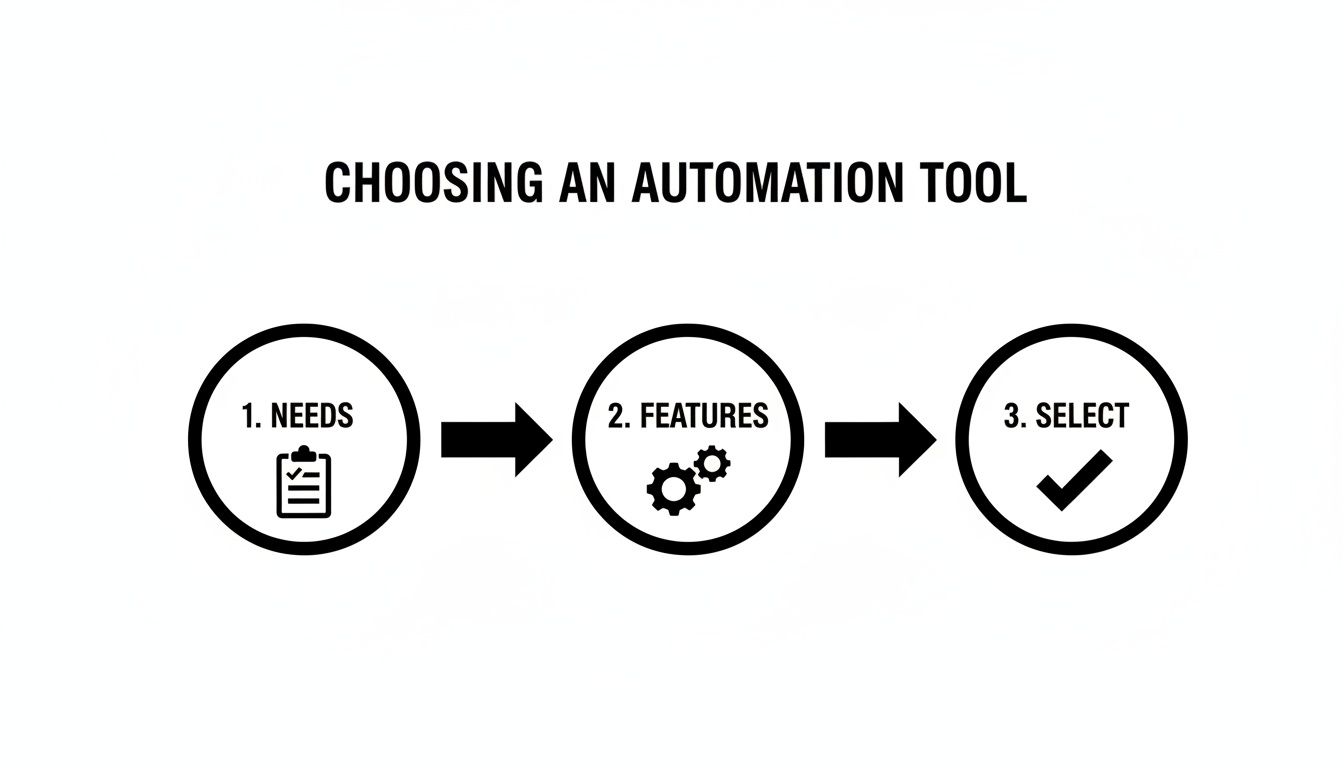
As you can see, a methodical approach—figuring out your needs, matching them to features, and then picking your tool—is the best way to guarantee you end up with a system that actually works for you.
Create a Content Curation Engine
You don't always have to create content to be valuable. Sharing great stuff from other industry leaders is a killer way to build your authority and keep your feed fresh. A content curation engine automates this by plugging directly into your favorite blogs and news sites.
Here’s how you can build one using OneUp’s RSS feed automation:
- Find Your Sources: First, grab the RSS feed URLs from 5-10 industry blogs you genuinely trust and admire.
- Plug them into OneUp: Add these RSS feeds to your account. The tool will then automatically pull in new articles the moment they're published.
- Set Your Rules: You can have new articles drop into a queue for you to approve later, or you can go full hands-off and let them publish automatically. You can even set rules to automatically tack on certain hashtags or a bit of your own commentary to every link shared from a feed.
Just like that, your social profiles become go-to resource hubs. Your audience gets a steady stream of relevant info, and you don't have to spend hours every week hunting down links.
Pro Tip: Make sure to use OneUp’s integrations with URL shorteners like Bitly for every automated post. It cleans up your links and, more importantly, lets you track click-through rates to see exactly how well each workflow is performing.
Map Out a Campaign Launch Sequence
Got a product launch, webinar, or big event coming up? You need a coordinated blitz of posts to build hype and get people to act. Instead of painstakingly scheduling each post one by one, you can automate the entire sequence from start to finish.
A bulk scheduling feature is your best friend here. By uploading a simple CSV file or using a bulk composer, you can line up dozens of posts in one go.
A typical launch sequence might look something like this:
- Week 1: A few teaser posts and some behind-the-scenes content.
- Week 2: The official launch date announcement and maybe an early-bird offer.
- Launch Day: A burst of activity driving everyone to your sales page.
- Post-Launch: Share some customer testimonials and send out a few "last chance" reminders.
By scheduling the whole campaign at once, you lock in a perfectly timed promotional push. This frees you up to do what really matters during a launch: engaging with your audience in real-time.
Advanced Automation Tips and Best Practices
Alright, so you’ve got your basic scheduling down. Now it’s time to get a little more sophisticated. This is where you graduate from just pushing content out to building a smart, nearly self-sufficient system that does the heavy lifting for you.
The real difference between decent automation and great automation is in the details—those little adjustments that make your social presence feel less robotic and more genuinely human.
What's the biggest giveaway of lazy automation? Seeing the exact same caption blasted across every single social media platform. A caption that's perfectly crafted for LinkedIn’s professional vibe just feels awkward and out of place on Instagram or X. It's a common trap, but luckily, it's also an easy one to sidestep.
With a tool like OneUp, you can customize captions for each social network right from the same screen you're drafting the post. This means you can tweak the tone, add platform-specific hashtags, and tag the right accounts without creating a dozen separate posts. It’s a small change that has a massive impact on how your content lands with each audience.
Create a Bulletproof Collaborative Workflow
Throw a few people into the social media management mix, and things can get messy—fast. Without a rock-solid process, you’re opening the door to off-brand messages, embarrassing typos, or unapproved posts slipping through the cracks. This is precisely why collaborative features are a must-have to automate social media posting without the chaos.
The simple solution is setting up an approval workflow. In OneUp, you can assign certain team members the role of approving posts before they ever get scheduled.
- For internal teams: A junior marketer can draft a week's worth of content, which then automatically gets kicked over to a manager for the final green light.
- For agency-client work: An agency can build out an entire month of content and send it to the client for approval right inside the platform. No more confusing email threads or messy spreadsheets.
By putting a simple approval process in place, you guarantee every piece of content is polished, on-brand, and ready for primetime. Think of it as essential quality control for your brand's voice.
For a deeper dive into making your systems work together, check out these top marketing automation best practices for overall SaaS growth. The same principles that drive growth can integrate your social media efforts into a much bigger, more powerful strategy.
Turn Analytics Into Actionable Automation
Smart automation isn't a one-way street. It's not just about what you send out; it's about what you learn from the data that comes back. Your analytics dashboard is a treasure trove, and it should be the brains behind your entire scheduling strategy.
Start looking for patterns. Which topics consistently get the most love? Are videos outperforming images?
Once you spot your winners, it's time to feed that intel back into your system. If posts from your "Behind-the-Scenes" category are crushing it, tweak your content calendar to feature them more. If an old evergreen blog post drove a ton of traffic, use OneUp's repeating post feature to automatically share it again every 60 days.
This creates a powerful feedback loop. Your automation gets smarter and more effective with every post, guided by what your audience actually wants to see.
Leverage Niche Automation for Local SEO
Finally, don't sleep on the platform-specific automations that most of your competitors are completely ignoring. For any local business, a Google Business Profile (GBP) is a golden ticket for local visibility. But let's be honest, manually posting updates to it often ends up at the bottom of a very long to-do list.
This is a job tailor-made for automation. Using OneUp, you can schedule regular updates, special offers, and even Q&A posts directly to your GBP. For example, set up a recurring weekly post that highlights a customer review or a monthly update on your hours. OneUp even supports different GBP post types, such as Event posts and Offer posts with start/end dates.
This consistent stream of activity signals to Google that your business is active and relevant, which can give your local search rankings a nice boost—all without you lifting a finger.
Your Top Questions About Social Media Automation, Answered
Jumping into social media automation usually brings up a few questions. That’s a good thing. Being curious and understanding the details is what separates a decent strategy from one that actually gets results. Let's tackle some of the most common things people ask when they're ready to automate social media posting.
Will Automating My Posts Hurt My Engagement?
This is the big one, right? The short answer is no—not if you're smart about it. The whole point of automation is to stay consistent, not to sound like a soulless robot. And honestly, modern tools are built to make sure that doesn't happen.
For example, with a tool like OneUp, you can write a single post and then easily tweak the caption for each social network. This makes your content feel right at home wherever it shows up. You're automating the scheduling, not your personality. You'll still want to hop in and reply to comments, but by posting consistently, you’ll probably see your engagement go up, not down.
Don't think of automation as a replacement for engagement. Think of it as the tool that frees up your time for actual engagement. It handles the tedious posting, so you can have real conversations with your followers. That's where the magic happens.
How Do I Automate Posting Content From Other Blogs?
Sharing great content from others in your industry is a killer way to provide value without having to create every single thing yourself. This is where RSS feed automation is your best friend.
Most solid automation tools, including OneUp, let you connect the RSS feed from your favorite blogs. Once you've hooked it up, the tool will automatically pull in new articles as they're published. You can set them to post automatically, or you can have them drop into your drafts so you can add your own two cents and relevant hashtags before they go live.
What Is Evergreen Content Recycling?
Evergreen content recycling is just a fancy way of saying you're automatically re-sharing your best, most timeless content. Think about it: a single post only ever reaches a tiny slice of your audience at any given moment.
By recycling it, you make sure new followers see your greatest hits and you give existing ones a helpful reminder. OneUp has a repeating post feature built specifically for this. You can set a killer post to go out every few weeks or months, getting the absolute most mileage out of your content creation efforts and keeping your feed lively with stuff you already know works.
Can I Automate Instagram Stories And Reels?
You sure can. The days of getting a push notification reminder to post your Story are over. More advanced platforms like OneUp let you fully automate Instagram Stories and Reels.
You can schedule them out, and they'll publish automatically—no phone-fumbling required. Even better, OneUp lets you add a clickable link sticker directly to your Stories when you schedule them, which is a massive win for driving traffic right from your content.
Ready to put together a smart, time-saving automation system for your brand? OneUp has everything you need—from repeating posts and RSS feeds to custom captions and fully automated Reels. Start your free trial today and see how easy it is to automate social media posting the right way.