
Before you even think about plugging topics into a spreadsheet, we need to get the foundation right. Building a content calendar isn't just about scheduling posts; it's about creating a strategic blueprint that ties every single piece of content back to a real business goal.
Without this crucial first step, you're just making noise. Your content will feel random, your results will be non-existent, and you'll burn through resources with nothing to show for it.
Setting the Stage for a Purpose-Driven Content Calendar

A great calendar isn't a to-do list; it’s a direct link between your daily marketing grind and your big-picture business objectives. This initial planning is, hands down, the most important part of the whole process.
Before you get lost in content pillars or editorial workflows, you need a solid strategy. This means creating a comprehensive content marketing strategy that aligns with what your business is trying to accomplish. Get this right, and your calendar will have a clear purpose from day one.
Define Your Core Objectives
First things first: What are you actually trying to achieve here? Pushing out content without a clear "why" is like sailing without a map. Your goals need to be specific, measurable, and directly linked to growing your business.
Common goals I see people start with include:
- Increasing brand awareness: Just getting your name in front of the right people.
- Generating qualified leads: Turning browsers into potential buyers for your sales pipeline.
- Building community engagement: Creating a loyal group of followers who actually interact with your brand.
- Driving website traffic: Pulling people from social media or Google over to your website.
For example, a B2B SaaS company might set a goal to generate 50 new demo requests a month using LinkedIn content. On the flip side, a D2C apparel brand might aim to grow their Instagram following by 15% this quarter to build hype for their next launch. See the difference?
Craft Detailed Audience Personas
You can't create content people love if you don't know who you're talking to. And I mean really know them. Forget basic demographics like age and location for a second.
What keeps them up at night? What are their biggest pain points? What social media channels are they scrolling through on their lunch break? What problems are they desperately trying to solve?
Let's imagine you're marketing a project management tool. Your persona could be "Alex, the Overwhelmed Agency Manager." Alex is constantly juggling multiple client projects, struggling with team burnout, and terrified of missing deadlines. Suddenly, you know exactly what to create: content like "5 Ways to Stop Scope Creep in its Tracks" or "The Ultimate Project Timeline Template."
A deep understanding of your audience turns content creation from a guessing game into a calculated strategy. When you know their challenges, you can craft content that provides genuine solutions, building trust and authority.
Conduct a Quick Content Audit
Before you plan for the future, take a quick look back. A content audit doesn't have to be some massive, complicated spreadsheet. It's just an honest analysis of what's worked, what flopped, and where the hidden gems are.
Ask yourself a few simple questions:
- Which topics got the most likes, comments, and shares?
- What formats killed it? (e.g., videos, carousels, long-form articles)
- Do we have any "evergreen" posts that are still getting traffic and could be repurposed?
- What are the gaps? What questions are people asking that we haven't answered yet?
This simple review gives you data-driven direction. If you discover that your short TikTok tutorials consistently blow your static Instagram posts out of the water, that's a huge clue. Your new calendar should lean into what's already proven to work, not just what you think will work.
With your goals set and your audience in sharp focus, it's time to figure out what you’re actually going to talk about. This is where you hammer out your content pillars—the 3-5 foundational themes that will become your brand’s calling card.
Think of them like the main genres on Netflix. Everything you create should fall squarely into one of these buckets.
Content pillars are your guardrails. They stop you from chasing every fleeting trend and make sure every post, video, and article reinforces your expertise. For a small marketing agency, for example, pillars might be "Local SEO Strategies," "Social Media for Small Business," and "Client Success Stories." They're distinct, yet they all tie back to the agency's core mission.
From here, you can start brainstorming specific sub-topics. That "Local SEO Strategies" pillar could spawn posts on Google Business Profile optimization, local keyword research, and how to handle online reviews. Suddenly, that blank calendar doesn't seem so intimidating—it's a structured plan waiting to happen.
Choosing the Right Channels for Your Message
One of the biggest mistakes I see is brands trying to be everywhere at once. It just doesn't work. A technical, long-form article that crushes it on LinkedIn is going to be a total dud as an Instagram Reel.
Every platform has its own vibe, its own audience expectations, and its own content formats. The trick is to map your content pillars to the channels where your ideal customer is already hanging out and ready to listen.
This means you need a strategic platform mix, not just a cross-posting frenzy. You have to adapt the message.
- LinkedIn: The home for your in-depth articles, case studies, and professional takes. That "Local SEO" pillar could become a comprehensive guide here.
- Instagram: It's all about the visuals. A carousel post breaking down the key points from your SEO guide or a Reel celebrating a client's win would be a perfect fit.
- TikTok: Think short, snappy, and educational. A quick "30-Second SEO Tip" is exactly what users are looking for.
- Google Business Profiles: Non-negotiable for local businesses. This is the spot for direct updates, special offers, and highlights from your "Client Success Stories" pillar.
Your content strategy isn't about creating more content; it's about creating the right content for the right platform. Tailoring your message shows you get the platform's culture and respect your audience's time.
As you start to nail down the specific types of content, these tips for crafting engaging content can give you some great frameworks for making sure your posts actually connect, no matter where you publish them.
Using Categories to Organize Your Calendar
Okay, you've got your pillars and you know which channels you're targeting. How do you keep it all from turning into a chaotic mess?
This is where a tool like OneUp becomes a lifesaver, especially if you're managing multiple brands or clients. Instead of wrestling with a clunky spreadsheet, you can use categories to represent each of your content pillars.
You could create a "Local SEO" category in OneUp, for instance, and schedule all related content under that tag. This lets you see at a glance if you're keeping a healthy balance between your pillars. For agencies, you can also use OneUp to group social media accounts. Just create a group for "Client A" and another for "Client B" to keep their calendars totally separate and organized.
This kind of structure ensures you're delivering a consistent and effective mix across all your profiles, from Facebook and X to TikTok and Google Business Profiles. And for a platform like Instagram where the grid aesthetic is everything, a dedicated tool is key. You can learn more about planning your feed with an Instagram grid planner to make sure your visuals line up with your content strategy.
Getting this organized is what allows you to scale. Whether you're a freelancer with a handful of clients or a business with multiple locations, features like creating custom posting schedules for each category in OneUp put the process on autopilot. You can set your "Local SEO" content to go out every Tuesday and Thursday, while "Client Success Stories" are reserved for Fridays—a steady, strategic flow of content without you having to push buttons all day long.
Dialing In Your Editorial Workflow and Cadence
You've got your content pillars and know which platforms you're targeting. Now, it's time to build the engine that actually powers your content calendar. A solid editorial workflow is what separates a list of ideas from a repeatable, scalable system—it turns creative chaos into predictable, high-quality content.
This process is the secret sauce for consistency. It makes it crystal clear who does what, when, and how. Every piece of content, from a spark of an idea to a published post, should move along a smooth path without hitting roadblocks or missing deadlines.
Think of it like this: your core themes branch out into specific sub-topics, and each of those gets tailored for the right channels to maximize its impact.
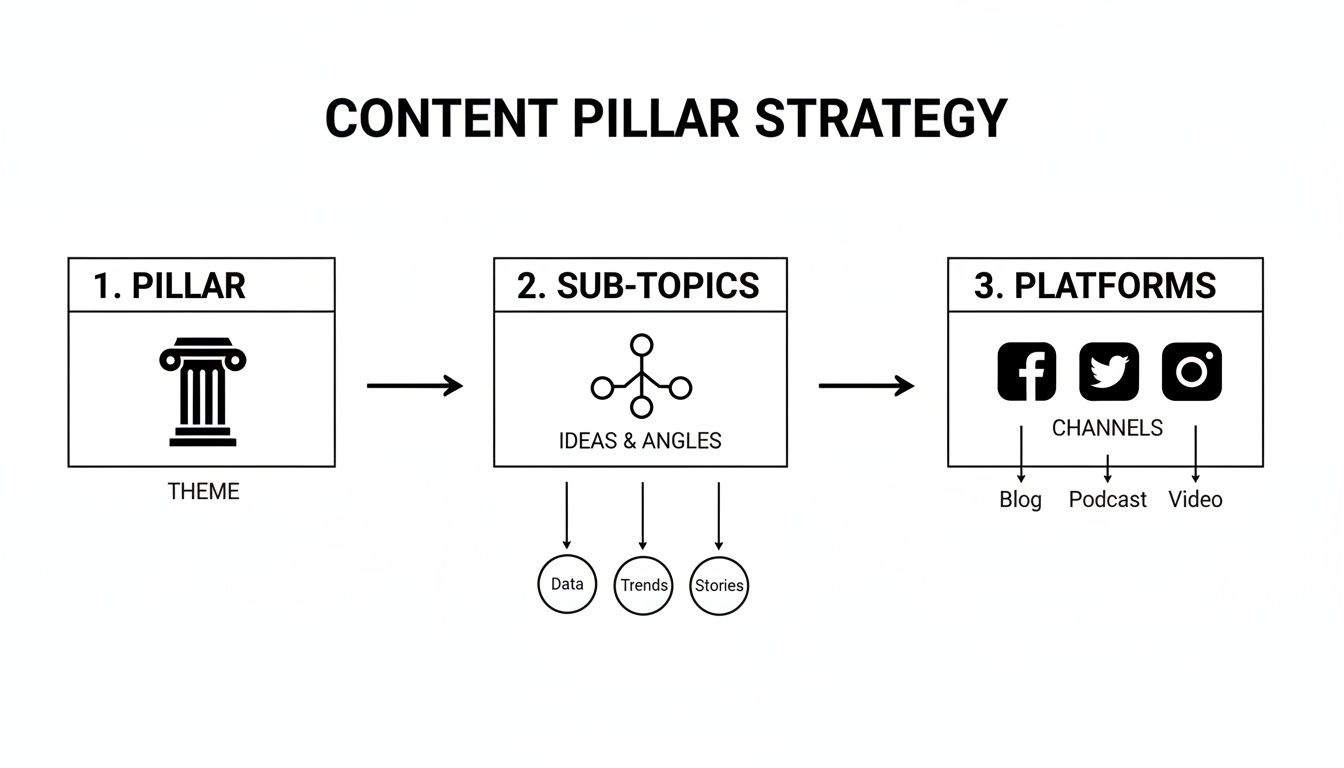
This flow shows how one single idea can be strategically sliced and diced for different platforms, getting you the most bang for your buck.
Building Your Content Production Pipeline
Your production pipeline is just the step-by-step journey each piece of content takes. It doesn’t have to be crazy complicated, but it absolutely must be clear. A typical workflow usually breaks down like this:
- Ideation: Kicking around initial concepts based on your content pillars and audience research.
- Creation: Actually writing the copy, designing the graphics, or shooting and editing video.
- Review: An internal gut check for tone, accuracy, and making sure it aligns with the brand.
- Client Approval: (Crucial for agencies!) Sending the post to the client for the final thumbs-up.
- Scheduling: Plugging the approved content into your scheduling tool for a specific date and time.
- Publishing: The content goes live on its designated social media channels.
For teams juggling multiple clients, this kind of structured approach is non-negotiable. It's how you keep quality high and things moving efficiently without getting stuck in the dreaded "endless email chain" for every single approval.
Streamlining Collaboration and Approvals
Ever heard that 55% of firms let just one person handle the entire editorial calendar? That’s wild, especially when you consider content eats up 26% of most marketing budgets. It's a fast track to burnout, particularly for smaller teams. This is where dedicated tools completely change the game for agencies and freelancers.
OneUp, for example, tackles this headache head-on with a few smart features:
- Built-in Post Approvals: Forget emailing drafts back and forth. Clients or stakeholders can approve or reject posts right inside the platform.
- Assigning User Roles: You can give different people different levels of access. A writer might only be able to create drafts, while a manager can approve and schedule everything.
- Read-only Calendar Sharing: Easily give clients a live look at the content calendar so they're always in the loop, but without giving them permission to accidentally delete a month's worth of work.
These features pull all communication into one place and create a clear, auditable trail for every post—an absolute lifesaver for agency workflows. If you're stuck on crafting the perfect caption, tools like an Instagram caption generator can help get the creative juices flowing and speed things up.
An effective workflow isn't just about speed. It's about building in checkpoints that guarantee quality and consistency. When you define roles and use the right tools, you get rid of the guesswork and empower your team to work with confidence.
Figuring Out Your Posting Cadence
So, how often should you post? There's no magic number here. It completely depends on the platform and what your audience expects. Hit your LinkedIn followers with five posts a day and you'll get unfollowed in a hurry. But post only once a week on TikTok, and you might as well be invisible.
Start by looking up the best practices for each network, but then—and this is key—test what actually resonates with your audience. The goal is to find a sustainable rhythm that keeps people engaged without burning out your content team.
Once you have a target cadence, you can set up a custom posting schedule in a tool like OneUp. You can define specific time slots for each day, and any new post you add to your queue automatically grabs the next open spot. This is huge. It ensures you're consistently posting at peak times without having to think about it. For example, you could tell OneUp to post to Facebook at 9 AM and 2 PM on weekdays, and it will handle the rest.
Put Your Calendar on Autopilot for Maximum Efficiency
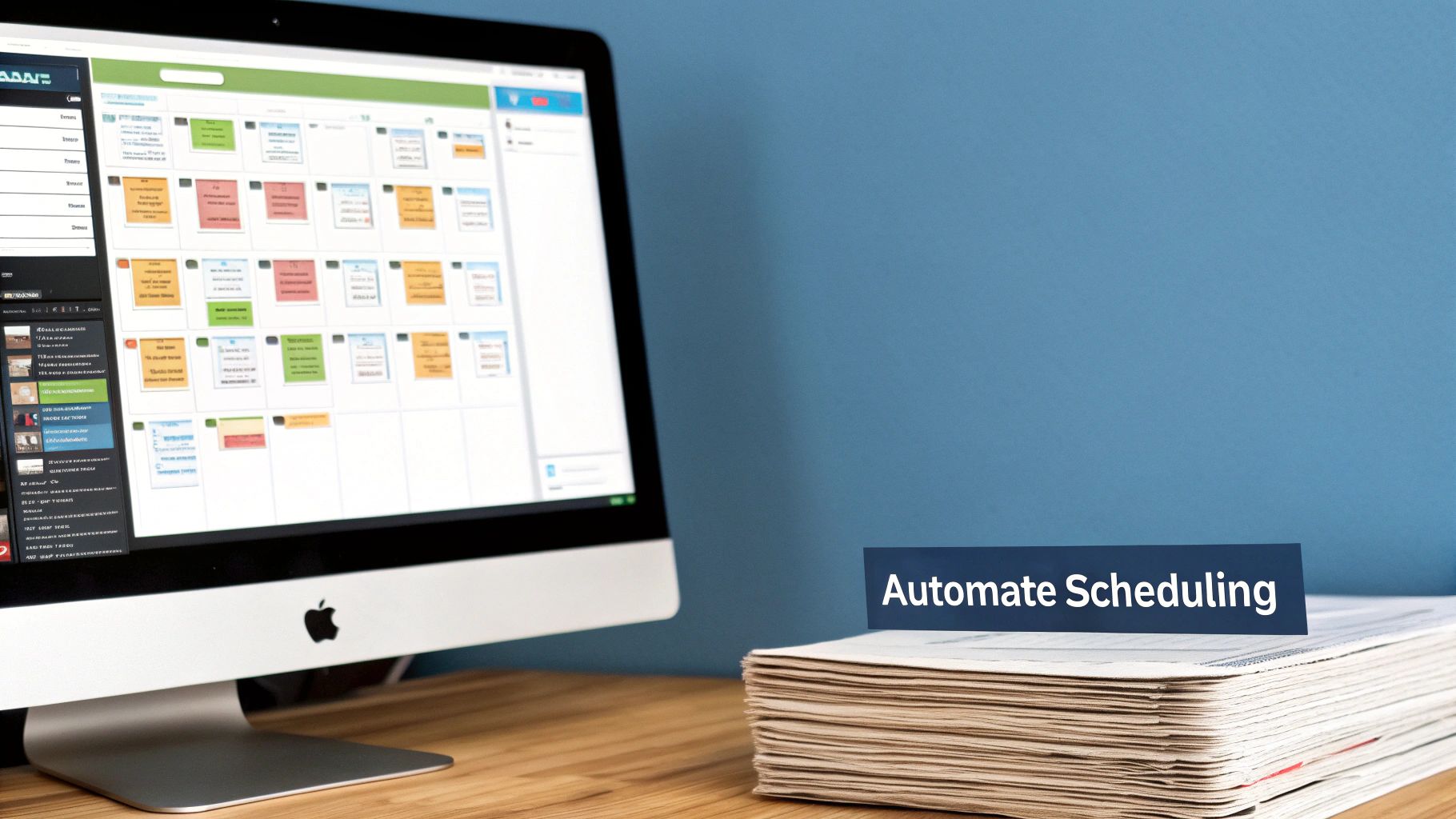
Once your workflow is dialed in, the next step is to fill up your calendar and put your scheduling on autopilot. Let's be honest, manually uploading every single post is a fast track to burnout and a massive time-suck. Automation is what turns your calendar from a static plan into a dynamic, content-pumping engine.
This is where the real magic happens. By automating the grunt work, you free up your time to focus on what actually moves the needle: strategy, creative thinking, and genuinely engaging with your audience.
Bulk Scheduling to Get Hours of Your Life Back
Ever have a month's worth of amazing content ready to go, only to be stopped dead by the thought of copying and pasting every… single… post? It's a common bottleneck that slows down even the sharpest teams. The solution is simple: think in batches.
With a tool like OneUp, you can use the bulk scheduler to upload hundreds of posts at once from a CSV file. Just pop your posts into a spreadsheet—with columns for the date, caption, and image URL—and upload the whole file in a few clicks. This simple move can turn a full day of tedious data entry into a five-minute task.
This approach is an absolute game-changer for agencies juggling multiple clients or any business with a high-volume content plan.
Keep Your Feeds Buzzing with Evergreen Content Recycling
Not every piece of content is a one-and-done. Your best "evergreen" posts—those killer how-to guides, timeless tips, and foundational case studies—can and should be shared more than once. But manually digging through old posts to find something to republish is the opposite of efficient.
This is where setting your content to automatically recycle becomes so powerful. In OneUp, you can tag specific posts as evergreen and have them republish automatically at set intervals, like every 30, 60, or 90 days.
This one tactic keeps your social feeds consistently active and drives fresh traffic to your most valuable assets, all without you lifting a finger. It's the ultimate "set it and forget it" strategy.
This ensures your new followers always see your best stuff and keeps your brand top-of-mind, even when you're swamped. It’s just a smart way to squeeze every drop of ROI from the content you've already worked hard to create.
Auto-Post Industry News with RSS Feeds
Part of being a thought leader is sharing valuable, relevant content from across your industry—not just your own. But manually hunting for news to curate and share every day is another one of those time-draining tasks we can easily automate.
A super effective tactic is to connect RSS feeds from your favorite industry blogs and news sites directly to your scheduler. OneUp lets you add RSS feeds and have new articles post automatically to your accounts. You can even add your own custom text before or after the article title to add your own spin.
This simple automation hits two birds with one stone:
- It keeps your calendar full of fresh, relevant material that your audience will love.
- It solidifies your brand as the go-to source for the latest industry insights.
Measuring Performance to Refine Your Strategy
Your content calendar isn't a "set it and forget it" document. The best ones are living, breathing strategies that you constantly tweak based on what the data tells you. This last step is honestly the most important one: turning performance insights into smarter content.
This is where you close the loop. You use real-world analytics to fuel your next batch of content. Without this feedback process, you’re just throwing content at the wall and hoping something sticks. With it, you're building a content engine that gets sharper and more effective over time.
Moving Beyond Vanity Metrics
Likes and follower counts feel good, but they don't directly translate to business growth. To really get a grip on your content's impact, you need to zero in on the key performance indicators (KPIs) that actually line up with your business goals. Chasing vanity metrics is a surefire way to waste time, while focusing on meaningful data gives you a clear path forward.
Instead of just celebrating likes, start measuring what matters:
- Engagement Rate: This tells you what percentage of your audience is actually interacting with your posts. A high rate is a flashing sign that your content is hitting the mark.
- Click-Through Rate (CTR): How many people clicked a link in your post? This is critical if your goal is driving traffic to your website or a specific landing page.
- Conversions: This is the big one. Did your content lead to a sale, a newsletter sign-up, or a demo request? This metric connects your content directly to revenue.
Keeping an eye on these KPIs is how you build a content calendar that delivers a real return on your effort.
Leveraging a Unified Analytics Dashboard
Hopping between the native analytics of Facebook, LinkedIn, TikTok, and Google Business Profiles is a massive headache. It's almost impossible to get a clear, big-picture view of your performance when all your data is siloed on different platforms.
A centralized tool completely changes the game. Using a platform like OneUp, you can track performance across all your connected social accounts from a single dashboard. This gives you an immediate, at-a-glance read on what's working and what's not, saving you hours of painful, manual data wrangling.
A unified dashboard transforms analytics from a chore into a strategic advantage. When all your data is in one place, you can spot cross-platform trends and make faster, more informed decisions about your content strategy.
This consolidated view makes it dead simple to compare performance. You can easily see if a topic that blew up on LinkedIn could be repurposed for your Instagram audience, for instance.
Generating Custom Reports for Stakeholders
You need to show your clients or your boss that your social media efforts are paying off. A screenshot of your follower count isn't going to convince anyone. You need clean, professional reports that showcase the results you're driving.
With OneUp, you can generate custom, white-labeled PDF reports that pull data from across all your networks. Just select specific date ranges and networks to create tailored reports that put the most important KPIs front and center for your stakeholders.
Even better, you can schedule these reports to be automatically emailed to yourself or your clients on a recurring basis—daily, weekly, or monthly. This automation keeps everyone in the loop without adding another recurring task to your to-do list.
Identifying Top Performers to Guide Future Content
Your analytics are a goldmine of clues about what your audience wants to see from you. By regularly checking your top-performing posts, you can pinpoint the content pillars, formats, and topics that are generating the most buzz and driving the most action.
OneUp’s analytics make this process a breeze. You can sort your posts by likes, comments, shares, or clicks to see what really landed. Did that behind-the-scenes video on Instagram Reels get double the engagement of your usual posts? That's a huge signal to create more content just like it.
This data-driven approach takes the guesswork out of content planning. It gives you a clear roadmap for what to create next, ensuring your calendar is packed with content that you know has a high chance of success. This continuous cycle of measuring, learning, and refining is the real secret to a powerful and sustainable content strategy.
Answering Your Content Calendar Questions
Even with the best-laid plans, a few practical questions always pop up once you start managing a content calendar day-to-day. Let's get into some of the most common hurdles I see and give you some clear, actionable answers to keep things running smoothly.
How Far in Advance Should I Plan Content?
For most businesses, planning content one full month in advance is the sweet spot. This gives your team plenty of breathing room for creation, review, and any approvals, but you're not so locked in that you can't react to what's happening right now.
Of course, for the big stuff—major campaigns, product launches, or seasonal pushes like Black Friday—you'll want to aim for 2-3 months of lead time.
The real secret is building in flexibility. A tool like OneUp lets you schedule posts way out into the future, but its calendar view makes it dead simple to drag and drop things around. That means you can easily pause your scheduled evergreen content to jump on a trending meme without blowing up your entire workflow.
What Is the Best Tool for a Content Calendar?
Look, a simple Google Sheet can work when you're just starting out. I get it. But it becomes a massive bottleneck pretty fast. If you're serious about getting efficient, a dedicated social media management platform is the way to go.
The best tool moves you from just planning content to actively managing the entire lifecycle. It should bring scheduling, collaboration, and analytics together in one place.
Instead of just typing out post ideas in a spreadsheet, a platform like OneUp lets you do so much more:
- Directly schedule posts to all the major networks, including the tricky ones like Instagram Reels, Stories, and multi-image carousels.
- Bulk upload hundreds of posts at once from a CSV file. This is a massive timesaver.
- Keep a central media library of approved images and videos for your whole team to pull from.
- Set your best-performing content to automatically repeat at whatever interval you choose.
This all-in-one approach is just a smarter way to manage a dynamic content strategy.
How Do I Consistently Find New Content Ideas?
Ah, the age-old problem: keeping the idea well from running dry. It's a challenge for everyone. I always suggest starting by breaking down your core content pillars into different formats. Think how-to guides, behind-the-scenes peeks, industry news commentary, or customer stories.
You also have to listen. Your audience is constantly giving you ideas. Monitor your comments and DMs for recurring questions—those are content goldmines just waiting to be tapped. It also never hurts to keep an eye on what your competitors are doing to see which topics are getting traction in your space.
And when you're well and truly stuck, an AI assistant can be a great brainstorming partner. For example, OneUp's AI caption writer can help you find new angles on a topic or just get you past that initial writer's block, making sure your calendar never has an empty slot.
Ready to move beyond spreadsheets and build a content calendar that actually automates your work and gets results? With OneUp, you can schedule, manage, and analyze all your social media content from a single platform. Start your free trial today and see the difference.