

Posting on social media without a plan is just making noise. To get real results, you need a solid foundation built on clear goals, a deep understanding of your audience, and a consistent schedule. This upfront thinking ensures every single post has a purpose and contributes to your bigger business goals.
Build Your Foundation for Social Media Success
Before you even dream up your next post, let's lay some groundwork. Just winging it might get you a few likes here and there, but it won't lead to meaningful growth or conversions. A little strategic planning now pays off big time later.
First things first: ditch vague wishes like "get more followers" and set some real, measurable goals. The SMART framework (Specific, Measurable, Achievable, Relevant, Time-bound) is perfect for this.
- Specific: Instead of "boost engagement," try "increase our average Instagram post comment rate by 15%." See the difference?
- Measurable: You can track this using native platform analytics or a tool like OneUp, which offers both post-level and summary analytics.
- Achievable: If you average 10 comments now, aiming for 1,000 next month is a setup for failure. A 15% jump, however, is a solid, challenging goal.
- Relevant: Does getting more comments help your bigger goal of building a lively community? If yes, it's relevant.
- Time-bound: Give yourself a deadline, like "in the next 90 days."
Just like that, you've turned a fuzzy idea into a clear target that will shape every piece of content you create.
Get to Know Your Audience Deeply
Once you know what you want to accomplish, you need to know who you're talking to. This is where creating detailed audience personas comes in handy. Don't just stop at basic demographics; you need to dig into their psychographics. What keeps them up at night? What are their biggest motivations? What’s their sense of humor like?
With a projected 65.7% of the world's population on social media by 2025, and the average person juggling 6.84 different platforms each month, you can't afford a generic approach. In fact, 34% of consumers are actively turned off by too much self-promotion, which underscores the need to put your audience first. If you want to dive deeper, you can explore more data about social media usage to really sharpen your strategy.
This whole foundational process—defining goals, finding your audience, and analyzing data—is what your entire plan rests on.
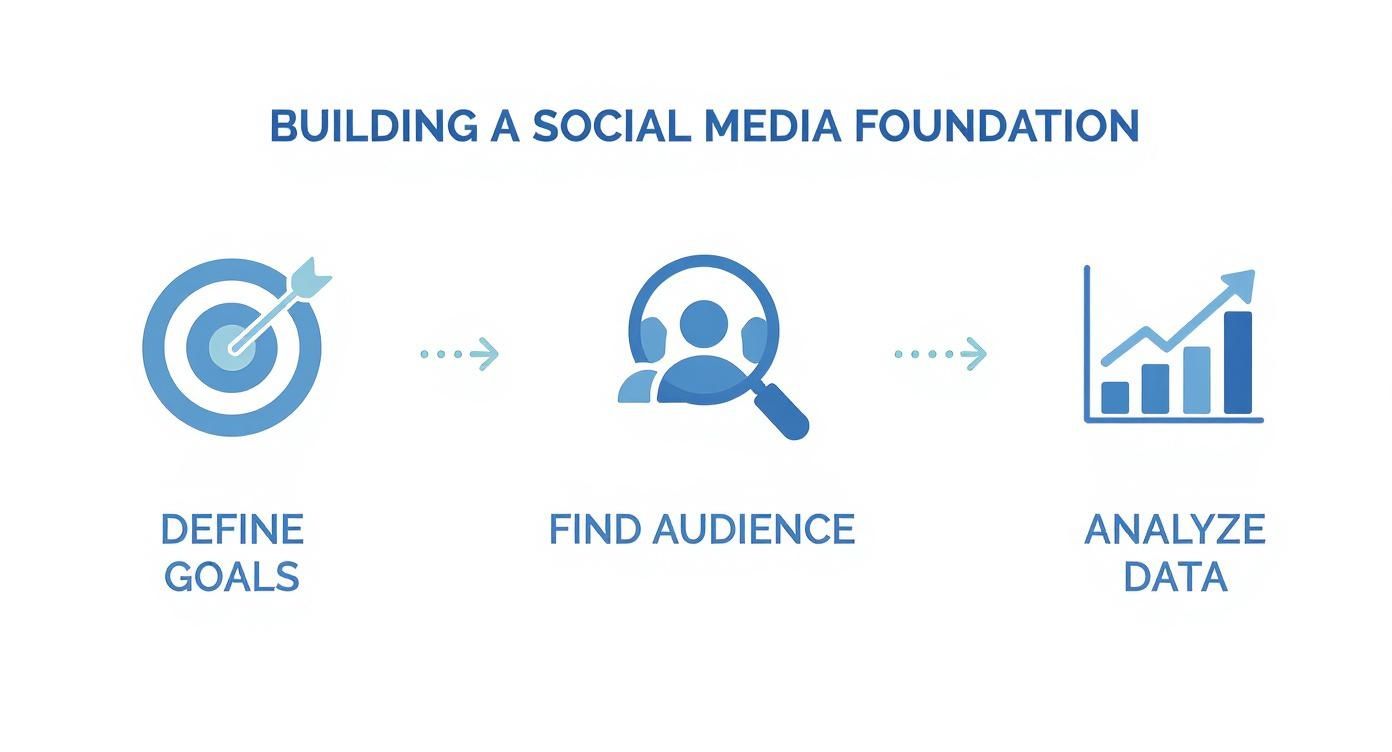
As the infographic shows, it all starts with clarity on your objectives and the people you want to connect with.
How do you get this info? Start with your existing analytics. Send out a simple survey to your email list. And don't be afraid to poke around your competitors' follower lists. The aim is to build a data-backed picture of your ideal customer so every caption and creative feels like it was made just for them.
Develop Your Core Content Pillars and Idea Engine
Now that you know your goals and your audience, you can finally stop asking that dreaded question: "What the heck am I supposed to post today?"
The secret is to establish your content pillars—the 3 to 5 core themes you’ll talk about, day in and day out. Think of them as the main shows on your brand's TV network. They keep everything you post relevant and on-brand.
Content pillars live at the intersection of what you know and what your audience cares about. If you sell sustainable home goods, your pillars might be something like "Eco-Friendly Cleaning Hacks," "Zero-Waste Living," and "Sustainable Product Spotlights." Simple, right?

Brainstorming Your Content Pillars
To nail down your pillars, just start dumping ideas. Grab a whiteboard or a notebook and list out every topic even remotely related to your industry. Don't filter yourself yet—the goal is just to get it all out.
Once you have a massive list, start grouping similar ideas into broader themes.
Not sure where to start? Ask yourself these questions:
- What are the top 10 questions customers are constantly asking?
- What’s the one thing our brand knows better than anyone else?
- What topics really get our audience talking (or even arguing)?
- What keywords are people plugging into Google to find what we offer?
This process will quickly highlight the big-picture topics that should anchor all your content. You're looking for pillars that are broad enough for you to create tons of posts, but specific enough that they feel uniquely yours.
Building Your Never-Ending Idea Engine
Once your pillars are set, you have a solid framework for an endless stream of fresh post ideas. This is where you move from strategy to actual, tangible content. The goal is to build an "idea engine" that never sputters out.
One of the smartest ways to keep that engine running is to put parts of it on autopilot. This is where a tool like OneUp can be a game-changer. Instead of spending hours hunting for relevant industry news, you can have it come directly to you.
OneUp's RSS Feed Automation: This feature is a lifesaver. You can plug in the RSS feeds from your favorite blogs, news sites, and industry leaders. New articles automatically pop up in your drafts, ready for you to add your own spin and share. It’s an easy, automated way to mix valuable third-party content into your calendar with almost zero effort.
Keeping Your Content Fresh and Engaging
An idea engine needs a few different types of fuel to keep from getting stale. A great visual trick is mind mapping. Put one of your pillars in the center of a page and just start branching out with sub-topics, questions, and different content formats (like videos, carousels, or quick tips).
It also never hurts to see what’s working for your competitors. A quick scan of their top-performing posts can tell you a lot about what resonates with the audience you share.
To keep things interesting, you should always be on the lookout for new social media content ideas that you can filter through your brand's unique voice. When you combine your own brainstorming with a little competitive intel and smart automation, you’ll never run out of things to say. Your pillars give you structure, and your idea engine gives you the variety.
Design a Practical and Flexible Content Calendar
Alright, let's talk about the single most important tool in your social media arsenal: the content calendar. This is way more than just a spreadsheet. Think of it as the central nervous system for your entire social media operation. It’s where your abstract strategy—all those pillars, goals, and audience notes—gets real and becomes an actionable plan.
A solid calendar brings clarity to the chaos. It ensures you’re posting consistently and, most importantly, it kills that daily "what on earth do I post today?" panic. This is your command center.
The Essential Anatomy of a Content Calendar
Whether you're using a simple Google Sheet or a sophisticated tool, every effective content calendar needs to track the same core pieces of information. If you skip these, you're just inviting confusion and making more work for yourself later.
At a minimum, your calendar has to include:
- Post Dates and Times: Exactly when is this post going live? On which platform?
- Target Platforms: Is this for Instagram, LinkedIn, your Google Business Profile, or all of the above?
- Content Pillar: Which core theme does this post connect back to? This is crucial for keeping your content mix balanced.
- Format: Reel? Carousel? Single image? Plain text? Story? Be specific.
- Copy: The final, approved caption, complete with hashtags and mentions.
- Visuals: A direct link to the final image or video file. No more hunting through Dropbox folders.
- Status Tracker: A simple way to see where things stand. Is a post a
Draft,In Review,Approved, orScheduled?
For visual-heavy platforms like Instagram, you also need to think about your grid's aesthetic. You can't just post randomly and hope it looks good. This is where a dedicated OneUp Instagram grid planner is a lifesaver. It lets you drag and drop scheduled posts to see exactly how your feed will look before anything is published.
Establishing a Realistic and Effective Posting Cadence
So, you have the structure. Now, how often should you actually post? Honestly, consistency trumps raw frequency every time. But you still need to show up enough to stay on people's radar.
Research from Hootsuite and Critical Truth actually suggests that top brands aim for 48 to 72 posts per week across all their platforms combined. That breaks down to roughly 7 to 10 posts a day. That number might sound insane, but it highlights just how critical smart planning and efficiency are.
Trying to create 7-10 brand-new, masterpiece posts every single day is a recipe for burnout. The good news? You don't have to. The same study found that 48% of social media marketers lean heavily on repurposing content, sharing similar posts across channels with a few strategic tweaks. This is the key to a sustainable plan.
Your posting cadence needs to be a sweet spot between what the platform algorithms prefer and what your team can realistically handle. Start with a manageable schedule, prove it works, then scale up.
This is where a powerful scheduling tool stops being a "nice-to-have" and becomes absolutely non-negotiable. Manually managing this kind of volume is a nightmare. A tool like OneUp is built specifically for this challenge, with features designed to make high-volume scheduling not just possible, but easy.
- Bulk Upload: Forget scheduling posts one by one. You can map out hundreds in a CSV file and upload them in minutes. What used to take a whole day can now be done in the time it takes to drink a coffee.
- Repeating Posts: Got some killer evergreen content? Timeless tips, glowing testimonials, or helpful guides? Don't just post them once and let them get lost in the feed. Set them to automatically republish every 60 days (or whatever interval you choose) to keep your calendar full of proven winners.
Let's pull this all together with a sample calendar structure. This is what it might look like in a simple spreadsheet:
Sample Weekly Content Calendar Structure
| Date | Platform | Content Pillar | Format (Video, Image, Text) | Copy Draft | Visual Asset Link | Status (Draft/Scheduled) |
|---|---|---|---|---|---|---|
| Oct 21 | Product Education | Reel | "Here's a hack you didn't know about our new feature…" | [Link to Video] | Approved | |
| Oct 21 | Industry Insights | Text + Image | "New report shows a 25% shift in consumer behavior…" | [Link to Image] | Scheduled | |
| Oct 22 | GBP | Customer Story | Image + Text | "Shoutout to our amazing customer Jane for sharing this!" | [Link to Photo] | In Review |
| Oct 22 | TikTok | Behind the Scenes | Video | "A day in the life at our HQ. It's not always glamorous!" | [Link to Video] | Draft |
| Oct 23 | Community Q&A | Story (Poll) | "What do you want to see more of from us this month?" | [Link to Graphic] | Scheduled | |
| Oct 23 | X (Twitter) | Company News | Text | "Excited to announce our partnership with @Company…" | N/A | Approved |
By combining a well-structured calendar with a smart, sustainable cadence and the right automation tools, you build a system. Your calendar stops being a chore and starts being a strategic asset that powers your entire social media presence.
Master Your Content Creation and Repurposing Workflow
With your calendar structured, it's time to shift gears from planning to actually producing. Creating high-quality, engaging content is the engine of your social media plan, but it doesn't need a Hollywood-sized budget. The real key is efficiency and creativity—especially when it comes to making your assets work harder for you.
This means moving beyond just one-off posts. You need to start seeing every piece of content as a potential goldmine of future material. The ultimate productivity hack in social media is repurposing, which is really just the art of transforming one core asset into a dozen different social media posts.
Crafting Compelling Content from Scratch
Before you can repurpose anything, you need a strong starting point. Whether that's a blog post, a video, or a customer story, the initial creation process is what sets the stage.
-
Writing Engaging Captions: Your words matter just as much as your visuals. Captions provide context, drive conversations, and show off your brand’s personality. For those days you're staring at a blank screen, an Instagram caption generator can be a great way to spark some ideas. Inside OneUp, the built-in AI Assistant can also help you brainstorm fresh caption ideas right in the post editor.
-
Designing Thumb-Stopping Visuals: You don't have to be a professional designer to create great graphics. Tools like Canva are perfect for this, and OneUp’s direct Canva integration lets you design and schedule your visuals in one seamless flow. No more downloading and re-uploading files.
-
Producing Short-Form Video: In today's social media world, video is non-negotiable. It’s what people want to see. In fact, 87% of marketers report a direct, positive impact on sales from using video content. It’s a powerful tool for driving real results.
The Art of Smart Repurposing
Repurposing is how you scale your content output without scaling your workload. It’s about working smarter, not harder, to fill your calendar with valuable content. Think of it as content recycling—you extract the absolute maximum value from every single thing you create.
If you really want to level up your output, there are some great strategies that show you how to create 30 days of LinkedIn content in just 30 minutes by mastering these kinds of efficiency techniques.
Let's walk through a real-world scenario. Imagine you just published a 1,500-word blog post on "5 Tips for Better Time Management." Here's how you can slice and dice that one asset into a full week's worth of content:
- Instagram Carousel: Turn each of the five tips into a separate slide with a bold headline and a quick explanation. Simple and effective.
- LinkedIn Post: Pull a key statistic or a powerful quote from the article and build a longer, thought-provoking text post around it.
- Short Video (Reel/TikTok): Film a quick 30-second video where you talk through your top three tips from the post.
- Quote Graphics: Lift 2-3 of the most impactful sentences and turn them into shareable quote graphics for Instagram, Facebook, and X (formerly Twitter).
- Instagram Stories: Use the poll or quiz sticker to ask your audience about their biggest time management struggles, then drop a link to the full blog post.
You've just created nine distinct pieces of social media content from a single blog post. This is the core of an efficient content creation workflow.
This approach ensures your core messages reach a wider audience across different platforms and formats. It reinforces your expertise without forcing you to constantly reinvent the wheel. It's a foundational strategy for anyone serious about planning social media content that doesn't lead to burnout.
Streamline Your Workflow with Scheduling and Automation
Let’s be honest: manually posting content every single day across a half-dozen platforms is a recipe for disaster. It's a one-way ticket to burnout, and your consistency will inevitably suffer. This is where you stop being a reactive content poster and start becoming a proactive strategist.
Smart scheduling and automation tools are what separate the pros from the amateurs. They turn your social media plan from a frantic daily scramble into a well-oiled machine that hums along in the background. By batching your content creation and scheduling it out, you reclaim your time to focus on what actually moves the needle—engaging with your audience and digging into your performance data.
Beyond Basic Scheduling: Advanced Automation Tactics
True efficiency isn’t just about plugging posts into a calendar. It's about automating the strategic parts of your plan. The best tools today let you build a high-performing, perfectly balanced feed with minimal day-to-day effort. A platform like OneUp is built specifically for this, turning complex strategies into simple, set-it-and-forget-it workflows.
One of the most powerful features I've seen is the ability to create post 'Categories'. Think of these as digital buckets for your content pillars. You can create a category for 'Blog Posts,' 'Quick Tips,' 'Promotions,' and 'Behind the Scenes.'
Then, you can give each category its own unique posting schedule. For example, you can tell OneUp to share something from your 'Quick Tips' bucket every Monday and Wednesday morning, and pull from the 'Blog Post' category every Friday afternoon. Just like that, your content mix stays varied and on-strategy without you ever having to manually balance it again.
By categorizing and automating your posting schedule, you guarantee a balanced content flow. This prevents you from accidentally posting too much promotional content in a row, keeping your audience engaged and your feed valuable.
Unlocking Platform-Specific Opportunities
Here’s a hard truth: not all social platforms are the same, and your automation tool needs to understand that. Too many schedulers take a one-size-fits-all approach, which means you’re missing out on unique ways to connect with different audiences.
A perfect example is your Google Business Profile (GBP). For any local business, it's an absolutely critical channel, yet most schedulers offer the most basic posting features. With a tool like OneUp, you can schedule not just your standard updates but also specific Event posts with start/end times and Offer posts with coupon codes and redemption links. This is a huge leg up on competitors who are probably neglecting their GBP entirely.
Another game-changer is a direct Canva integration. The old way was a clunky, multi-step headache: design in Canva, download the file, then re-upload it to your scheduler. Now, you can do it all in one motion. You can design your graphic inside Canva and push it straight to your OneUp schedule with a single click. It seems small, but it adds up to a ton of saved time.
Work Smarter with Intelligent Features
Flawless execution comes down to the details. A top-tier scheduling tool is packed with intelligent little features that shave hours off your week and make your posts more effective.
Think about these time-saving automations:
- Automatic First Comment: For platforms like Instagram or LinkedIn, you can schedule the first comment to go live the second your post does. This is the perfect spot to drop your hashtags on Instagram (keeping the caption clean) or add a supplementary link on LinkedIn without cluttering the main post.
- Custom URL Shorteners: Want to track click-throughs accurately? Connect your custom shorteners like Bitly or Rebrandly. You get cleaner-looking links and much better analytics on what’s working.
- Bulk Scheduling: Got a month's worth of content planned out in a spreadsheet? With a CSV upload feature, you can schedule hundreds of posts in minutes. That’s a task that used to take a full day, now done before your coffee gets cold.
Still not convinced? Let's break down the difference between the manual grind and smart automation.
OneUp Features vs Manual Social Media Planning
| Task | Manual Process | How OneUp Streamlines It |
|---|---|---|
| Content Mix | Manually tracking post types in a spreadsheet to ensure balance. | Set up Categories with their own schedules for an automatically balanced feed. |
| Design Workflow | Design in Canva > Download file > Upload to scheduler > Schedule post. | Design and schedule directly from Canva with the built-in integration. |
| GBP Events | Log into Google Business Profile separately to create special posts. | Schedule Event and Offer posts directly from the same calendar as your other content. |
| First Comment | Post manually, then quickly add a comment with hashtags or links. | Automatically schedule the first comment to be published with the post. |
The takeaway is simple: the right tool doesn’t just schedule posts, it automates your entire strategy. It gives you back your time and ensures your social media presence is consistent, strategic, and professional.
Common Questions About Social Media Content Planning
Even with the best playbook in hand, a few questions always seem to pop up. Let's tackle some of the most common hurdles social media managers run into, so you can navigate the finer points of content planning like a pro.
How Far in Advance Should I Plan Social Media Content?
For most businesses, planning content one month in advance is the sweet spot. This gives your team plenty of breathing room to create high-quality posts, run them through approvals, and get everything scheduled without being so locked in that you can't jump on a trend.
Now, if you're gearing up for a big, integrated marketing campaign or a major product launch, you'll want to push that timeline out to two or three months. This ensures everything is coordinated perfectly across all your different marketing channels.
The best approach is usually a hybrid one. Plan your core content—your educational posts, product features, and community spotlights—a month out. But here's the key: intentionally leave a few empty slots in your calendar each week. These are your golden opportunities for those reactive, of-the-moment posts that show your brand is paying attention.
What Are the Best Tools for Content Planning?
Honestly, the best tools are the ones that bring planning, scheduling, collaboration, and analytics together under one roof. You can definitely start with a spreadsheet, but you'll quickly find that dedicated platforms are built from the ground up to save you time and prevent those "oops, wrong account" mistakes.
When you're shopping around, look for a tool that offers a solid mix of these features:
- A visual content calendar: You need to see your entire month at a glance. No exceptions.
- Bulk scheduling: This is a non-negotiable for efficiency. The ability to upload and schedule a month's worth of posts from a CSV file is a game-changer.
- Automatic post recycling: Why let great content die? Tools like OneUp have a Repeating Posts feature that's perfect for automatically resharing your best evergreen content.
- Deep platform support: Make sure the tool covers all your channels, especially the ones that often get overlooked, like Google Business Profile. OneUp even supports unique GBP post types like Events and Offers.
- Collaboration tools: To keep your team in sync, look for things like internal notes on posts and client approval workflows. OneUp allows for unlimited team members on every plan.
How Do I Measure the Success of My Content Plan?
Measuring success always comes back to those SMART goals you set in the beginning. Your metrics are just the proof that you're hitting your targets. It's easy to get distracted by vanity metrics, so stay focused on the numbers that actually move the needle for your business.
Try to tie your key performance indicators (KPIs) directly to your goals:
- For brand awareness: Keep an eye on reach (how many unique people see your post) and impressions (the total number of times your post was seen).
- For audience engagement: This is all about likes, comments, shares, and saves. These actions show your content is actually connecting with people.
- For driving business: Track click-through rates (CTR) on your links and, most importantly, the conversions or leads you generate.
Use a mix of the native analytics from each platform and the data from your scheduling tool. In OneUp, for example, you can see both post-level and summary analytics to get the full picture. Carve out time each month to review these numbers, see which content pillars and formats are killing it, and use those insights to make next month's plan even better.
How Can a Small Team Manage a Content Schedule?
For small teams, efficiency isn't just a nice-to-have; it's a survival tactic. The secret is to work smarter, not harder, by leaning heavily on solid processes and automation.
First off, don't spread yourself too thin. Focus your energy on the one or two platforms where your audience is most active. It’s far better to be a rockstar on one channel than to be just okay on five.
Second, get into the habit of batching. Dedicate specific blocks of time to specific tasks. For example, you could spend one day planning the entire month's content, another day creating all the visuals, and then use a tool with a bulk uploader to get everything scheduled in one session.
Finally, master the art of repurposing and automation. A single blog post can be transformed into multiple quote graphics, a short video clip, and several text posts. Combine this with features like OneUp's ability to set posts to automatically repeat at set intervals, and you can maintain an active, high-quality feed with a fraction of the effort.
Ready to turn your social media plan into a streamlined, automated, and effective machine? With OneUp, you get unlimited accounts, posts, team members, and powerful features like post categories, Canva integration, and Google Business Profile scheduling—all for one simple price. Stop the daily scramble and start executing your strategy with precision by exploring everything OneUp has to offer.