

If you've ever felt like you're trying to conduct a chaotic, multi-platform orchestra—one tentacle on Facebook, another on Instagram, another on X (formerly Twitter), and so on—you're not just imagining it. It’s overwhelming.
The secret to managing multiple social media accounts isn't about working harder or faster. It's about building a smart, centralized system that lets you escape the chaos for good.
Why Managing Multiple Social Media Accounts Is So Hard
The sheer scale of social media today has exploded. What started as a simple way to connect is now a massive professional demand. We're talking about a global user base of around 5.24 billion identities, with the average person bouncing between 6.8 different platforms every single month.
This growth pressures brands and creators to be everywhere at once, but trying to do it all manually is a one-way ticket to burnout. You can dig into these social media user trends to get the full picture.
The real headache isn't just the number of accounts; it's that each platform speaks its own language. A killer LinkedIn post will likely bomb on TikTok. This constant context-switching kills creativity and waters down your brand message. Without a unified game plan, you're just reacting to notifications instead of proactively building a community.
The Downward Spiral of a Scattered Approach
When you jump from app to app, you get stuck in a reactive loop that hurts both your brand and your sanity. This fragmented way of working almost always leads to the same problems:
- Inconsistent Branding: Your tone, visuals, and messaging get jumbled, leaving your audience confused.
- Missed Engagement: Important comments, DMs, and mentions slip through the cracks, damaging relationships with your followers.
- Wasted Time: Logging in and out, manually uploading the same content over and over… it all adds up to hours you could have spent on actual strategy.
- Burnout and Errors: The mental gymnastics of juggling everything inevitably lead to mistakes, like posting a client's content to your personal account. We've all been there.
The only way out is to shift from a scattered, platform-by-platform approach to a unified, strategic system. When you centralize your workflow, you stop being busy and start being effective.
Before we dive into the step-by-step process, let's look at the foundational pillars that hold up any successful multi-account strategy. These are the core concepts you need to nail down.
Core Pillars of Effective Multi-Account Management
| Pillar | Objective | Key Action |
|---|---|---|
| Centralization | Create a single source of truth for all social media activity. | Use a dedicated management tool to connect all accounts in one dashboard. |
| Systemization | Build repeatable workflows for content and engagement. | Develop clear processes for planning, creating, approving, and scheduling content. |
| Optimization | Tailor content for each platform's unique audience and algorithm. | Customize posts for each network instead of using a one-size-fits-all approach. |
| Analysis | Use data to measure what works and refine your strategy. | Regularly review performance metrics to make informed decisions for future content. |
Getting these four pillars right is the difference between constantly feeling behind and confidently driving real results across every channel.
A Smarter Workflow for Social Media Management
This guide will walk you through building a streamlined system from the ground up. We'll use a powerful management tool like OneUp as an example, which lets you connect unlimited social accounts, including trickier ones like Instagram (Stories and Reels), TikTok, and even Google Business Profiles.
A truly successful workflow is a cycle built on four core stages.
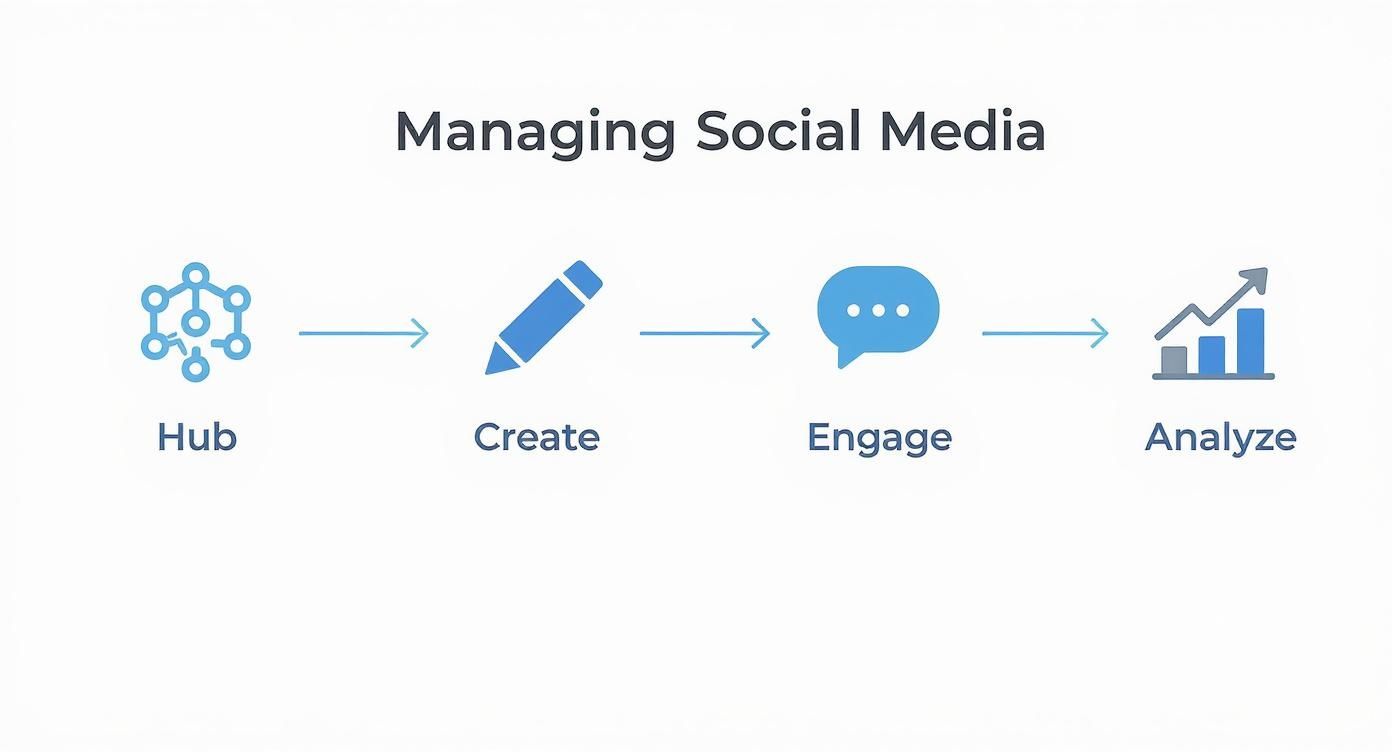
Think of it as a loop: your analysis of what's working (or not) feeds right back into the content you create, which all lives in your central hub. By combining a single hub with efficient creation, engagement, and analysis, you build a sustainable engine for growth.
Build Your Centralized Social Media Hub
The first real step to escaping social media chaos is getting everything out of scattered browser tabs and into one command center. If you want to manage multiple social media accounts without pulling your hair out, you need a single source of truth—one spot where you can see, plan, and execute your entire strategy.
No more constantly logging in and out of different platforms. This is where a dedicated social media management tool becomes your digital headquarters.
Connecting Your Accounts to a Single Dashboard
First things first: connect every single social profile you manage to a unified dashboard. This isn't just about saving a few clicks; it's about gaining a high-level, strategic view of all your moving parts at once. A solid tool should handle the big networks and the niche ones, no problem.
With a platform like OneUp, for instance, you can connect an unlimited number of accounts. That means everything from:
- Facebook (both Pages and Groups)
- Instagram (with direct posting for Stories and Reels)
- X (formerly Twitter) (including support for threads)
- LinkedIn (Profiles and company Pages)
- Pinterest, TikTok, and YouTube
- Even your local-focused Google Business Profiles
This simple move immediately breaks down the silos that make managing multiple accounts so painful. Suddenly, your entire digital footprint is visible in one place, setting the stage for a much more organized workflow.
Gaining a Bird's-Eye View with a Visual Calendar
Once your accounts are connected, the visual calendar becomes your best friend. Instead of trying to remember what's scheduled for a client's LinkedIn versus your own brand's Instagram, you can see the entire content plan laid out clearly.
Here’s what that looks like in a tool like OneUp. You get a complete overview of everything in the pipeline.
This calendar view instantly shows you where the gaps are. Are you posting too much on X on Tuesday? Forgetting about LinkedIn all week? This is the kind of strategic insight you simply can't get when you're managing accounts natively. It shifts your planning from a reactive scramble to a proactive, organized process.
A centralized hub does more than save you login time. It provides the strategic clarity you need to ensure your messaging is consistent, balanced, and perfectly timed across every single channel.
Organizing Content with Categories and Labels
As you add more accounts, your content library can turn into a mess fast. That's why the ability to categorize your posts is a game-changer, especially for agencies or businesses juggling different brands or campaigns.
In a tool like OneUp, you can create custom categories to group your social accounts. Just imagine setting up separate categories for:
- Client A vs. Client B: Bundle all of one client’s accounts (Facebook, X, LinkedIn) to make scheduling and reporting a breeze.
- Campaign-Specific Content: Group all posts for a product launch or holiday promo to easily track how they're performing as a set.
- Content Pillars: Organize posts by themes like "Educational Tips," "Behind the Scenes," or "User-Generated Content."
This level of organization makes managing a high volume of content across dozens of accounts feel completely under control. It also makes it way easier to collaborate—team members can just filter the calendar to see only the posts that matter to them.
By building this central hub first, you create a solid foundation for every other part of your social media workflow. To get a feel for how it all comes together, you can check out the full capabilities of a comprehensive social media hub like OneUp.
Streamline Your Content Creation and Scheduling
Okay, once you've got your accounts wrangled into a central hub, it's time for the fun part: creating and scheduling your content. This is where you stop being a frantic, post-by-post content creator and start thinking like a strategist. It's how you reclaim hours from your week.
Think about how much social media has exploded. Back in 2010, there were about 970 million users. By July 2025, that number is expected to hit a staggering 5.41 billion. People aren't just on one platform anymore; the average person bounces between nearly seven different social networks every month. You can't keep up with that kind of scale by posting manually. The game has changed, and your content process needs to change with it.
Create and Schedule Content at Scale
Let's be real: manually posting across ten, twenty, or even fifty accounts is a recipe for burnout. To get your workflow humming, you need to think in batches and lean on automation.
This is where features like bulk uploading posts from a CSV or Google Sheets file become your best friend. Seriously, imagine mapping out an entire month of content for multiple clients in a single spreadsheet. With a tool like OneUp, you can lay out hundreds of posts—text, image URLs, scheduled times, the whole nine yards—and upload them in one click. For big campaigns or just getting ahead for the quarter, it’s a total game-changer.

Another lifesaver is the ability to repeat or recycle your best evergreen content. Not every post has to be a one-hit wonder. Got a killer blog post, a timeless tip, or a core brand message that always gets engagement? Put it on repeat! OneUp lets you set posts to automatically share again at specific intervals—say, every few weeks or months. Your best stuff keeps reaching new eyeballs with zero extra effort on your part.
Customize One Post for Every Network
One of the biggest mistakes I see is blasting the exact same message across every single platform. Each network has its own vibe, audience, and algorithm. Your content needs to fit in. But that doesn't mean you have to create ten different posts from scratch.
The smarter move is to use a tool with in-editor customization. In OneUp, you can write your core message and then quickly tweak it for each network before you hit "schedule."
- For LinkedIn: You'll want a more professional tone. Tag some relevant companies and throw in a few industry-specific hashtags.
- For X (formerly Twitter): Keep it short and punchy. Add a couple of trending hashtags and maybe a question to get people talking.
- For Facebook: You can be a bit more conversational and write a longer caption. Don't forget a clear call-to-action to spark some comments.
This "create once, customize everywhere" method saves a ridiculous amount of time while making sure your content feels native and performs better everywhere. You can even build and schedule multi-image carousel posts for Facebook, X, and LinkedIn right from the same screen.
The goal isn't just to be on multiple platforms; it's to be there effectively. Customizing your message for each network is non-negotiable if you want real engagement.
Integrate Your Creative and Automation Tools
Your workflow gets even smoother when your favorite tools play nicely together. Constantly downloading graphics from one app just to re-upload them to your scheduler is a huge drag. Look for direct integrations that cut out those annoying extra steps.
OneUp’s direct Canva integration is a perfect example of this. You can design a beautiful graphic right inside the post composer without ever leaving the app. It keeps your creative flow going and kills the friction of juggling multiple tabs.
And for those days when the ideas just aren't coming? Tap into AI. OneUp has an AI assistant built-in to help brainstorm captions right on the spot. It’s like having a co-writer on call to help you get past that blinking cursor.
Finally, put your blog promotion on autopilot. By connecting an RSS feed, OneUp can automatically create and publish a social media post every time a new article goes live on your website. It's instant distribution that drives traffic back to your site, all without you lifting a finger. If you need some fresh social media content ideas to feed the machine, check these out. And to keep your Instagram looking sharp, you can use OneUp's Instagram grid planner to visualize and perfect your feed's aesthetic before anything goes live.
Nail Your Engagement and Team Collaboration
Pushing content out is only half the job. Honestly, it’s the easier half. The real magic—and the real growth—happens when you start actually talking to your audience and working smoothly as a team. Get this wrong, and you're just shouting into the wind while your team members trip over each other.
This is where your setup graduates from a simple content scheduler to a full-blown command center. It’s all about sparking conversations and keeping your brand’s reputation solid, whether that’s with followers or clients.
Tame Your Inboxes
Jumping between five different apps to answer DMs and comments is a recipe for disaster. It’s a massive time-waster, and you’re guaranteed to miss something important. A unified social inbox isn't a luxury; it’s a must-have. It pulls everything into a single feed so you can knock out replies without losing your mind.
A good system goes beyond just likes and comments, though. For any local business, reputation management is everything. OneUp, for example, lets you respond to Google Business Profile reviews and questions right from the same inbox. This is a game-changer. You’re handling customer service right alongside your social chatter, making sure no one gets ignored. After all, if you're working hard to get people talking, you need a plan for when they do. Learning how to improve social media engagement is critical to keeping those conversations flowing.
Set Up a Flawless Post Approval Workflow
When you’ve got a team, or you're an agency juggling clients, you absolutely need quality control. You can’t risk off-brand posts, typos, or unapproved content slipping through the cracks. This is where a post-approval workflow saves the day.
Forget messy email chains or confusing spreadsheets. A tool with a built-in approval system cleans up the whole process. With OneUp, you can have junior team members or even clients submit posts for review. The manager gets a ping, gives it a once-over, and can approve or reject the post before it ever sees the light of day.
This simple process is huge for a few reasons:
- Keeps the Brand Voice Consistent: Every post stays on-message and matches your established tone.
- Catches Mistakes Early: A second pair of eyes is your best defense against typos and broken links.
- Empowers the Whole Team: Junior staff can create content confidently, knowing it’ll be double-checked.
- Builds Client Trust: Giving clients the final say is a powerful way to build strong, transparent partnerships.
An approval workflow isn't about micromanaging. It's about creating a safety net that protects your brand and gives your team the confidence to do great work.
A Real-World Agency Scenario
Picture this: you're a marketing agency running social media for five different clients. A junior manager drafts a week’s worth of content for a new client in the finance sector. Given the industry, every single post has to be buttoned-up and compliant. No room for error.
Using OneUp’s team features, the junior manager submits the drafted posts. A senior manager gets an alert, scans the captions for tone and compliance, and makes a few tweaks. Once it’s good to go internally, they can send the client a shareable, read-only calendar link for the final sign-off. The client sees exactly what's planned without needing a login and can give their feedback externally.
That entire multi-step approval process happens inside one platform. It cuts down on errors, makes communication a breeze, and keeps the client happy. It’s a professional system that works whether you have two clients or twenty. You can dig into how OneUp's capabilities for teams and agencies work on their site.
Analyze and Automate Your Social Performance
Okay, you've nailed down your content creation and your team is working like a well-oiled machine. What's next? It's time to close the loop with data. This is the part where you stop guessing and start building a real, data-driven strategy. It’s all about figuring out what your audience actually cares about and using smart automation to make every single post pull its weight.
Seriously, without analytics, you're just flying blind. You might feel busy, but are you actually being effective? Digging into your performance data lets you ditch the content that’s falling flat and double down on what’s genuinely driving results. This is how the pros stay ahead of the curve when juggling a dozen different accounts.

Go Beyond Basic Scheduling with Smart Automation
Automation is so much more than just queuing up posts for the week. It’s about creating intelligent workflows that save you a ton of time and boost your impact. One of the most powerful—and weirdly overlooked—features is setting posts to expire.
Think about it. You're running a contest or a flash sale. With a tool like OneUp, you can schedule that post and tell it to automatically delete itself on a specific date and time. Boom. Your feed stays clean, and you don't have followers stumbling across outdated promos weeks later.
This is also a lifesaver for:
- Event Promotions: Posts vanish right after the event wraps up. No manual cleanup needed.
- Seasonal Content: Keep your profiles fresh by clearing out holiday posts once the season's over.
- Flash Sales: Build urgency without having to remember to delete the post when the sale ends.
Unify Your Analytics in a Single Dashboard
Let's be real, managing multiple social accounts is a huge time sink. People are spending, on average, about 2 hours and 21 minutes a day on social media and are active on 6.83 platforms. That means you need a constant stream of tailored content, which is a massive investment. You can find more juicy details in these social media marketing statistics.
Manually pulling reports from Facebook, then Instagram, then LinkedIn… it's not just tedious, it's a terrible way to spot trends. A unified analytics dashboard is the only sane solution. It pulls all your key metrics into one spot so you can actually see the big picture.
With OneUp, you can track everything for all your connected accounts, with both summary analytics and post-level analytics. This means you can keep an eye on engagement, reach, and follower growth without hopping between a million different tabs.
A single analytics dashboard isn't just a convenience—it's a strategic necessity. It's the only way to get a clear, comparative view of what's working across your entire social media ecosystem.
Pinpoint Your Best Content and Optimal Posting Times
Once all your data is in one place, you can start asking the fun questions. Which formats are getting the most love? Are carousels killing it on Instagram? Do questions in your Facebook posts actually get more comments?
By diving into post-level data, you can see exactly what your top-performing content is. This takes all the guesswork out of your strategy. Instead of wondering what to post, you can just create more of what you know your audience wants. A good tool makes this a breeze, showing you top posts by engagement, reach, or clicks.
You can also figure out the best times to post for each network. Your LinkedIn crowd might be scrolling during their Tuesday lunch break, while your TikTok followers are most active on a Saturday night. The data reveals these patterns, so you can schedule everything for maximum impact.
Make Data-Informed Decisions for Better Results
At the end of the day, the whole point of looking at analytics is to make smarter decisions. Your data should directly shape what you do next.
For example, if your analytics scream that video content gets the highest engagement on Facebook, it’s a no-brainer to pour more resources into video for that platform. If a certain content category in OneUp is underperforming everywhere, maybe it’s time to retire that content pillar.
This cycle—post, analyze, iterate—is the heart of great social media management. It ensures you’re not just posting for the sake of posting, but are actively moving toward your goals. OneUp even lets you generate custom, cross-network reports and schedule them to be sent straight to your email, which is perfect for keeping yourself and your clients in the loop.
Common Questions About Managing Social Accounts
Even with the perfect strategy on paper for managing multiple social media accounts, you're always going to run into specific questions. Every platform has its own quirks, rules, and audience expectations, and trying to keep it all straight can feel like a full-time job in itself.
This is your go-to guide for those "what do I do when…" moments. We're tackling the most common hurdles social media managers hit, with clear, no-fluff answers.
What Is the Best Way to Manage Multiple Instagram Accounts?
Honestly, the only sane way is to use a third-party management tool like OneUp that’s built for it. You need something that supports multiple Instagram profiles and allows for direct posting of everything—Stories, Reels, Carousels, you name it. This gets you out of the endless cycle of logging in and out of the app.
When you're picking a tool, there are a few features that are non-negotiable. A visual Instagram grid planner is a must for keeping your aesthetic sharp. The ability to schedule the first comment is a game-changer for keeping your captions clean and tucking hashtags away. And, of course, a good link-in-bio tool is essential for actually driving traffic. This kind of centralized hub doesn't just save a ton of time; it also helps you avoid getting flagged by Instagram for suspicious login activity.
How Do I Post to Multiple Accounts Without Sounding Robotic?
This is where most people go wrong. The key is customization. You can't just blast the exact same message everywhere and expect it to work. Instead, find a tool that lets you tweak your content for each network, all from the same place.
For example, in OneUp, you can draft a core message and then quickly adapt it:
- LinkedIn: Switch to a more professional tone and tag relevant companies.
- X (formerly Twitter): Shorten it, make it punchy, and add a few trending hashtags.
- Facebook: Keep it conversational, add some emojis, and pose an engaging question.
This "create once, customize everywhere" approach is the secret. It respects the unique culture of each platform (and its algorithm) without forcing you to create ten different posts from scratch.
The biggest mistake in managing multiple social media accounts is sacrificing authenticity for efficiency. The right tools allow you to have both by making platform-specific customization a seamless part of your workflow.
Can I Manage Multiple Social Media Accounts for Free?
You can try, but the free plans out there are usually very restrictive. They'll cap how many accounts you can connect or how many posts you can schedule, making them impractical for any serious business, creator, or agency.
Think of a paid tool as an investment. The ROI comes from the massive amount of time you save, access to indispensable features like analytics and bulk scheduling, and your ability to show up consistently. OneUp, for instance, has a simple pricing model with unlimited social accounts, posts, and team members. When you compare that to tools that charge per seat or per account, it pays for itself almost immediately in pure efficiency.
What Are the Biggest Mistakes to Avoid?
It's surprisingly easy to fall into a few common traps when you're juggling multiple accounts. Knowing what they are ahead of time is half the battle.
Here are the big ones I see all the time:
- Broadcasting Identical Posts: This is the fastest way to look lazy and get ignored. You have to tailor the message.
- Neglecting Engagement: It's called social media for a reason. If you're just posting and ghosting, you're missing the whole point. You have to reply to comments and DMs.
- Inconsistent Posting: The algorithms favor consistency. If you post sporadically, your reach will suffer. Simple as that.
- Ignoring Analytics: You can't improve what you don't measure. Flying blind without looking at your data is a recipe for wasted effort.
- Trying to Do It All Manually: A jumble of spreadsheets and calendar reminders will eventually lead to missed posts, embarrassing errors, and total burnout.
A good tool and a solid system help you sidestep every single one of these pitfalls.
Ready to stop juggling and start managing your social media with confidence? OneUp provides all the tools you need—from scheduling and analytics to team collaboration and a unified inbox—all for one simple price. Start your free trial of OneUp today and see the difference.