
Social content strategy is your roadmap for turning brand objectives into conversations your audience cares about. Instead of patchwork posting, it blends research, clear themes, smart timing, thoughtful distribution, and honest measurement to build real momentum—all powered by OneUp’s robust feature set.
Why Social Content Strategy Drives Consistent Growth
You might have tried posting on a whim and seen spotty results. A solid plan flips that script by first zoning in on who you’re talking to and what truly moves them.
Next, you build content pillars that reflect both your brand’s character and the questions your audience is actually asking. Every update then feeds back into analytics so you can sharpen your approach as you go—and OneUp makes it seamless:
- Audience research uncovers demographics, pain points, and content gaps through surveys, polls, and OneUp’s listening tags and trending analysis
- Defining clear content pillars ensures every post reflects brand values and resonates with users
- Drag-and-drop calendars from OneUp give you a monthly overview you can tweak on the fly, complete with calendar heatmap overlays and time zone sync
- AI Caption Assistant spins out caption variants in seconds, schedules first comments, and suggests hashtags from your saved library
- Bulk Upload via CSV or Google Sheets queues over 50 posts in one go—images, videos, GIFs, and links—and recurring posts guard your series with custom frequencies
- RSS Feed Importer syncs unlimited blog feeds or YouTube channels directly into your draft queue
- Chrome Extension and Slack Integration let you clip content or approve posts on the go
- UTM automation tags every link and OneUp’s performance dashboard surfaces engagement metrics, CTR, and conversion rates—with custom reporting exports
Real D2C Short-Form Video Success
When we advised a direct-to-consumer brand on Instagram and TikTok, they shifted from random static images to a focused short-form video rhythm. Two months later, reach had tripled and follower growth was firing on all cylinders.
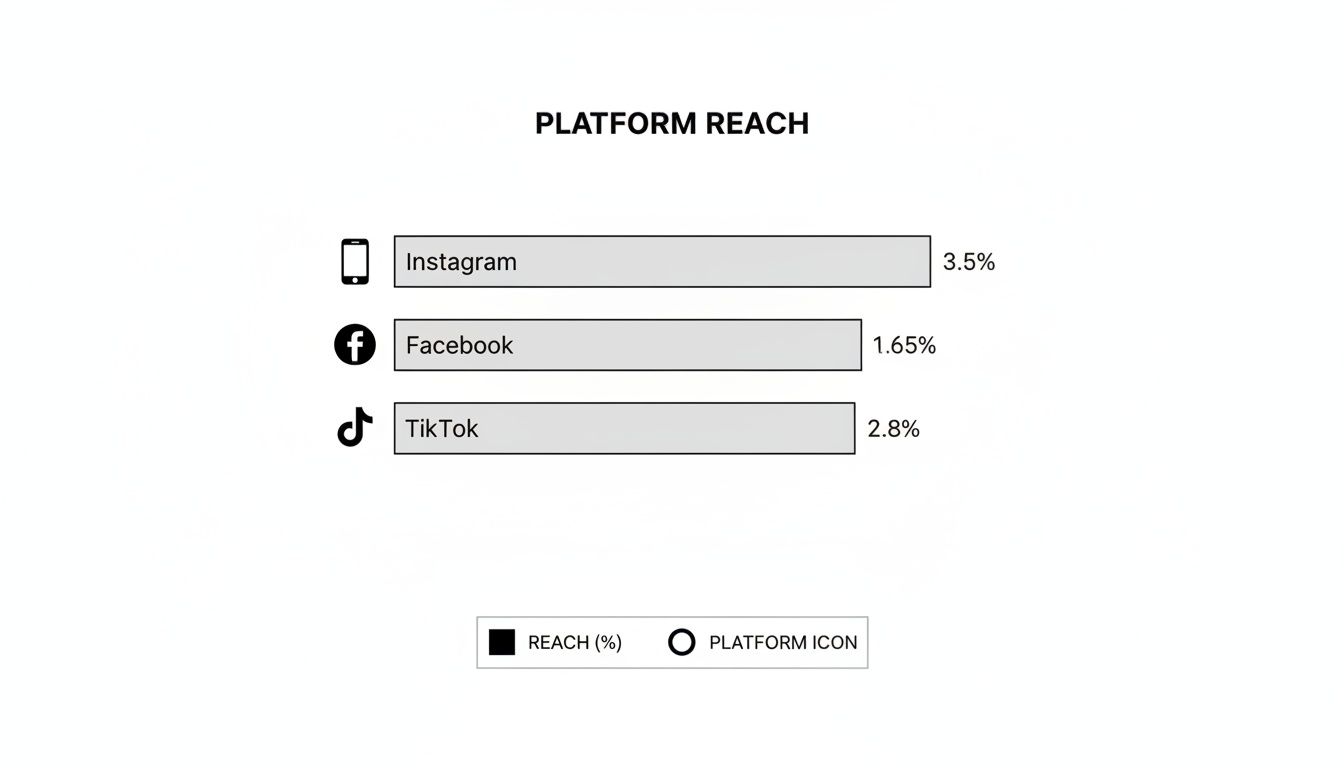
Instagram led with 3.5%, TikTok followed at 2.8%, and Facebook trailed at 1.65%, making it clear where organic efforts pay off most.
Platform Reach And Usage Comparison
Below is a quick look at active users and average organic reach across top social platforms. Use this to decide where your brand should lean in.
| Platform | Active Users (B) | Average Organic Reach (%) |
|---|---|---|
| 1.4 | 3.50% | |
| 2.9 | 1.65% | |
| TikTok | 1.0 | 2.80% |
This snapshot highlights which networks offer the biggest bang for your organic buck.
By 2025, roughly 5.44 billion people will use social networks and the average user visits 6.84 platforms each month. With organic reach shrinking on legacy channels, it makes sense to focus on the top performers and blend owned, earned, and paid tactics. Check out Statista’s global network usage and reach benchmarks.
Prioritize platforms with the right audience, design for dominant formats, and use paid lift to counter falling organic reach.
Planning Next Steps
- Zero in on your most impactful channels rather than scattering efforts
- Use OneUp’s unified calendar view, with drag-and-drop scheduling, time-zone sync, and calendar heatmap insights
- Speed up copywriting with AI Caption Assistant, save reusable templates, and keep links tidy through UTM automation
- Review metrics in the performance dashboard, then iterate your plan on a monthly cadence
A repeatable framework like this keeps your strategy agile and aligned with your audience’s evolving needs.
Conducting Audience Research And Building Personas
Pinpointing your audience isn’t a checkbox—it’s the foundation of everything you publish. I lean on a mix of social listening, native analytics, quick polls and in-depth surveys to balance hard data with real human voices.
By tapping into:
- Twitter hashtag streams tracked via OneUp’s listening dashboard to spot trending conversations
- Facebook Insights and direct API pulls into OneUp for a breakdown of age, location and top posts
- Instagram Story polls that deliver instant yes/no feedback with auto-report summaries
- Typeform surveys to unearth challenges and content wishes
you bridge what people say with how they actually behave. That clarity fuels messaging that lands.
Choosing Social Listening Channels
Don’t try to be everywhere at once. Focus on the platforms your buyer avatars already use. For instance, a B2B SaaS team might zero in on Twitter and LinkedIn, shelving Instagram for now. Meanwhile, Facebook page analytics reveal the age groups and regions most active—and that insight shapes tone, format and timing.
- Combine keyword alerts, hashtag tracking and sentiment analysis on Twitter via OneUp
- Plug Facebook page analytics into your content dashboard to watch top-performing posts
- Run an Instagram Story poll each week to track shifting preferences and view results in OneUp’s poll report
This selective approach reflects genuine habits instead of chasing every shiny network out there.
Harnessing OneUp For Research
OneUp’s listening dashboard, research tags, and alerts keep everything in one place. I tag comments by theme—pricing, onboarding, feature requests—then let bulk actions sort dozens of posts at once. The trending view surfaces spikes when a hot topic erupts, so you never miss a beat.
- Enable listening across networks to capture every mention
- Apply research tags that align with your key themes
- Group accounts by niche to compare distinct segments
- Watch the trending view for sudden conversation bursts
In one SaaS project, tagging phrases like “workflow shortcut” and “bulk upload” revealed an overlooked need. Within two weeks, form submissions jumped by 25%—all because hidden patterns finally saw the light.
Consistent tagging uncovers hidden patterns and powers your messaging calendar.
Building Buyer Personas
Raw data only becomes useful when it’s personified. I craft buyer avatars with demographics, motivations and preferred content styles. Each one includes:
- Age range and job title
- Day-to-day challenges
- The formats that grab their attention
| Persona Name | Role | Pain Point | Content Preference |
|---|---|---|---|
| Startup Sam | Founder | Scaling without added budget | Step-by-step guides |
| Freelance Fran | Consultant | Client acquisition issues | Case study videos |
| Growth Gina | Marketing Lead | Low engagement on key posts | Data-driven infographics |
That table becomes our quick reference for tone, format and calls to action—and it highlights gaps where new content can shine.
Inject Insights Into Your Calendar
Turning personas into a packed calendar is easier than you think. I tie every theme back to a OneUp tag, then:
- Link tags to calendar topics and post types
- Assign each persona’s top three themes to weekly slots
- Drag and drop in OneUp’s calendar for a clear view, complete with markdown previews
- Schedule recurring polls or surveys to keep insights fresh
This mapping makes sure every post moves the needle because it’s firmly rooted in audience needs.
A clear mapping process keeps your calendar full of audience-driven ideas.
Ongoing Research Best Practices
Audience research isn’t a one-and-done task. I build monthly audits into my routine—and quarterly persona reviews—to stay on top of shifting interests.
- Track tag volume by theme to measure interest trends via OneUp’s reporting
- Watch demographic changes in engagement for emerging segments
- Note trending keywords each month to catch new conversation sparks
With this cycle, your social content strategy stays nimble and genuinely responsive to real audience needs.
Defining Content Pillars and Building a Calendar
When you lock in clear themes—your content pillars—you give every post a purpose. In a recent B2B trial on LinkedIn and TikTok, we experimented with four distinct pillars and discovered that video tutorials earned twice the engagement of plain text updates.
Before you dive into scheduling, lay out those pillars so every week has a healthy mix of education, proof, and personality.
Content Pillars Summary
Here’s a quick look at the five core pillars that formed the backbone of our campaign. Each one addresses a different audience need and slots neatly into a monthly calendar.
| Pillar | Purpose | Example |
|---|---|---|
| Tutorials | Educate prospects on product features | 3-minute LinkedIn how-to videos recorded and posted via OneUp’s video uploader |
| User Stories | Build trust through customer success | TikTok testimonial clips showing ROI, scheduled in bulk through CSV upload |
| Behind-the-Scenes | Humanize brand voice and culture | Instagram Stories office tours with first-comment scheduling |
| Product Demos | Highlight new features step by step | Carousel posts with slide annotations and alt text support |
| Tips & Tricks | Offer quick actionable advice | Daily auto-posted tips using recurring templates and saved hashtag sets |
Mapping these out in advance means you avoid last-minute scrambling and maintain a strategic rhythm.
Testing Pillar Performance
You won’t know which themes stick until you try them. We ran A/B tests in OneUp by tagging each post with its pillar and watching metrics in the performance dashboard.
- Label posts by pillar to filter results instantly
- Compare engagement rate, CTR, and video views side by side
- Shift your mix when certain themes fall below target benchmarks
In our tests, tutorials and demos always rose to the top—likely because they solve real problems. Meanwhile, behind-the-scenes clips and user stories kept the feed feeling fresh and human.
Building Your Calendar In OneUp
Once the pillars proved their worth, we moved into OneUp’s drag-and-drop calendar. Recurring templates pick up daily tips and routine posts so nothing slips through the cracks.
- Automate UTM tagging for every link to trace back traffic sources
- Assign tasks with due-date reminders and role-based access for collaborators
- Schedule around product launches, webinars, or industry events
You can even preview your grid with OneUp’s Instagram grid planner to strike the right visual balance. Rearranging tiles makes spotting gaps painfully easy.
A structured calendar keeps variety high and ensures each pillar gets its moment.
Tips For Balancing Consistency And Variety
Variety and predictability aren’t enemies—they’re dance partners. Rotate pillars weekly so your audience sees something new without losing familiarity.
- Watch tag filters in OneUp to catch any pillar that’s fallen off schedule
- Swap in fresh formats mid-month if engagement plateaus
- Reserve recurring slots for your top performers to reinforce what works
Quarterly check-ins are your chance to align with seasonality and product updates. Treat your calendar as a living document, not a set-and-forget.
A flexible schedule is the backbone of an ever-evolving social strategy.
Monitoring Pillar Impact
Keep an eye on month-over-month shifts in reach and engagement by pillar. Aim to boost your leading pillar’s performance by at least 15% each quarter to stay on track.
- Track UTM-driven website visits for bottom-of-funnel content
- Compare average engagement across channels to spot high-value themes
- Jot down emerging topics that deserve a pillar of their own
When one theme starts losing steam, pivot your distribution or retire it altogether. Data-driven tweaks stop feeds from going stale.
Data-driven pillar management prevents stale content and supports a vibrant feed.
Next Actions For Your Calendar
Pull a read-only calendar view in OneUp and share it instantly with your team. Then set up a monthly audit to review which pillars need extra airtime and brainstorm new themes before they become urgent.
A little planning today saves hours of last-minute scrambling tomorrow—freeing you up to focus on the creative side of social.
Streamlining Content Creation And Repurposing Workflows
Scaling your creative output doesn’t mean late nights and caffeine binges. By pairing AI-assisted brainstorming with reusable templates and OneUp’s bulk features, your team can keep up a steady flow of posts without pressure.
Turning a long-form article into a carousel, a short Reel, and a tweet thread in under 90 minutes becomes routine:
- Brainstorm 5–7 topic angles with the AI Caption Assistant and explore fresh perspectives
- Pull images or graphics directly from Canva or Google Drive into your OneUp media library
- Write caption drafts in short, medium, and long formats aligned to each network
- Save drafts in caption templates and use the Chrome Extension to add notes on the fly
That structure speeds up ideation and lets writers concentrate on crafting a compelling story. Plus, every draft is saved in OneUp’s caption library so you can revisit past ideas, remix them, or add top performers to your calendar in seconds.
With this workflow, ideation bottlenecks vanish—and producing 30–50 draft posts in one session feels entirely doable.
AI Ideation And Draft Generation
Kick off each session by feeding your long-form text into the AI Caption Assistant. It pulls out key angles and generates caption options in short, medium, and long formats.
Next, link your Canva or Google Drive account and drag visuals into OneUp’s media library. Then tweak tone, calls-to-action, and any accessibility details like first comments or alt text.
- Generate caption variants for Instagram, Facebook, LinkedIn, X, TikTok, and YouTube
- Schedule posts across networks with correct formatting baked in via the scheduler
In one agency test, a 2,000-word article turned into three carousel posts and two Reels in just 85 minutes.
Batch Processing And Evergreen Recycling
Once ideas are locked in, batch processing handles the heavy lifting. Use the bulk upload feature to import dozens of posts via CSV or Google Sheets in seconds. Then set up auto-reposting schedules and tag content for seasonal recycling.
| Process | Time Before | Time After |
|---|---|---|
| Ideation and drafts | 4 hours | 45 minutes |
| Bulk upload of 50 posts | 3 hours | 10 minutes |
| Seasonal repurposing | 2 hours | 5 minutes |
Operational scale—mixing frequency, the right tools, and AI—determines if a social content strategy can meet modern goals. According to Hootsuite’s 2025 research, high-performing teams publish 48–72 social posts per week. Read the full research about social trends
Speed plus insight beats one-off creative campaigns and keeps your feed ready for trends.
Templates, approval workflows with role-based access, and real-time listening let you pivot in days, not months.
Building A Creator Pipeline
Imagine a UGC pipeline where contributors upload assets straight into OneUp. The approval workflow pings admins for quick checks, then tags approved items by campaign or season.
- Share an invite link so creators can submit content via web portal
- Define review rules and assign posting slots with due-date reminders
- Tag approved assets for instant calendar placement
When a topic heats up, keyword alerts in OneUp’s listening dashboard flag fresh UGC opportunities. Then you can request on-trend material right away.
For fast caption edits on the go, check out our guide on creating engaging Instagram captions with OneUp’s AI tool.
A few clicks later, ideas turn into scheduled posts that keep your content calendar humming. Freeing up hours each week means more time for performance analysis. OneUp’s dashboard highlights engagement hotspots so you can sharpen your next cycle.
Apply these tactics consistently and watch both engagement and follower growth climb.
Scheduling Posts With OneUp
Open OneUp and you’ll find a unified scheduling calendar that puts every channel—Instagram, LinkedIn, Facebook, X, TikTok, YouTube, Pinterest, and Google My Business—side by side. No more juggling spreadsheets or chasing last-minute posts. Instead, you get a clear visual grid that flexes with your content strategy.
Pull in fresh material automatically by syncing your RSS feeds from blogs or YouTube. New articles and videos drop straight into your queue, so you never miss a beat.
- Link unlimited RSS feeds and have blog posts or YouTube videos auto-imported
- Queue over 50 posts in seconds with the bulk post creator
- Schedule recurring content—from daily tips to #TipTuesday or holiday promos—with custom frequencies
- Use time zone sync to hit feeds at peak local hours across regions
- Tag links with UTM parameters and track clicks through the built-in link tracker
Automatic RSS Feed Imports
When you connect your feeds from WordPress, Medium, or YouTube, every new publish shows up in OneUp as a draft. You decide if it goes live immediately or needs a quick tweak first. Plus, mapping your feed’s tags and categories keeps everything organized without extra effort.
Bulk Queuing And Recurring Posts
Say goodbye to manual uploads. Drop a CSV or Google Sheet into the bulk post builder, or use the visual interface to batch import images, captions, and hashtags. Then drag your items onto the calendar and fine-tune publish times with a single click.
Recurring posts guard your most-loved series—think weekly Q&As or #TipTuesday—from slipping through the cracks. Set them to repeat at any interval, and OneUp handles the rest.
“With OneUp’s bulk scheduling, we reclaimed 6 hours per week for strategic work,” says Maria, a nonprofit social manager.
Approval Workflows And Time Zone Sync
Invite colleagues or clients into custom approval lanes, complete with role-based access and tag-driven alerts. Each draft travels through review stages until it’s cleared for launch.
Once you group accounts by region, OneUp automatically adjusts publish slots. A 9 AM PST post lands at optimal times in GMT or IST—no more mental math or manual shifts.
Here’s a look at OneUp’s calendar view showing color-coded posts and scheduled time slots.
From this screen, you can spot gaps, double-check recurring series, and avoid overloading any single day at a glance.
Analytics With Calendar Heatmap
The calendar heatmap overlays engagement metrics right onto your schedule. Instantly see which days and hours drive the most likes, comments, and shares—then lean into those sweet spots.
Detailed reports break down performance by post and platform. And because the link tracker feeds into UTM-tagged campaigns, you can tie every click back to its source. That data is gold when you’re fine-tuning your next content push.
“Contact times and recurring series boosted our reach by making sure posts hit when audiences are most receptive.”
A nonprofit client set up weekly automated highlights on Facebook and Twitter, freeing up 4 hours each week. They reinvested that time into live polls and Q&As—and saw engagement climb as a result.
Explore pricing and scheduling features on the OneUp homepage. Then use the unified calendar, RSS imports, bulk creator, and analytics to improve your social content strategy step by step.
Measuring Performance And Optimizing Strategy
Knowing how your posts perform is the only way to prove ROI and sharpen your social content plan. Engagement rate, reach, click-throughs and conversions sit at the heart of those insights. Thankfully, OneUp’s UTM builder and custom reporting engine make the heavy lifting feel effortless.
Tracking these metrics reveals which topics spark conversation and where you might be over-posting or under-investing. Let’s dig into the specifics so you can fine-tune your calendar like a pro.
Key Metrics Explained
- Engagement Rate
Compares likes, comments and shares against total impressions. - Reach
The number of unique users who saw your content—ideal for spotting audience fatigue. - Click-Through Rate (CTR)
Shows how compelling your headlines and visuals really are. - Conversion Rate
Ties UTM-tagged clicks back to sign-ups, purchases or other goals.
Once you know which posts resonate, you can replicate winners and retire underperformers. OneUp’s performance dashboard lays out trend lines at a glance and lets you filter by network, campaign tag or date range.
Setting Realistic Benchmarks
Before you chase lofty goals, establish what “good” looks like for your brand. Dive into OneUp’s historical data to pull average engagement rates and CTR from last quarter. Then:
- Run A/B tests on formats and CTAs
- In one D2C campaign, swapping a vague “Learn More” for a direct “Buy Now” call lifted purchase rate by 20%
- Update your targets every quarter as new data rolls in
Review deviations each month and tweak your calendar tags accordingly. Storing benchmark reports in OneUp’s library ensures everyone on your team has quick, consistent access to the latest goals.
Automating Reports For Stakeholder Success
Manual reporting drains time you could spend on strategy. Instead, schedule weekly email digests in OneUp featuring key metrics like CPC, CPA and ROAS. That way, busy stakeholders see clear payoff numbers—without lifting a finger.
Here’s a quick benchmark table for D2C campaigns:
| Metric | Average Value | Example Use |
|---|---|---|
| CPC | $0.45 | Cost per click on product posts |
| CPA | $15.20 | Cost to acquire a newsletter subscriber |
| ROAS | 3.8x | Revenue per ad dollar spent |
When ROAS dips below the mark, revisit your creative or adjust budget slices. To dig deeper:
- Export raw data as CSV for custom analysis
- Build cross-network reports for full-funnel insights
- Share read-only links to maintain version control
Automation delivers consistency and flags performance shifts before they become emergencies.
Iterating With Data-Driven Insights
Social ad spend hit $276 billion in 2025—a 10.9% jump year over year. And since roughly 83% of that now flows through mobile, mobile-first creative is non-negotiable. According to Sprinklr’s social ad benchmarks, TikTok placements can deliver 2.4x ROAS compared to traditional display.
Looking ahead, social commerce is projected to top $1 trillion by 2028 at a 14.7% CAGR. That growth hinges on shoppable posts, influencer tie-ins and frictionless checkout—so you’ll want to:
- Export quarterly UTM reports and compare ROAS by campaign
- Refresh content pillars based on your top-performing themes
- Shift posting frequency and budget toward channels showing the most traction
With each iteration, your strategy gets sharper. Continuous optimization is what separates good teams from industry leaders.
Data-driven loops turn raw metrics into smarter creative decisions.
Tie every data point back to revenue and your social content strategy becomes indispensable at budget time. Start tracking today and watch insights fuel sustained business growth.
FAQ

What Are The First Steps To Build A Social Content Strategy?
Begin by setting clear, measurable goals. Next, dive into audience research with OneUp’s listening tags, sentiment analysis and filters to uncover interests and pain points. Finally, map out your core content pillars—those themes will guide every post you create.
How Many Posts Should I Schedule Per Week?
Aiming for consistency is key. Try 3–5 posts on LinkedIn, 5–7 posts on Facebook and Instagram, plus a daily short-form video on TikTok. Then use OneUp’s calendar heatmap to spot your ideal publishing windows.
Which OneUp Features Speed Up Content Repurposing?
- AI Caption Assistant: Spin out multiple caption drafts in seconds
- Bulk Upload via CSV/Google Sheets: Queue up large batches at once
- Evergreen Auto-Repost: Give high-performing posts a second life
- Approval Workflow: Route user-generated content smoothly through reviews
- Chrome Extension & Slack Integration: Clip and approve content from anywhere
How Can I Report ROI From Social Efforts?
Automate UTM parameter creation in OneUp so every link ties back to a campaign. Schedule weekly performance digests, run A/B tests on calls to action and formats, then track CPC, CPA, and ROAS against your revenue goals.
Quick Setup Checklist
- Tagging And Listening: Capture audience insights in OneUp
- Calendar Heatmap: Identify peak engagement times
- AI Caption Assistant: Generate polished captions instantly
- Bulk Upload: Queue dozens of posts with a single file
- Evergreen Reposting: Keep top content circulating
“I cut scheduling time in half by batching posts with OneUp’s bulk uploader,” says a marketing lead.
| Feature | Benefit |
|---|---|
| UTM Builder | Seamless link tagging |
| Approval Workflow | Faster content sign-off |
| Evergreen Auto-Repost | Extends content lifespan |
| Calendar Heatmap | Optimal timing insights |
Need more help? Visit the OneUp FAQ page for detailed walkthroughs and video demos.
- Watch step-by-step video tutorials on the OneUp YouTube channel
- Download a free calendar template from the OneUp blog
- Read real-world use case stories in our blog
Find quick wins today.
Ready to transform your social content strategy? Get started with OneUp today.