

Yes, you absolutely can schedule Instagram Stories. You can stick with Meta's built-in tools for basic scheduling, or you can jump to a more powerful third-party scheduler if you need more features. For simple, straightforward planning, the free Meta Business Suite does the job. But if you're after a truly robust workflow, a dedicated tool like OneUp is where you'll find serious automation, from direct posting and a visual calendar to RSS feed automation and a built-in Canva integration.
Why Scheduling Instagram Stories Is a Game Changer
If you've ever found yourself frantically trying to get an Instagram Story live at the "perfect" time, you already get it. Scheduling flips the script, turning that reactive, often chaotic process into a proactive, strategic one. It’s the real difference between just tossing content out there and actually building a cohesive brand story, one frame at a time.
Imagine batching an entire week's worth of content in just one sitting. That's what scheduling does. Instead of daily interruptions, you get a solid block of creative time. This doesn't just save you a ton of time; it genuinely improves the quality of your content. When you aren't rushing, you can think more creatively, design on-brand graphics, and make sure every single Story serves a purpose.
The Strategic Shift from Daily Tasks to Big-Picture Wins
For social media managers and business owners, this is about more than just convenience. Scheduling your Stories is a direct line to consistency, which is a massive signal to the Instagram algorithm. Posting regularly keeps your brand top-of-mind and tells Instagram your account is active and adding value.
This isn't just a "nice-to-have" anymore. With brands posting around 71.9% of their content as Stories, being able to plan and automate is crucial for staying visible. It lets you map out everything from daily engagement to perfectly timed product launches weeks in advance. If you're curious, you can discover more insights about how brands are leaning into Stories.
The real power here is freeing up your brain. Once you automate the posting, you get back all that time you were spending on the manual work. That time can now go into strategy, engaging with your community, and coming up with killer creative ideas—the stuff that actually grows your brand.
Choosing the Right Scheduling Tool for Your Needs
First things first, you need to decide what kind of tool actually fits your workflow. Are you looking for something simple and free, or do you need the heavy-duty features that come with a dedicated platform? This little flowchart should help you figure out which path makes the most sense.
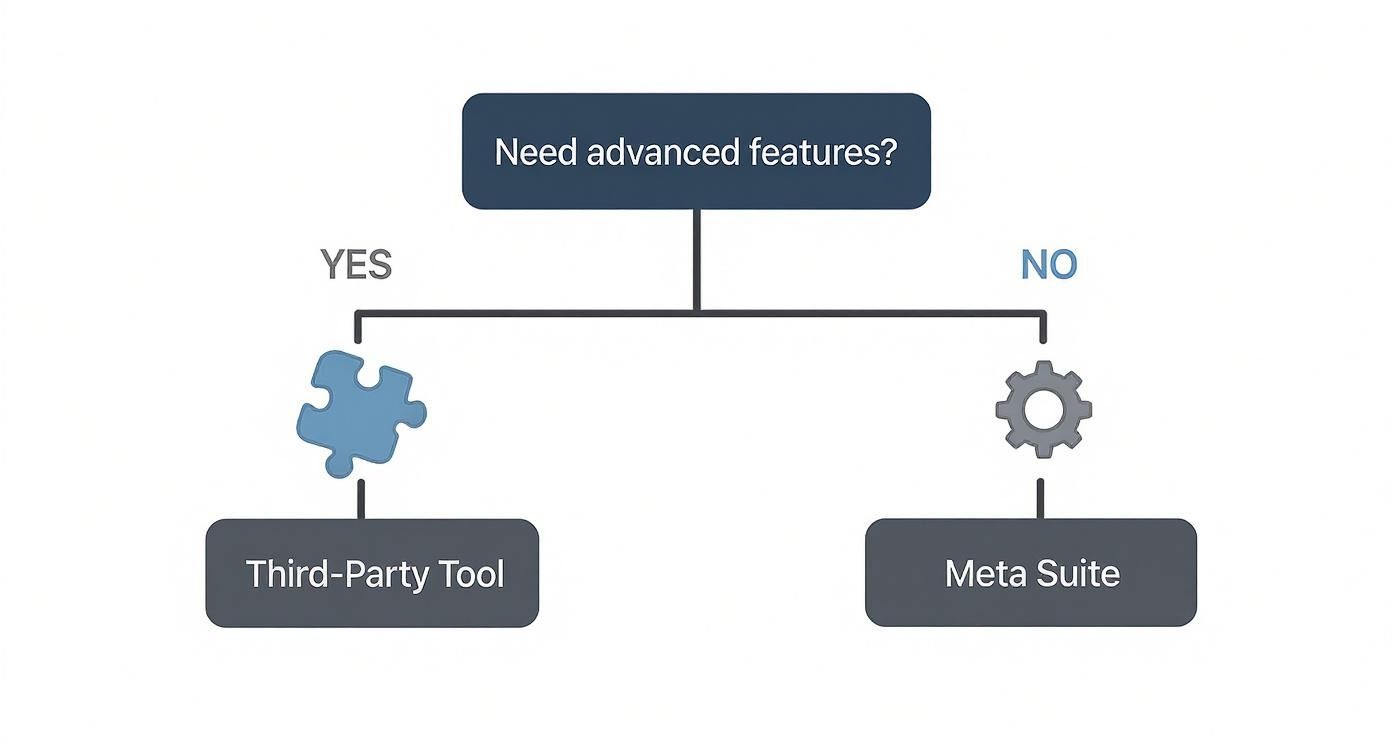
This choice is pretty important. If you're only handling one or two accounts and just need the basics, Meta's free tool is a solid place to start. But if you're juggling multiple clients, posting across different platforms, or craving powerful automation, a dedicated third-party tool is a much smarter investment.
Scheduling Methods at a Glance Meta vs Third-Party Tools
To make it even clearer, let's break down the key differences between Meta's native scheduler and a more advanced third-party tool.
| Feature | Meta Business Suite (Native) | Third-Party Tools (e.g., OneUp) |
|---|---|---|
| Cost | Free | Paid subscription (various pricing tiers) |
| Platform Support | Instagram and Facebook only | Multiple platforms (Instagram, Facebook, TikTok, LinkedIn, etc.) |
| Core Functionality | Basic scheduling for single images and videos | Advanced features like bulk uploads, repeating posts, and media libraries |
| Creative Tools | Limited editing options within the suite | Often includes integrations with tools like Canva for in-app design |
| Collaboration | Basic team access | Client approval workflows, team assignments, and detailed permissions |
| Best For | Individuals or small businesses with simple scheduling needs | Agencies, social media managers, and businesses with complex strategies |
The bottom line? A tool like OneUp gives you a central content calendar to see everything at once—Instagram, Facebook, TikTok, you name it. It also brings some serious features to the table that you just won't find in Meta's tool:
- Bulk Scheduling: Got a ton of Stories ready to go? Upload them all at once from a CSV file.
- Built-in Canva Integration: Design your graphics right inside the scheduler. No more downloading and re-uploading.
- AI Assistant: Automatically generate captions, ideas, and even rewrite text to make your content creation process faster.
- Client Approval Workflows: A lifesaver for agencies. Get feedback and sign-off from clients without endless email chains.
Ultimately, making the decision to schedule your Instagram Stories is your first step toward a more organized, effective, and way less stressful social media game.
Scheduling Stories with Meta Business Suite
If you're just starting out or only handling one brand, you don't need to immediately shell out for a paid tool. Meta Business Suite is the official, free way to plan and publish content across Instagram and Facebook. It’s the most natural place to start when learning how to schedule Instagram Stories.
Think of it as the ground floor for content planning. It doesn't have the heavy-duty, multi-platform features of a tool like OneUp, but it’s a solid, reliable way to get your Stories lined up without ever leaving the Meta ecosystem. It's perfect for getting the hang of the process before your needs get more complicated.
Finding Your Way Around the Meta Dashboard
Getting set up is pretty straightforward. The first thing you need to do is make sure your Instagram account is a Professional account (either Business or Creator) and properly linked to a Facebook Page. This connection is non-negotiable—it's what gives Meta Business Suite permission to manage your Instagram content.
Once that's sorted, you'll head over to the Meta Business Suite dashboard. It can look a little busy at first, but the parts you need for scheduling are easy to find. Your command center is the main navigation menu on the left.
Here's what the main dashboard looks like when you first log in.
This dashboard is your hub for all connected accounts. You'll spend most of your time hitting the "Planner" or "Create Story" buttons.
Actually scheduling a Story is designed to be pretty intuitive:
- Kick things off: From the main dashboard or inside the "Planner" tab, just click "Create Story."
- Pick your account: A pop-up will appear where you'll select the Instagram account you want to post to.
- Upload your media: Click "Add Media" and grab the image or video file you've already prepped.
That simple three-step process gets your content loaded into the system, ready for you to add the final touches and set a time.
From Upload to Scheduled Post
After your image or video is uploaded, you'll get a preview of what your Story will look like. Meta gives you a few basic editing tools right in this interface. You can add text overlays or some stickers, which is handy for adding a quick CTA or a bit of context right before you schedule.
This is also where you'll tell it when to post. Instead of publishing immediately, you'll choose the “Schedule” option. A calendar pops up, letting you pick the exact date and time for the Story to go live. Once you hit confirm, your Story is officially on the calendar.
The Planner is probably the most useful feature in the whole Suite. It gives you a bird's-eye view of all your scheduled content—both Feed posts and Stories—on a calendar. This makes it super easy to spot any awkward gaps in your posting schedule and keep your content flow consistent.
The Honest Limitations of a Native Tool
Meta Business Suite is a fantastic free tool, no doubt. But you have to be realistic about where it falls short. As your brand grows or your social strategy gets more layered, you'll start to feel these limitations pretty quickly.
Here are the main drawbacks I've run into:
- No Bulk Scheduling: You have to schedule every single Story slide one by one. If you're trying to build a multi-part narrative or plan a whole week of content, this gets old fast. Tools like OneUp let you upload a CSV file to schedule dozens of posts in one go.
- Limited Media Management: The Suite is missing a real media library. There's no central place to store, tag, and organize your approved assets for easy reuse. With a platform like OneUp, you get a centralized media library, which is a huge time-saver.
- Basic Collaboration: If you're working with a team or need to get client approval on posts, the Suite’s options are bare-bones. More advanced schedulers offer features like client approval workflows and team permissions, which are absolute must-haves for agencies.
- No Cross-Platform Versatility: You're stuck in Meta's world—it's Facebook and Instagram only. If your strategy also involves TikTok, LinkedIn, Pinterest, or Google Business Profiles, you'll be juggling a bunch of different tools. OneUp brings scheduling for 10+ platforms into one calendar.
- Lack of Content Recycling: There's no way to automatically set your best-performing, evergreen Stories to repeat down the road. This is a feature that can save you a ridiculous amount of time in the long run.
At the end of the day, Meta Business Suite is the perfect training ground. It teaches you the basics of scheduling and helps you get into a consistent posting rhythm. But once you're ready to get serious about managing social media efficiently, upgrading to a more comprehensive tool is the clear next step.
Unlocking Advanced Features with OneUp
Think of Meta Business Suite as your first car—reliable, gets you from A to B, but not exactly built for high performance. It's a solid starting point. But when you're ready to move beyond the basics and turn your Instagram Stories into a serious content engine, you'll want to upgrade. This is where a dedicated third-party scheduler like OneUp completely changes the game.
The goal isn't just to schedule posts; it's to build a sophisticated, automated system. OneUp is built to fix the exact headaches you run into with native tools. It pulls all your channels—Instagram, TikTok, LinkedIn, Pinterest, Google Business Profiles, and more—into a single command center. For the first time, you can see your entire content calendar in one place, which is crucial for building a cohesive brand presence.
From Manual Uploads to an Automated Content Engine
Let’s be honest: the biggest drag with basic schedulers is the repetitive work. Uploading every single Story, one by one, feels like a massive time sink. Because it is. OneUp was clearly designed by people who understand this pain point, offering features built for speed and scale.
The bulk scheduling feature, for instance, is a lifesaver. You can prep an entire week's or month's of Stories in a CSV file and upload them all in one shot. If you're planning a multi-part launch sequence or a daily Q&A series, this single feature can save you hours. It’s not just about efficiency; it's about making complex, narrative-driven content strategies actually manageable.
This level of automation directly fuels your consistency. We know from research that accounts posting 3 to 5 Instagram Stories per day see up to three times higher daily reach. Spreading those posts out—say, at 9 AM, 12 PM, 3 PM, and 7 PM—keeps you at the top of your followers' feeds and maximizes engagement.
Creative Workflows Without Leaving Your Dashboard
Nothing kills a creative groove faster than jumping between different apps. You design in one tool, export the file, find it in your downloads, then upload it to another. OneUp cuts out the friction with its built-in Canva integration.
You can design your branded Story graphics right inside the OneUp platform and then drop them straight into your schedule. It turns a clunky, multi-step chore into one fluid motion. It’s perfect for keeping your visual style on-point without the usual back-and-forth.
Another simple but powerful workflow booster is the AI Assistant. We all have those moments of writer's block. Instead of staring at a blank screen, you can use the AI Assistant to generate post ideas, write captions, or even rephrase existing text to sound more engaging. It builds a bank of ready-to-go content ideas you can schedule in seconds.
Organizing and Recycling Your Best Content
Great content shouldn't be a one-and-done deal. OneUp is built on the principle that your best work should keep working for you. With its ability to automatically repeat posts, you can set your top-performing evergreen Stories to republish at whatever interval you choose—every few weeks, every couple of months, you name it. This is an effortless way to make sure new followers see your greatest hits.
To keep everything straight, especially if you're managing multiple accounts, you can sort them into custom categories. An agency could create a category for each client. A brand could separate accounts by product line or region. It makes managing a busy calendar way less chaotic.
Pro Tip: Combine content categories with repeating posts for a truly automated system. You can schedule a "Tip Tuesday" Story to repeat every week, but only for your "Small Business Client" category. Boom—a steady stream of valuable content, completely hands-off.
Advanced Automation That Goes Beyond Scheduling
True automation is about more than just hitting "schedule." It's about creating systems that find and share content for you. OneUp’s RSS feed automation is a perfect example of this. You can connect your blog's RSS feed, and the tool will automatically pull in new posts and share them to your Stories. It’s a brilliant way to drive traffic back to your website without lifting a finger.
To really see how these features stack up against the basics, let's look at what OneUp brings to the table for your Instagram Story workflow.
OneUp Feature Deep Dive for Instagram Stories
This table breaks down how specific OneUp features solve common scheduling problems, making your workflow smarter and more efficient.
| OneUp Feature | How It Improves Your Instagram Story Workflow | Ideal Use Case |
|---|---|---|
| Bulk Scheduling via CSV | Upload dozens of Stories at once, including captions and scheduled times. | Planning a multi-day campaign or scheduling an entire month of content in one session. |
| Built-in Canva Integration | Design and schedule your Story graphics without leaving the platform. | Creating branded templates and graphics quickly for a consistent brand look. |
| Repeating Posts | Automatically recycle your best evergreen content at chosen intervals. | Resurfacing popular tutorials, testimonials, or foundational brand messages. |
| RSS Feed Automation | Automatically share new blog posts or articles to your Stories. | Driving consistent traffic from Instagram to your website or blog. |
| Shared Content Calendar | View and manage content for over 10 platforms in one unified calendar. | Agencies or managers handling diverse social media strategies for multiple brands. |
When you get down to it, tools like OneUp help you graduate from being a simple post scheduler to an architect of a smart, automated content strategy. It's about working smarter, not harder.
Creating Engaging Stories for Your Schedule
Knowing how to schedule Instagram Stories is only half the battle. The real magic happens when you fill that schedule with content your audience actually wants to see.
Let's be honest, effective scheduling isn’t just about plugging content into a calendar. It’s about being strategic. When you plan ahead, you shift from that last-minute scramble of "what do I post today?" to the bigger, more impactful question: "what story do I want to tell this week?"
Building a Consistent Visual Brand
Your Stories need to feel like you, even if they were scheduled weeks ago. Consistency is everything for brand recognition. This doesn't mean every single Story has to be a carbon copy, but they should share a common visual thread—think fonts, colors, or specific graphic elements.
The easiest way to nail this is by creating templates. And with a tool like OneUp, this is incredibly simple because of its direct Canva integration. You can design your branded templates right in Canva and pull them straight into your OneUp content calendar. No more tedious downloading and re-uploading. Every Story you schedule is perfectly on-brand from the jump.
Crafting a Balanced Content Mix
An endless stream of sales pitches is the fastest way to get your followers tapping away from your Stories. A truly successful strategy relies on a balanced mix of content that serves different purposes: educating, entertaining, and connecting on a human level.
Social media experts often recommend posting between 5 and 7 stories at once, rather than a long, drawn-out stream throughout the day. Dropping dozens of slides just overwhelms people and leads to skip-fatigue.
A good rule of thumb is to aim for a mix of 50% value content (tips, tutorials), 30% engagement prompts (polls, question boxes), and 20% connection content (behind-the-scenes glimpses). This keeps your followers engaged without burning them out. And if you need help organizing these content pillars, look into creating a social media content calendar.
Planning Compelling Story Arcs
Stop thinking of your Stories as individual posts. Start thinking of them as chapters in a larger narrative. A multi-part Story arc can be ridiculously effective at holding your audience's attention and getting them to tap through to the very end.
Imagine you're launching a new product. You could plan a three-day arc:
- Day 1: Start with a tease. Use a question sticker to highlight the problem your product solves.
- Day 2: Pull back the curtain. Share some behind-the-scenes footage of the product being made.
- Day 3: The big reveal! Announce the launch, complete with a link sticker driving to the product page.
This narrative approach is so much more engaging than a single "buy now" post dropped out of nowhere. With a scheduler, you can map out this entire sequence in advance, ensuring the story unfolds exactly as you intended. And for an extra boost, an Instagram caption generator can help you come up with fresh ideas for each part of your arc.
When you batch-create these narrative arcs, you can ensure each slide flows logically into the next. This is something that's very difficult to get right when you're posting on the fly throughout the day.
Scheduling for Maximum Visibility
Finally, the most amazing content in the world won't matter if nobody sees it. To maximize your reach, you have to post when your audience is actually online and active.
Your best friend here is Instagram Insights, the platform's own analytics tool.
Dive into your Insights and pinpoint the specific days and times your followers are most engaged. Once you have that data, you can use your scheduling tool to target those peak moments with precision. This transforms scheduling from a simple convenience into a powerful tactic for boosting visibility. If your data shows your audience is most active at 7 PM, you can make sure your most important Story of the day goes live right on the dot—even if you're nowhere near your phone.
Common Scheduling Problems and How to Fix Them
Even when you've got your scheduling workflow down to a science, tech glitches happen. It's super frustrating to hit a snag when you're trying to schedule Instagram Stories, but the good news is that most issues are pretty simple to fix. Knowing what to look out for will save you a headache and keep your content calendar on track.
One of the most common frustrations? Visual formatting errors, especially with video. You spend all that time getting a Story just right, only for it to look cropped, stretched, or blurry once it goes live. This is almost always an aspect ratio problem.
The easiest fix is prevention. Before you even think about uploading to your scheduler, double-check that your content is exported with the right specs.
- Resolution: Always aim for 1080×1920 pixels. That's the perfect vertical 9:16 aspect ratio Instagram loves.
- File Format: Keep it simple. MP4 for videos, and JPEG or PNG for your images.
- File Size: Make sure your videos aren't too massive. Every platform has a limit, so check your specific tool’s requirements to be safe.
Resolving Connection and Permission Errors
Another classic issue is the dreaded connection error—when your scheduling tool suddenly can't talk to your Instagram account anymore. Nine times out of ten, this is a permissions thing. It's usually triggered by something simple like a password change or a background security update from Meta.
Don't panic. The solution is just to re-authenticate the connection.
Just pop into your scheduling tool’s settings and look for an option to refresh or reconnect your Instagram account. You'll likely have to log back into Facebook (since it manages the connection) and grant permissions again. It's a quick reset that solves the problem 99% of the time.
Auto-Posting vs. Notification Reminders
It's also crucial to understand how your tool actually publishes your content. This is a big one. Not all schedulers offer true auto-posting for Stories, and if you're expecting a hands-off experience, a simple notification can feel like a major failure.
Auto-posting means the tool does all the work, publishing your Story at the scheduled time without you lifting a finger. Notification reminders just send a push notification to your phone, requiring you to manually hit the final 'post' button yourself.
Tools like OneUp are a lifesaver here because they offer true, hands-off auto-posting for Instagram Stories. For busy social media managers, that’s a game-changer.
If your tool uses notifications, just make sure you have them enabled on your phone. If you don't, you'll miss the prompt, and your Story will never go live. That leaves an awkward gap in your content calendar that's easily avoided just by knowing which system you're working with.
Frequently Asked Questions About Scheduling Stories
Even with a solid plan, a few questions always come up when you first dive into scheduling Instagram Stories. Let's walk through the most common ones I hear so you can get started with total confidence.
Can I Schedule Interactive Stickers Like Polls and Quizzes?
This is the big one. And the short answer is no, not directly—all thanks to limitations in Instagram's API. You currently can't schedule things like polls, quizzes, or question boxes for true, hands-off auto-posting.
But that doesn't mean you have to build the whole Story from scratch at posting time.
Most third-party tools have a smart workaround. They'll send a push notification to your phone when it's time to post. Your image or video is all ready to go; you just have to pop in, manually add the interactive sticker you want, and hit "publish." It's a hybrid approach, sure, but it still saves a ton of time on the design and planning side.
What Is the Difference Between Auto-Posting and Push Notifications?
Getting this distinction is crucial for picking the right tool for your workflow. The two methods are worlds apart in terms of convenience.
-
Auto-Posting: This is the "set it and forget it" dream. You schedule your Story, and the tool publishes it directly to your Instagram profile at the right time. No phone alerts, no last-minute steps. Tools like OneUp offer true auto-posting for static Stories (images and videos), which is a game-changer for busy marketers.
-
Push Notifications: This is more of a reminder system. The scheduler gets your media ready, but you're the one who has to open the notification on your phone and complete the final publishing steps yourself.
I like to think of it this way: auto-posting is like setting a smart coffee maker to brew your coffee automatically at 7 AM. A push notification is the alarm on your phone that reminds you to go press the "brew" button yourself. Both are helpful, but one is completely hands-off.
How Far in Advance Can I Schedule Instagram Stories?
The scheduling window you get really depends on the tool you're using.
If you stick with the native Meta Business Suite, you're pretty limited. You can typically only schedule content up to 75 days out. That's fine for week-to-week planning, but not much else.
For real long-term strategy, you'll need a dedicated third-party tool. Platforms like OneUp give you way more runway, often letting you schedule content months or even a full year ahead. This is absolutely essential for mapping out entire marketing quarters, planning holiday campaigns, or just building a deep content calendar so you can finally take a vacation.
And if you need to find the right hashtags that far in advance, check out OneUp's powerful Instagram hashtag generator.
Ready to stop scrambling and start scheduling like a pro? OneUp gives you true auto-posting for Stories, a central content calendar for all your social accounts, and powerful automation features that Meta's free tool can't match. Sign up for OneUp today and reclaim your time.