Mastering content strategy for social media

A solid content strategy for social media is basically the blueprint for your brand's entire digital personality. It’s the game plan that decides what you post, why you're posting it, and who you're trying to reach. Every single piece of content should be pulling you one step closer to your actual business goals.

Why You Need a Social Media Content Strategy

Picture this: you're building a skyscraper. Would you just start throwing down bricks and hope for the best? Of course not. You'd need a detailed architectural plan. Your social media content strategy is that exact plan for your brand online.

It's what turns your social media channels from a bunch of random, off-the-cuff posts into a powerful, intentional engine for growth. Without a strategy, you're just adding to the noise. With one, you're building a real asset for your business.

This kind of planned approach means every post, Story, and video has a clear job to do. It helps you move past chasing likes and comments and start hitting measurable business targets. For a deeper dive, a good guide on how to create a social media marketing strategy can help you build that solid foundation.

From Random Acts to Intentional Impact

Let’s be real: social media is crowded. A clear strategy is your only hope for cutting through the clutter with any kind of consistency.

By 2025, a staggering 65.7% of the entire world's population will be on social media. The average person juggles nearly seven different platforms a month and spends about 141 minutes a day scrolling. That's an incredibly small window to grab someone's attention.

This chart breaks down how a high-level strategy connects all the dots, from your big-picture goals down to the content you create every day.
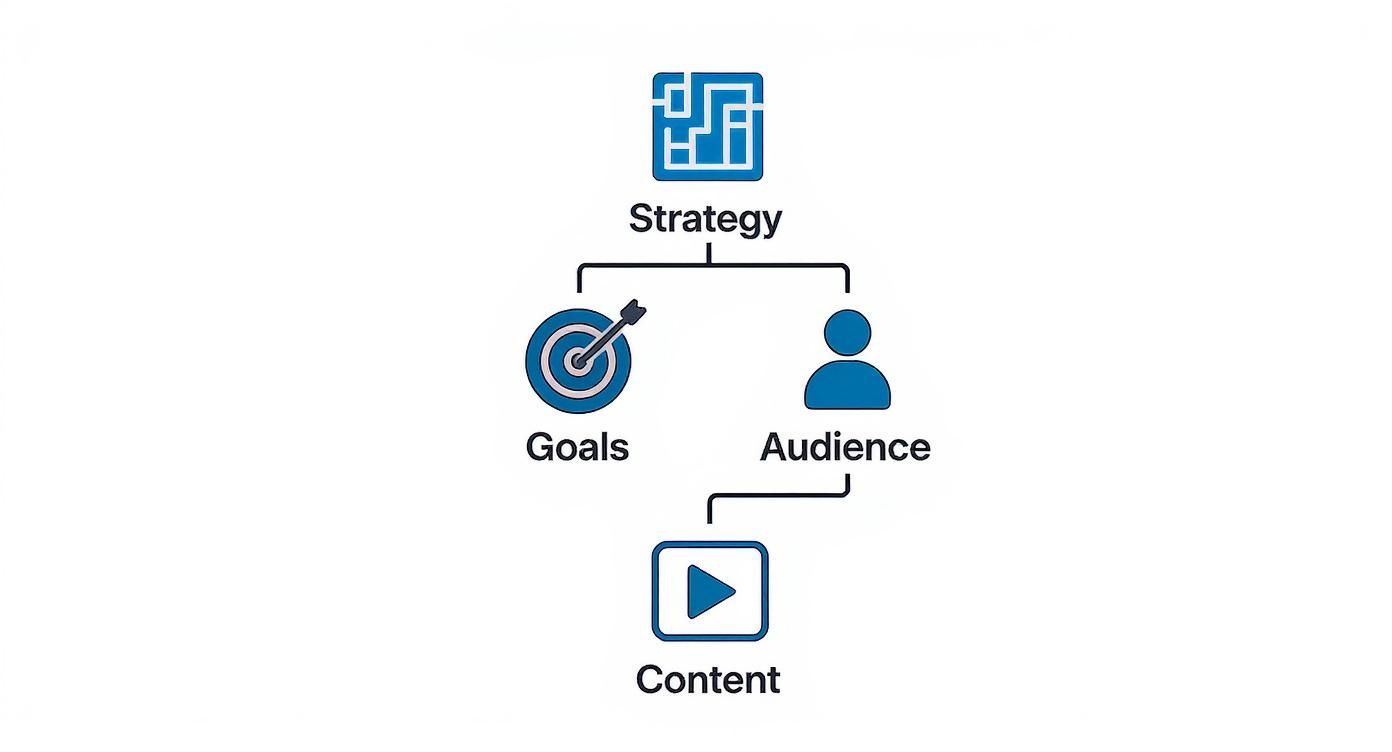
Infographic about content strategy for social media

As you can see, a successful outcome doesn't happen by accident. It starts with a smart blueprint that guides everything else you do.

A documented strategy moves your social media efforts from a daily chore into a system for predictable growth. It’s the difference between guessing what might work and knowing what will.

The Benefits of a Documented Plan

When you stop posting on a whim and start following a strategy, you’ll see some real, tangible benefits. This is what separates the brands that truly succeed online from those that are just… there.

Here’s what having a clear plan actually gets you:

  • Achieve Consistency: A strategy keeps your brand voice, visuals, and messaging straight across every platform. People start to recognize you, and that builds trust.
  • Improve Efficiency: Instead of scrambling, you can use tools like OneUp to execute your plan smoothly. Schedule all your posts for Facebook, Instagram (including direct publishing for Reels, Stories, and Carousels), TikTok, YouTube (including Shorts), and Google Business Profiles from one simple calendar.
  • Make Data-Driven Decisions: When you have goals, you can track the right numbers. You’ll quickly learn what your audience loves (and what they ignore), so you can stop guessing and start optimizing.
  • Scale Your Efforts: A written-down strategy makes it a thousand times easier to grow your team. With OneUp, you can add unlimited team members with different permissions at no extra cost and set up post-approval workflows to keep everything on-brand.

Setting Goals and Defining Your Audience

Every solid social media strategy kicks off with two simple questions: "What are we actually trying to do here?" and "Who are we talking to, anyway?" This isn’t about making stuff up; it's about laying a data-backed foundation that informs every single thing you post.

Without clear goals, you’re just throwing content into the void. It's like a ship without a rudder. Vague ideas like "get more followers" or "boost engagement" aren't goals; they're wishes. A real strategy needs to be precise, with a clear way to know if you're winning or losing.
A person working on a laptop with charts and graphs showing audience data.

From Vague Hopes to SMART Goals

To give your strategy some teeth, you need to use the SMART goal system. This classic framework is perfect for turning those fuzzy daydreams into real, actionable targets. It breaks down into five parts: Specific, Measurable, Achievable, Relevant, and Time-bound.

  • Specific: Nail down exactly what you want to do. Instead of "more engagement," try "Increase Instagram Story replies and poll responses."
  • Measurable: Slap a number on it. For example, "Increase Instagram Story engagement by 20%."
  • Achievable: Be real with yourself. If your engagement is currently 2%, shooting for 50% next month is just setting yourself up for failure.
  • Relevant: Make sure this goal actually helps the business. Does it tie back to bigger objectives like driving website traffic or getting more leads?
  • Time-bound: Set a deadline. For instance, "Increase Instagram Story engagement by 20% over the next quarter."

Suddenly, your wishy-washy idea becomes a clear mission: "Increase Instagram Story engagement by 20% over the next quarter to boost community interaction and drive traffic to our new product page." Now that's a plan.

Uncovering Who Your Audience Really Is

Once you know where you're going, you need a map. For social media, that map is a deep, almost personal understanding of your audience. Creating content without this is like trying to tell a joke to a room full of strangers—it’s probably going to bomb.

You have to go way beyond basic demographics. It's time to build out detailed user personas that get into the psychographics of your ideal followers. What are their challenges? What's their sense of humor? What motivates them, and what keeps them scrolling at 2 AM?

A classic mistake is creating content for the audience you wish you had, not the one that's actually following you. Your data is the only thing that can bridge that gap.

So, where do you find this intel?

  • Platform Analytics: The built-in tools on Instagram, Facebook, and TikTok are treasure troves of data on your followers' age, location, and when they're most active.
  • Social Listening: Keep an eye on conversations about your brand, your competitors, and your industry. You'll quickly find out what people really care about.
  • Customer Feedback: Your comments, DMs, and reviews are pure gold. They tell you exactly what your audience’s pain points and desires are, in their own words.

Don't forget about generational differences—they matter a lot here. For example, Gen Z users spend about 54% more time on social media than the average person. They're heavily influenced by what they see, with 63% saying social ads and reviews are the biggest factor in their buying decisions. They also find social ads more relevant than what they see on TV, which tells you just how important personalized content is. You can dig deeper into these trends and what they mean for marketers by checking out key social media marketing statistics.

Ultimately, a strong social media content strategy stands on these two legs. Your goals give you the "why," and your audience insights give you the "who" and "what." When you get those two things working together, your content stops being just another post in the feed and starts building real connections that actually move the needle for your business.

Developing Content Pillars and Choosing Formats

Are you tired of that daily, heart-pounding panic trying to figure out what on earth to post? A real content strategy for social media gets rid of that stress by building on content pillars.

Think of these pillars as the main support beams for your content house. They're the 3-5 core themes your brand will talk about, over and over again. This gives your content a predictable structure, making the whole creation process a lot less chaotic. Your pillars live in that sweet spot where what you know meets what your audience actually cares about.

For example, a local coffee shop's pillars might be 'Brewing Techniques,' 'Coffee Bean Origins,' and 'Cafe Culture.' Every single post they create would fit neatly into one of those buckets. This reinforces who they are and builds a consistent story, ensuring you're not just posting at random but strategically becoming the go-to expert on specific topics.

How to Define Your Content Pillars

Figuring out your pillars is simpler than it sounds. It's really just about organizing your knowledge and mapping it to what your audience wants to see. A strong pillar isn't just a product category; it's a conversation starter.

Start by brainstorming topics where these three areas overlap:

  1. Your Expertise: What can you speak about with authority? What unique knowledge or angle can your brand own?
  2. Your Audience's Passions: What are your followers' hobbies, challenges, and dreams? What problems can you solve for them?
  3. Your Brand's Niche: Where do you fit in the larger industry? What specific perspective is uniquely yours?

Once you have a list, start grouping related ideas together until you have 3-5 distinct, big-picture themes. These become the bedrock for every piece of content you make. Using a tool like OneUp, you can even create content categories based on these pillars. This helps you schedule posts under specific themes and make sure you're keeping a balanced content mix over time by viewing them on your color-coded calendar.

By defining clear pillars, you turn content creation from a reactive daily chore into a proactive, strategic operation. You'll always have something to talk about, keeping your brand message focused and powerful.

Matching Content Formats to Your Pillars and Platforms

Okay, so your pillars are set. Now what? The next step is deciding how you'll bring them to life. This is where content formats come into play. The same idea—like a coffee brewing technique—can be a quick Instagram Reel, a detailed image carousel, or even an engaging Facebook Live Q&A.

Choosing the right format really depends on the platform and what you're trying to achieve. The data is clear: ads that are tailored to a platform's native style can see 3x more click-through rates than generic, one-size-fits-all content.

So, how do you pick the right format for the job? This table breaks it down, connecting your strategic goals with the content formats that get the best results.

Matching Content Formats to Strategic Goals

Strategic Goal Primary Content Format Why It Works Example Platforms
Build Awareness Short-Form Video (Reels, TikToks, Shorts) Highly shareable and loved by algorithms, these formats are perfect for reaching new people who don't follow you yet. Instagram, TikTok, YouTube
Drive Engagement Carousels, Polls, and Quizzes Interactive formats get people to save, share, and comment, which signals to the platforms that your content is valuable. Instagram, Facebook, LinkedIn
Educate Audience Tutorials and How-To Guides In-depth formats build authority and provide real value, positioning your brand as a trusted expert. YouTube, Pinterest, Blogs
Generate Leads Webinars, Case Studies, Testimonials These formats showcase results and social proof, building the trust needed to guide followers toward a purchase. LinkedIn, Facebook, Website

On visual-heavy platforms like Instagram, the overall look and feel of your feed is everything. A clean, well-organized grid that reflects your content pillars can make a huge difference in how your brand is perceived. This is where planning your visual layout becomes a key part of your strategy. Using an Instagram grid planner can help you see how your posts will look together, ensuring a cohesive and professional vibe that pulls followers in and keeps them around.

By strategically mapping your pillars to these formats, your social media content strategy becomes a well-oiled machine. Every single piece of content serves a purpose and moves you one step closer to your goals.

How to Automate and Streamline Your Workflow

Look, a brilliant strategy is just a nice document if it never sees the light of day. The real magic happens when you build a bridge from your plan to actual, tangible results. This is where you create a seamless workflow, powered by a solid content calendar and the right tools. It's how your content strategy for social media goes from theory to a consistent, well-oiled machine.

Think of your content calendar as the conductor of an orchestra. It tells each platform what to play and when, making sure everything sounds great together. Without it, you're just making noise—missed posts, random content, and that last-minute scramble we all know and hate. A good calendar keeps you organized, consistent, and always a few steps ahead.

But a calendar on its own doesn't post for you. That's where a powerful automation tool like OneUp comes in. It handles all the tedious, repetitive tasks so you can get back to what matters: creating killer content.

This is the OneUp dashboard, a central hub where you can schedule and manage everything for all your social accounts in one spot.
Screenshot from https://www.oneupapp.io/

The big takeaway here is centralization. Having one place to schedule everything saves a ridiculous amount of time and cuts down on mistakes. No more jumping between five different tabs just to get a single post out.

Centralizing Your Content with the Right Tool

Picking the right tool is make-or-break for turning your strategy into something you can actually manage. You need a platform that not only supports all your active channels but also has features that solve your biggest workflow headaches.

With a platform like OneUp, you can line up posts for all the major players from one single screen. This covers:

  • Facebook (Pages and Groups)
  • Instagram (including direct publishing of Stories, Reels, and Carousels)
  • TikTok
  • YouTube (including Shorts and video descriptions with timestamps)
  • Google Business Profiles (including CTA buttons and event posts)
  • X (formerly Twitter), Pinterest, and LinkedIn

This unified approach is the first, most crucial step to a smoother workflow. Instead of logging into eight different apps, you get a single command center for your entire social presence.

Advanced Features That Save Serious Time

To really get your workflow humming, you need more than just basic scheduling. Think about what eats up most of your time—planning content in big batches, keeping it all organized, and writing captions. The best tools help automate exactly that.

OneUp has a few game-changing features built for this:

  • Bulk Uploader: This thing is a lifesaver, especially if you're managing multiple brands or planning content way in advance. You can upload hundreds of posts at once from a CSV file or directly from your computer, letting you schedule out months of content in minutes.
  • Content Categories: Remember those content pillars we talked about? This is where they come to life. You can tag your scheduled posts with categories (like 'Brewing Tips' or 'Cafe Culture') and view them on a color-coded calendar to make sure your content mix is balanced.
  • Repeating Posts: Got some killer evergreen content? Set it to post again automatically on a recurring basis, like every few weeks or months. This keeps your best stuff circulating to new followers without you having to lift a finger.
  • AI Caption Writer: Staring at a blank cursor? The built-in AI assistant can whip up compelling caption ideas to get you started. And if you need more inspiration to craft that perfect hook, check out OneUp's dedicated Instagram caption generator.

By automating scheduling, content organization, and even caption writing, you claw back hours of your time. Those are hours you can pour back into strategy, talking to your community, and digging into analytics—the stuff that actually moves the needle.

At the end of the day, streamlining your workflow isn't just about saving time. It's about making sure your hard work on strategy actually pays off with flawless, consistent execution. Combine a smart content calendar with a powerful tool, and you've got a system that turns social media from a reactive chore into a proactive growth engine for your business.

Maximizing Reach with Advanced Content Tactics

Okay, you’ve got a solid plan and your workflow is humming along. That's the foundation. But a truly killer content strategy for social media is all about optimization. Once the machine is running, it's time to layer in the pro moves that squeeze more juice out of every single post. This is where you graduate from just doing the plan to actively working smarter.

Think about it: instead of being on a constant hamster wheel of content creation, what if you could amplify what's already proven to work? This means recycling your best evergreen posts to catch all the people who missed them the first time around. It's about making tiny tweaks that deliver a huge impact, like keeping your captions clean by tucking hashtags into the first comment.
A person at a desk using a laptop with icons representing different social media platforms floating around it.

Unlocking Efficiency with Purpose-Built Features

To pull off these advanced tactics without chaining yourself to your desk, you need tools built for exactly this kind of thing. This is where a platform like OneUp becomes your secret weapon, offering specific features that handle the heavy lifting of pro-level optimization.

These aren't just shiny objects; they're features that directly boost your content's performance and your team's sanity.

  • Repeating Posts: Got some evergreen content that always gets love? Use OneUp’s repeating post feature to automatically reshare it. Set it to repeat every few weeks or months, and forget it. This keeps your most valuable content in front of new eyes long after you first hit "publish."
  • Automatic First Comment: Keep your captions clean and focused on the message. OneUp lets you automatically schedule your hashtags to post in the first comment on Instagram and Facebook. You get all the discoverability without cluttering up your post. Need help finding the right tags? An Instagram hashtag generator can be a lifesaver.
  • Canva Integration: No more downloading and re-uploading graphics. The direct Canva integration lets you design visuals right inside the scheduler. Click publish in Canva, and boom, it's attached to your post and ready to go.
  • UTM Parameter Tracking: Stop guessing where your traffic comes from. OneUp can automatically add custom UTM parameters to your links, giving you crystal-clear data in your Google Analytics.

Streamlining Collaboration and Ideation

As your strategy gets bigger, so does your team. And managing content creation and approvals across a bunch of people can get messy, fast. A good workflow needs a central hub where everyone is on the same page.

The best content strategies are built on smooth collaboration. When your team can brainstorm, create, approve, and schedule in one seamless flow, you cut out the friction and free up brainpower for what really matters: creativity and results.

OneUp tackles this head-on with features built for teamwork:

  • Post Approval Workflows: Keep your brand voice consistent by setting up post approval workflows. Team members can submit posts for a quick review, and the right people get a notification to give the final nod before anything goes live. No more rogue posts.
  • AI Post Idea Generator: Hit a creative wall? It happens. The AI assistant can spit out fresh post ideas that fit right in with your content pillars, helping you fill those calendar gaps in seconds.

These features turn your strategy document into a living, breathing operation that’s efficient and collaborative. But to really make your content pop, you need to stay on top of advanced techniques. A great next step is to explore some strategies for making social media videos that get noticed to take your visual game to another level.

Measuring Your Performance and Optimizing for Growth

Let's be real: a social media content strategy isn't a "set it and forget it" kind of thing. It's a living plan that needs to adapt based on what's actually happening out in the wild. Pushing out great content is only half the job. The other half is listening to what your analytics are telling you and making smart moves based on that data.

This is how you create a feedback loop that turns your social channels from a guessing game into a predictable engine for growth.

To keep from drowning in a sea of numbers, it helps to break your metrics into three simple buckets: Awareness (how many people see your stuff), Engagement (how many people interact with it), and Conversion (how many people take the action you want). Think of it as the journey people take with your content, from just seeing it to actually becoming a customer.

Interpreting the Data and Taking Action

Once you're tracking these numbers, you can start playing detective.

Is your reach sky-high but engagement is dead? People are seeing your content, but it's not hitting the mark. That's your cue to start tweaking your messaging or testing completely different creative formats.

On the flip side, maybe your engagement is awesome—lots of likes and comments—but nobody is clicking your links. Your audience loves what you're posting, but they aren't motivated to take that next step. Time to experiment with stronger, clearer calls-to-action (CTAs).

The whole point of measurement isn't just to report on what happened. It’s to figure out what to do next. Data is your roadmap for making things better and better, ensuring all your hard work actually pays off.

Optimizing Your Strategy for a Mobile-First World

Optimizing also means keeping an eye on the big picture. For example, social media ad spending is expected to hit a staggering $276.7 billion in 2025. And by 2030, a massive 83% of that will be spent on mobile ads. This just hammers home the need for a mobile-first approach.

And when you see that 78% of consumers now prefer to discover new products through short-form video, it becomes crystal clear where you should be putting your creative energy. You can dig into more of these critical social media statistics on SproutSocial.com.

A tool like OneUp is built for this kind of ongoing, data-driven work. With its post-level and summary analytics, you can easily see how you’re doing across every single network. You can even get custom cross-network reports and scheduled email updates sent right to your inbox. This makes it a piece of cake to spot trends, compare what’s working where, and double down on your winners—all without having to juggle a dozen different tabs.

Frequently Asked Questions

How Often Should I Post on Social Media?

This is the million-dollar question, isn't it? But the honest answer is there's no single magic number that works for every brand out there.

The golden rule? Consistency is always more important than frequency. A good starting point is about 3-5 times per week for platforms like Instagram or Facebook, and daily for something as fast-paced as X (formerly Twitter).

But the real key is letting your own data tell you what works. Keep a close eye on your analytics. You'll start to see patterns that reveal the best posting cadence for your specific audience. Tools like OneUp make this easy by showing you which times and frequencies are actually getting you the most engagement.

What Is the Difference Between a Content Strategy and a Content Calendar?

It's easy to get these two mixed up, but the difference is pretty simple when you think about it like building a house.

Your content strategy for social media is the architectural blueprint. It’s the ‘why’ and the ‘what’ of everything you do. It defines your goals, who you’re talking to, and the core content pillars that shape your brand’s voice. It’s the big-picture plan.

The content calendar, then, is the construction schedule. It's the 'when' and the 'how'. This is the day-to-day, nuts-and-bolts schedule of posts that actually brings your strategy to life. Your strategy tells you what needs to go into your calendar.

How Do I Find New Content Ideas?

When you feel like you've hit a wall, don't panic. There are a few tried-and-true places to look for inspiration.

First, just listen to your audience. What questions are they asking in your comments and DMs? This is a goldmine of content ideas. A unified social inbox, like the one OneUp offers, helps you keep tabs on all these conversations in one place so you never miss a message.

Next, do a little friendly spying. Check out what your competitors' top-performing posts are. You're not looking to copy, but to find inspiration. You can also look inward and repurpose your own content—turn that long blog post into a quick video or an eye-catching carousel.

And if you’re really stuck, don’t be afraid to use a creative assist. OneUp’s AI Post Idea Generator can give you fresh concepts based on your content pillars.

Finally, the easiest way to find out what people want? Just ask them! Run a poll or a Q&A and let your audience tell you exactly what they want to see next.


Ready to turn your strategy into a smooth, automated workflow? With OneUp, you can schedule posts across every major platform, manage approvals, and track performance all from one central hub. Start your free trial and see how easy it is to execute a winning content strategy.

10 Social Media Strategy Examples to Drive Growth in 2025

Feeling stuck in a cycle of posting and hoping for engagement? A powerful social media presence isn't built on luck-it's built on strategy. Moving beyond generic advice is crucial for unlocking real growth, whether you're building a personal brand, launching a new product, or nurturing a dedicated community. A well-defined plan is what separates random posts from a high-performing marketing channel.

This guide moves past theory to dissect 10 specific social media strategy examples you can adapt and implement immediately. We will break down the "what," the "why," and most importantly, the "how" for each one. You'll find replicable frameworks for diverse goals, from boosting brand awareness and running local store promotions to managing franchise marketing and driving direct sales.

Each example is designed to be a practical blueprint. We'll cover everything from defining the target audience and content mix to establishing a posting cadence and identifying the right Key Performance Indicators (KPIs) to track success.

Furthermore, we'll demonstrate how to execute these sophisticated strategies efficiently. We'll show you how to turn these high-level plans into a manageable and automated workflow using a powerful tool like OneUp. You’ll see how features like automated post scheduling across 10 different platforms (including Facebook, Instagram, X, LinkedIn, Pinterest, TikTok, YouTube, and Google Business Profiles), content recycling for evergreen topics, a unified social inbox, an integrated Canva editor, and even Google Drive and Dropbox integration can transform your social media efforts from a daily chore into a predictable, scalable growth engine. Get ready to go beyond the feed and build a strategy that delivers measurable results.

1. Content Marketing & Storytelling

Content marketing and storytelling is a social media strategy focused on building a loyal audience by creating and sharing valuable, relevant, and consistent content. Instead of directly pitching products or services, this approach uses compelling narratives to forge an emotional connection with followers. It transforms a brand from a mere seller into a trusted resource and storyteller.

Content Marketing & Storytelling

This method is one of the most powerful social media strategy examples because it fosters long-term brand affinity. Companies like GoPro excel at this by building their entire social presence around user-generated content (UGC), turning customers into heroes of their brand story. Similarly, Airbnb's "Belong Anywhere" campaign highlights authentic host and guest stories, focusing on human connection over transactions.

How to Implement This Strategy

A successful storytelling strategy requires consistency and a deep understanding of your brand’s core message.

  • Goal: Build brand awareness and foster community.

  • Target Audience: Ideal customers who share your brand's values.

  • Content Mix: A blend of behind-the-scenes videos, customer success stories, educational posts, and posts that reveal your company's mission and values.

  • Posting Cadence: 3-5 times per week to maintain narrative momentum.

Actionable Steps with OneUp

  1. Plan Your Narrative: Use OneUp's content calendar to map out your story arcs over weeks or months. You can schedule single posts or use the bulk uploader to plan an entire campaign at once, creating a cohesive brand narrative across all your social platforms.

  2. Automate & Recycle Evergreen Content: Create categories in OneUp for different story pillars like "Customer Features" or "Our Mission." Add your best-performing story-based posts to these categories and set them to recycle automatically at chosen intervals (e.g., every 3 months), ensuring your core messages are consistently shared without manual effort.

  3. Engage with Your Community: As users respond to your stories, use OneUp’s unified social inbox to manage all comments and messages in one place. Prompt engagement fosters a stronger community around your brand's narrative. Crafting the perfect response is key; for inspiration, you can learn more about crafting compelling Instagram captions.

2. Influencer Partnerships & Collaborations

Influencer partnerships and collaborations are a social media strategy centered on leveraging influential figures to reach their established and engaged audiences. Brands collaborate with creators of all sizes, from nano to macro-influencers, to generate authentic endorsements, sponsored content, and co-branded material that resonates deeply with specific target demographics.

This tactic is one of the most effective social media strategy examples for building trust and driving conversions through social proof. Gymshark built its empire by partnering with fitness creators, turning them into long-term brand ambassadors. Similarly, Daniel Wellington's early growth was fueled by a widespread micro-influencer strategy on Instagram, placing their watches on the wrists of thousands of fashion-forward creators.

How to Implement This Strategy

A successful influencer strategy requires careful vetting, clear communication, and a focus on authentic alignment between the creator and the brand.

  • Goal: Increase brand trust, reach new audiences, and drive sales.

  • Target Audience: The followers of influencers who match your ideal customer profile.

  • Content Mix: Sponsored posts, product reviews, tutorials, account takeovers, affiliate marketing links, and co-created content series.

  • Posting Cadence: Varies based on campaign length; can be a single post or an ongoing ambassorship.

Actionable Steps with OneUp

  1. Coordinate Campaign Content: Once an influencer creates content, use OneUp's post approvals feature. You can invite the creator (and unlimited other users) to your OneUp account with restricted access, allowing them to submit their draft posts for your review before anything goes live, ensuring brand alignment.

  2. Amplify Influencer Content: Schedule posts across your own social media channels to re-share and amplify the influencer's content. Use OneUp to tag the creator's account and schedule these promotional posts at optimal times to maximize reach and engagement.

  3. Track Campaign Performance: Monitor the engagement on your amplified posts directly within OneUp's analytics. Track comments, likes, and shares to measure the immediate impact of the collaboration and gather data to refine future influencer partnerships. You can even create and share custom reports.

3. User-Generated Content (UGC) Campaigns

User-Generated Content (UGC) is a social media strategy that leverages content created and shared by a brand's own customers and followers. Instead of producing all content in-house, this approach encourages the community to share their experiences, photos, and videos featuring the brand, creating a powerful engine of authentic social proof and engagement.

User-Generated Content (UGC) Campaigns

This method is one of the most effective social media strategy examples for building trust and community at scale. Starbucks' annual #RedCupContest turns a simple seasonal product into a massive, interactive event, while GoPro has built its entire marketing foundation on showcasing breathtaking footage from its users. These campaigns transform customers from passive consumers into active brand advocates, fostering deep loyalty and providing a constant stream of relatable content.

How to Implement This Strategy

A successful UGC campaign hinges on clear instructions, a compelling incentive, and consistent community management.

  • Goal: Increase brand trust, build community, and generate authentic content.

  • Target Audience: Existing customers and brand enthusiasts eager to share their experiences.

  • Content Mix: Customer photos, video testimonials, unboxing videos, reviews, and contest submissions.

  • Posting Cadence: 1-3 times per week, curating and reposting the best user submissions.

Actionable Steps with OneUp

  1. Launch & Promote Your Campaign: Use OneUp to schedule a series of posts announcing your UGC campaign across all platforms. You can auto-generate unique captions for each network and even auto-add a first comment with relevant hashtags. Using a unique hashtag is crucial; for ideas, you can use tools to discover the best Instagram hashtags.

  2. Curate & Schedule Submissions: As users share content, use OneUp's Chrome extension to easily capture and schedule the best submissions directly from social media. Make sure to get permission from the original creator before reposting. This simplifies the process of filling your content calendar with high-quality, authentic posts.

  3. Engage and Give Credit: Use OneUp’s unified social media inbox to monitor your campaign hashtag and mentions. When you reshare a user's post, always tag and credit them in the caption to show appreciation and encourage further participation. You can even save reply templates to respond faster.

4. Community Building & Engagement

Community building and engagement is a strategy centered on creating a loyal, interactive group of followers around your brand. Rather than just broadcasting messages, this approach focuses on two-way conversations, fostering a sense of belonging, and turning passive followers into active brand advocates. It involves nurturing relationships through consistent interaction and providing a dedicated space for connection.

This method is one of the most sustainable social media strategy examples because it creates a powerful network effect where members engage with each other, not just the brand. Gaming companies like those on Discord have mastered this, creating servers where players can connect and discuss strategy. Similarly, brands use dedicated Facebook Groups to offer exclusive content and build tight-knit communities, transforming customers into a loyal tribe.

How to Implement This Strategy

A successful community strategy relies on consistent moderation, active participation, and providing genuine value to its members.

  • Goal: Increase brand loyalty and generate user-generated content.

  • Target Audience: Your most engaged customers and brand enthusiasts.

  • Content Mix: A blend of discussion prompts, polls, Q&As, user-generated content features, and exclusive community-only content.

  • Posting Cadence: Daily engagement is key, with multiple touchpoints per week.

Actionable Steps with OneUp

  1. Schedule Community Prompts: Use OneUp to schedule thought-provoking questions and polls directly to your Facebook Group or LinkedIn page. Plan a month's worth of engagement prompts in advance, even setting specific posts to repeat, to ensure your community always has something new to discuss.

  2. Manage All Conversations in One Place: Connect your Facebook Groups and Pages to OneUp's social media inbox. This allows you to monitor and reply to all comments and posts from one unified dashboard, ensuring no member interaction is missed and you can respond promptly.

  3. Amplify User-Generated Content: When a community member shares a great post, easily schedule it to be reshared across your other social media channels using OneUp's Chrome extension. This not only provides you with authentic content but also makes your community members feel valued and recognized.

5. Video Content Strategy

A video content strategy is a comprehensive approach that leverages video as the primary medium for engagement across social platforms. This includes a mix of short-form content (TikToks, Reels), long-form videos (YouTube), live streams, and behind-the-scenes footage. The goal is to capture attention, convey messages dynamically, and build a strong connection with the audience through a highly engaging format.

This approach is one of the most effective social media strategy examples in today's digital landscape, where video consumption is at an all-time high. Creators like MrBeast have built empires on YouTube with high-retention editing, while brands like Duolingo have gone viral on TikTok by embracing platform-native trends. The key is adapting video style and length to each platform's unique audience expectations.

How to Implement This Strategy

A successful video strategy requires a commitment to consistent creation and a keen eye on performance analytics to understand what resonates with your viewers.

  • Goal: Increase engagement, build brand personality, and drive traffic or conversions.

  • Target Audience: Broad audiences on platforms like TikTok and YouTube, or more niche communities on platforms like Twitch.

  • Content Mix: Short-form vertical videos (Reels, Shorts, TikToks), long-form tutorials or vlogs (YouTube), and interactive live streams.

  • Posting Cadence: 1-3 short-form videos daily; 1-2 long-form videos weekly to build a library.

Actionable Steps with OneUp

  1. Schedule Cross-Platform Video Campaigns: Use OneUp to schedule your videos across multiple platforms at once. You can upload a video and then customize the caption for Facebook, Instagram Reels, TikTok, LinkedIn, Pinterest, and YouTube Shorts, ensuring each version is optimized for its destination with unique text and mentions.

  2. Visually Plan Your Video Feed: You can create custom thumbnails for your videos and preview your feed's appearance directly in OneUp. Use its robust Canva integration to design professional, on-brand cover images and thumbnails to maintain a cohesive look on platforms like Instagram and YouTube.

  3. Monitor Performance and Adapt: Track your video analytics within OneUp to see which formats and topics are performing best. Use these insights to refine your content plan, focusing on what captures and retains audience attention most effectively. OneUp even suggests the best times to post to maximize viewership on each network.

6. Paid Social Advertising & Retargeting

Paid social advertising and retargeting is a strategy that uses paid advertisements on social media platforms to reach highly specific audience segments. This approach goes beyond organic reach, leveraging sponsored posts, display ads, and video ads to drive targeted actions. It includes retargeting, which specifically targets users who have previously interacted with your brand, such as visiting your website or engaging with a post.

This method is one of the most direct social media strategy examples for generating leads and sales. For instance, a B2B company might use LinkedIn sponsored content to reach professionals with specific job titles, while an e-commerce brand can use Meta's pixel to retarget website visitors who abandoned their shopping cart with a special offer. These campaigns deliver measurable ROI by focusing ad spend on the most qualified audiences.

How to Implement This Strategy

A successful paid strategy requires precise targeting, compelling creative, and continuous optimization to maximize your return on ad spend (ROAS).

  • Goal: Drive conversions, generate leads, and increase sales.

  • Target Audience: Highly segmented groups based on demographics, interests, behaviors, and previous brand interactions (e.g., website visitors).

  • Content Mix: A/B tested ad creatives, including single image ads, carousel ads, video ads, lead generation forms, and compelling calls-to-action (CTAs).

  • Posting Cadence: Continuous or flighted campaigns, with ad performance monitored daily and optimized weekly.

Actionable Steps with OneUp

  1. Amplify Your Best Content: Use OneUp's analytics to identify your top-performing organic posts. You can directly boost your scheduled Facebook and Instagram posts from inside OneUp, turning proven winners into high-reach ads without starting from scratch.

  2. Create Compelling Ad Visuals: Integrate your Canva account directly with OneUp. Design eye-catching ad graphics and videos inside Canva—or upload directly from Google Drive or Dropbox—and schedule them into your campaign calendar in OneUp, ensuring your creative assets are fresh and on-brand.

  3. Manage Post-Ad Engagement: As paid posts generate comments and questions, use OneUp’s social media inbox to manage all interactions in one unified stream. A quick and helpful response to a question on a sponsored post can be the final touch needed to secure a conversion.

7. Social Commerce & Direct Sales

Social commerce and direct sales is a strategy that integrates e-commerce functionality directly into social media platforms. This approach closes the gap between discovery and purchase by allowing customers to browse, select, and buy products all within their favorite app, creating a seamless and friction-free shopping experience.

Social Commerce & Direct Sales

This method is one of the most impactful social media strategy examples for retail and e-commerce brands because it capitalizes on impulse buys and reduces purchase friction. Platforms like Instagram Shopping, TikTok Shop, and Pinterest have transformed their feeds into virtual storefronts. Brands can tag products in posts, host live shopping events, and utilize in-app checkout, turning passive scrolling into active shopping.

How to Implement This Strategy

A successful social commerce strategy requires a visually appealing feed, compelling product information, and a streamlined path to purchase.

  • Goal: Drive direct sales and increase conversion rates.

  • Target Audience: Impulse buyers and users who are highly engaged with visual content.

  • Content Mix: High-quality product images, shoppable video posts, user-generated content featuring products, and live shopping events.

  • Posting Cadence: 4-7 times per week, including regular product features and promotional posts.

Actionable Steps with OneUp

  1. Visually Plan Your Shop: Use OneUp's integration with Canva to design stunning, high-quality product posts. A visually cohesive and attractive feed is crucial for social commerce. You can also visually plan your posts with OneUp's Instagram grid planner.

  2. Schedule Shoppable Content: Plan and schedule your shoppable posts and videos in advance using OneUp. You can add product tags for Instagram and even add a custom link and price to Pinterest Pins and Google Business Profile posts to drive traffic directly to product pages.

  3. Monitor Performance and Optimize: Use OneUp’s analytics to track which products get the most clicks and engagement. Analyze this data to understand what resonates with your audience and refine your product features and promotional calendar for maximum sales impact.

8. Data-Driven Analytics & Optimization

Data-driven analytics and optimization is a social media strategy centered on continuous measurement, analysis, and refinement. Rather than relying on guesswork, this approach uses platform analytics, third-party tools, and A/B testing to make informed decisions that directly improve campaign effectiveness and maximize return on investment. It transforms social media management from a creative-only discipline into a strategic, results-oriented function.

This method is one of the most essential social media strategy examples for any serious business because it ensures resources are allocated effectively. Companies like HubSpot and Sprout Social not only offer tools for this but also practice it, using detailed analytics dashboards to track everything from lead generation to customer sentiment. By implementing tools like the Meta Pixel or Google Analytics 4, they can tie specific social media activities back to tangible business outcomes, proving value and guiding future content.

How to Implement This Strategy

A successful data-driven strategy requires a commitment to tracking, testing, and adapting based on performance insights.

  • Goal: Improve ROI, increase conversion rates, and optimize content performance.

  • Target Audience: Specific customer segments you are trying to convert or engage.

  • Content Mix: Varied content formats (video, carousel, single image) and messaging to test performance. A/B test headlines, calls-to-action, and visuals.

  • Posting Cadence: Consistent enough to gather statistically significant data, often 4-7 times per week.

Actionable Steps with OneUp

  1. Establish Baselines & Track KPIs: Before you optimize, you need to know your starting point. Use OneUp's analytics to review post performance, identify top-performing content, and understand engagement metrics across all connected accounts to establish your baseline.

  2. Conduct A/B Tests: Schedule two variations of a post to go out at different times. For example, use OneUp to post the same link with a different caption or image. Compare the analytics after a set period to see which version performed better and apply those learnings. OneUp even provides a built-in URL shortener with Bitly integration for cleaner links.

  3. Optimize Posting Times: Dive into your OneUp analytics to identify the best times to post for each of your social media profiles. The platform analyzes your past engagement to suggest optimal times, taking the guesswork out of reaching your audience when they are most active.

9. Crisis Management & Reputation Monitoring

Crisis management and reputation monitoring is a defensive social media strategy focused on proactively tracking brand mentions, addressing negative feedback, and executing a clear communication plan during a crisis. Instead of waiting for a problem to escalate, this approach involves continuous listening and rapid, authentic responses to protect the brand's public image.

This method is one of the most critical social media strategy examples because one viral incident can undo years of positive brand building. A crucial aspect of maintaining a positive brand image across all digital touchpoints is understanding the importance of online reputation management. Brands like KFC have turned potential disasters, like running out of chicken, into award-winning campaigns through humor and transparency, while Domino's rapid response to a food tampering video helped it regain customer trust.

How to Implement This Strategy

A successful crisis management strategy requires a pre-approved plan and the right tools for immediate action.

  • Goal: Protect brand reputation, mitigate negative sentiment, and maintain customer trust.

  • Target Audience: Current customers, potential customers, and the general public.

  • Content Mix: Pre-approved holding statements, public apologies, transparent updates, and direct responses to user concerns.

  • Posting Cadence: As needed, with high frequency during an active crisis.

Actionable Steps with OneUp

  1. Monitor Brand Mentions: Use OneUp's unified social media inbox to track comments and messages across all platforms, including Facebook, Instagram, and LinkedIn. This centralized view allows you to spot negative sentiment or emerging issues before they escalate, enabling a swift response.

  2. Prepare Draft Responses: Create a category in OneUp named "Crisis Comms" and save pre-approved, non-public draft posts for common scenarios. If a crisis hits, your team can quickly access, customize, and publish these statements through the post-approval workflow without delay.

  3. Coordinate Team Responses: During a crisis, use OneUp's internal notes and team collaboration features within the inbox to discuss specific comments. You can assign conversations to specific team members to ensure your team provides a unified, on-brand response and knows when to take sensitive conversations to a private channel.

10. Personalization & Segmentation

Personalization and segmentation is a social media strategy focused on tailoring content to specific audience subgroups. Instead of broadcasting one generic message to all followers, this approach divides your audience based on demographics, interests, or behaviors, delivering content that resonates more deeply with each segment. This creates a more relevant and engaging experience for the user.

This method is one of the most effective social media strategy examples because it significantly increases engagement and conversion rates. Spotify excels at this with its "Wrapped" campaign, which provides users with highly personalized data about their listening habits, creating immense shareability. Similarly, e-commerce brands often use platform tools like Facebook Ads to show different product collections to users based on their past browsing history, making the ads feel less intrusive and more helpful.

How to Implement This Strategy

Effective personalization requires robust data collection and a clear understanding of your different customer personas.

  • Goal: Increase engagement rates, improve lead quality, and boost conversions.

  • Target Audience: Specific segments within your broader audience (e.g., new vs. loyal customers, users in different geographic locations, or those with different interests).

  • Content Mix: Tailored ad creative, segment-specific promotions, localized content, and personalized direct messages.

  • Posting Cadence: Varies by segment; high-value segments may receive more frequent or targeted communication.

Actionable Steps with OneUp

  1. Create Segment-Specific Content Streams: Use OneUp's Categories feature to organize content for different audience segments. For instance, create a "New Customers" category with introductory content and a "VIP Customers" category with exclusive offers, then schedule posts from each category to the appropriate platforms.

  2. Schedule Localized Posts: For businesses with multiple locations, connect each Google Business Profile to OneUp. Schedule unique posts that are specific to each location, such as local promotions or community events, ensuring content is highly relevant to each geographic segment.

  3. Monitor Segment Performance: Use OneUp's analytics to track how different types of content perform. By tagging posts or using separate categories for each segment, you can identify which messages resonate most effectively and refine your personalization strategy over time.

Comparison of 10 Social Media Strategies

Strategy Implementation Complexity Resource Requirements Expected Outcomes Ideal Use Cases Key Advantages
Content Marketing & Storytelling High — long-term editorial strategy, multi-format production Medium–High — creative team, production time Long-term brand loyalty & SEO growth — Brand building, thought leadership, retention Builds trust, deeper engagement, improved SEO
Influencer Partnerships & Collaborations Medium — partner sourcing, contracts, coordination Variable — low (micro) to high (macro) spend Rapid reach and engagement; variable conversion — Product launches, awareness, niche targeting Access to engaged audiences, social proof
User-Generated Content (UGC) Campaigns Low–Medium — campaign setup, moderation needed Low–Medium — incentives, community management Higher authenticity and engagement — Community growth, social proof, low-budget content Cost-effective content, strong trust signals
Community Building & Engagement High — ongoing moderation and relationship work Medium–High — dedicated community managers Long-term loyalty and advocacy — Retention, advocacy programs, B2B communities Creates brand advocates, customer insights
Video Content Strategy Medium–High — scripting, shooting, editing per platform High — equipment, editors, production time Very high engagement and retention — Awareness, tutorials, demos, platform growth Best engagement, algorithm prioritization
Paid Social Advertising & Retargeting Medium — targeting, A/B testing, optimization cycles High — ad spend, analytics tools, expertise Fast, measurable conversions and ROI — Direct response, acquisition, retargeting warm leads Precise targeting, scalable results
Social Commerce & Direct Sales Medium–High — platform integration, checkout setup High — inventory sync, commerce tools Direct revenue with lower friction — DTC brands, impulse buys, live shopping Shorter purchase path, real-time sales data
Data-Driven Analytics & Optimization Medium — tracking, attribution and testing frameworks Medium — analytics tools, data analysts Improved ROI and efficiency over time — Performance marketing, campaign scaling Evidence-based decisions, continuous improvement
Crisis Management & Reputation Monitoring High — 24/7 monitoring, rapid-response protocols Medium–High — monitoring tools, trained team Risk mitigation and reputation protection — High-profile brands, PR-sensitive industries Fast response, prevents escalation, transparency
Personalization & Segmentation High — data infrastructure and content variants High — data engineering, platforms, content scale Higher relevance, engagement and conversion — Retention, recommendation engines, email segs Increased conversion, better customer experience

Turn Strategy Into Action with Your Social Media Command Center

We've explored a diverse landscape of powerful social media strategy examples, from community-building initiatives and viral User-Generated Content campaigns to sophisticated paid advertising funnels and data-driven optimization. Each example demonstrates a core principle: success isn't about random posting, but about a deliberate, goal-oriented approach tailored to a specific audience and platform. The common thread weaving through all these successful strategies is a combination of creativity, consistency, and analytical rigor.

The most critical takeaway is that these strategies are not isolated tactics to be copied verbatim. Instead, view them as frameworks. A successful influencer collaboration for a B2C brand provides a blueprint you can adapt for a B2B thought leadership partnership. The principles behind a local business's community engagement strategy can be scaled up for a national franchise. The key is to deconstruct the "why" behind each success and apply that strategic thinking to your own unique goals.

From Blueprint to Reality: Operationalizing Your Strategy

Reading about these strategies is the easy part; the real challenge lies in execution. The difference between a strategy that lives in a document and one that drives tangible results is your workflow and the tools that support it. Juggling content creation, multi-platform scheduling, community engagement, and performance analysis manually is not just inefficient; it's a direct path to inconsistent execution and eventual burnout. This operational gap is where most strategies fail.

To effectively translate your social media plans into measurable outcomes, consulting a comprehensive guide to marketing strategy implementation can provide the operational framework needed for success. This is where a centralized platform becomes less of a luxury and more of a necessity for any serious marketer.

Building Your Command Center with OneUp

A dedicated social media management tool acts as your command center, transforming disjointed tasks into a streamlined, automated workflow. Imagine taking the video content strategy we discussed and putting it into action. With a tool like OneUp, you can:

  • Schedule with Precision: Use the visual calendar to schedule your entire video series across Instagram Reels, TikTok, YouTube Shorts, and Facebook. You can even bulk upload multiple posts at once from a CSV file or directly from your cloud storage.

  • Automate for Consistency: Set your top-performing educational videos as "evergreen" content. OneUp's post recycling feature will automatically re-publish them at set intervals, ensuring your best content continually reaches new audiences without manual effort.

  • Engage Efficiently: Instead of bouncing between apps, manage all comments, DMs, and mentions from every connected platform within a single, Unified Social Inbox. This ensures timely responses, a crucial component of community building.

  • Create and Collaborate Seamlessly: Design your video thumbnails and promotional graphics directly within OneUp using the built-in Canva integration. If you're part of an agency or team, use the post-approval workflows to get client or manager sign-off before anything goes live.

  • Analyze and Optimize: Stop guessing what works. OneUp's analytics provide a cross-network view of your performance, allowing you to easily compare which video formats resonate most on which platforms and generate shareable reports to prove your ROI.

By centralizing these functions, you move from simply managing social media to strategically orchestrating it. The time saved from automation is reinvested into what truly matters: refining your creative approach, analyzing performance data, and building genuine connections with your audience. These social media strategy examples are within your reach when you have the right operational foundation in place.


Ready to turn these examples into your own success story? OneUp gives you all the tools you need—from scheduling and recycling to a unified inbox and deep analytics—on a simple, affordable plan with unlimited accounts and users. Start your free trial of OneUp today and build the command center your strategy deserves.

“Top 10 Must-Have Social Media Scheduling Tools for 2025”

Social media has become an essential tool for businesses and individuals alike to connect with their audience, promote their brand, and drive engagement. With the increasing importance of social media, it has become crucial to have a solid social media strategy in place. This is where social media scheduling tools come in handy, allowing you to plan and schedule your posts in advance, saving you time and effort.

When it comes to social media scheduling tools, OneUp stands out from the crowd. With its user-friendly interface, extensive features, and affordable pricing, it is no surprise that OneUp is one of the best social media scheduling tools for 2025 and beyond.

OneUp is a comprehensive social media scheduler that supports all major social networks, including Facebook, Instagram, LinkedIn, YouTube, TikTok, Pinterest, Threads, Bluesky, Reddit, Snapchat, and Google Business Profiles. This means you can schedule and manage all your social media posts from one centralized platform, saving you the hassle of logging in and out of multiple accounts.

One of the standout features of OneUp is its ability to recycle posts. This means you can schedule your posts to be reposted on a recurring basis, ensuring your content is always visible to your audience. This feature is especially useful for evergreen content, as it allows you to keep promoting it without having to manually repost it.

Another great feature of OneUp is its advanced scheduling options. You can choose to post your content immediately or schedule it for a specific date and time. Additionally, OneUp allows you to schedule posts in bulk, making it easier to plan your social media content in advance.

OneUp also offers a handy content calendar that displays all your scheduled posts, making it easier to track and manage your social media content. You can also customize your posts for each social network, ensuring that your content is optimized for each platform.

In terms of pricing, OneUp offers a range of affordable plans to suit different needs. Whether you are an individual or a large business, OneUp has a plan that will work for you. Plus, with a 7-day free trial, you can test out all of OneUp’s features before committing to a paid plan.

If you ever run into any issues or have questions about OneUp, their helpdesk and FAQ section provide detailed and helpful resources. Plus, their blog posts offer valuable tips and insights on how to maximize your social media strategy using OneUp.

While OneUp is our top pick for social media scheduling tools, here are a few other options that are worth considering:

1. Hootsuite – One of the most popular social media scheduling tools, Hootsuite offers a user-friendly interface and supports all major social networks.

2. Buffer – A simple yet effective social media scheduler, Buffer offers a clean and intuitive interface and allows you to schedule posts for all major social networks.

3. Sprout Social – Ideal for larger businesses, Sprout Social offers advanced features such as social media listening and analytics.

4. Later – Focused primarily on Instagram scheduling, Later also offers scheduling for other social networks and has a visually appealing interface.

In conclusion, having a social media scheduling tool like OneUp in your arsenal can greatly improve your social media strategy and save you time and effort. With its advanced features, affordable pricing, and support for all major social networks, OneUp is undoubtedly one of the best options for social media scheduling in 2025 and beyond.

“10 Must-Have Social Media Scheduling Tools for 2025: Boost Your Online Presence!”

Are you tired of manually scheduling your social media posts every day? Do you wish there was a way to streamline your social media presence and save time? Look no further than OneUp – the ultimate social media scheduling tool for 2025 and beyond.

OneUp stands out from the rest of the social media scheduling tools on the market with its user-friendly interface, advanced features, and support for multiple social networks. With OneUp, you can schedule and automate your posts on Facebook, Instagram, LinkedIn, YouTube, TikTok, Pinterest, Threads, Bluesky, Reddit, Snapchat, and Google Business Profiles – all from one platform.

But what sets OneUp apart from the competition? Let’s take a closer look at some of its top features.

1. Repeating Posts
OneUp’s repeating posts feature allows you to schedule posts to be automatically recycled on a specific schedule. This means you can set it and forget it, saving you time and effort in the long run.

2. Bulk Upload
OneUp’s bulk upload feature allows you to upload multiple posts at once, making it easier to plan out your social media content in advance. You can even import posts from a CSV file, making it perfect for teams and agencies.

3. Advanced Analytics
With OneUp, you can track your social media performance with detailed analytics. From post engagement to follower growth, OneUp provides valuable insights to help you improve your social media strategy.

4. Hashtag Suggestions
OneUp’s hashtag suggestion feature helps you find the best hashtags to use for your posts. This can help increase your reach and engagement on social media.

5. Custom URL Shortener
With OneUp’s custom URL shortener, you can create branded links for your posts. This not only looks more professional, but it also allows you to track clicks and conversions.

6. Team Collaboration
OneUp offers team collaboration features, making it easy to manage multiple social media accounts and collaborate with team members.

7. Affordable Pricing
OneUp offers affordable pricing plans, starting at just $9 per month for up to 10 social profiles. You can also try it out for free with a 7-day trial.

Now that you know why OneUp is the top social media scheduling tool for 2025, let’s take a look at some other options on the market.

1. Hootsuite
Hootsuite is a popular social media management tool that allows you to schedule posts, monitor conversations, and track analytics. However, it does not support as many social networks as OneUp and its pricing plans can be expensive for small businesses.

2. Buffer
Buffer is another well-known social media scheduling tool that offers similar features to OneUp. However, its pricing plans can be limiting for businesses with multiple social media accounts.

3. Sprout Social
Sprout Social is a comprehensive social media management tool that offers scheduling, monitoring, and analytics. However, it is more expensive than OneUp and may not be suitable for smaller businesses.

4. MeetEdgar
MeetEdgar is a social media scheduling tool that focuses on “evergreen” content. However, its pricing plans can be pricey and it does not support as many social networks as OneUp.

In conclusion, OneUp is the top social media scheduling tool for 2025. With its advanced features, affordable pricing, and support for multiple social networks, OneUp is the ultimate solution for streamlining your social media presence. Give it a try and see the difference it can make for your business.

How to Create a Social Media Strategy That Wins

Before you even think about what to post, you need a plan. A social media strategy without clear goals is just noise. It’s the difference between throwing spaghetti at the wall to see what sticks and actually cooking a meal people want to eat.

To make this work, every single post, story, and video needs a purpose that ladders up to a real business objective. Forget random content—we're talking about measurable growth.

Defining Your Social Media Goals and Audience

Jumping onto social media without a destination in mind is a surefire way to burn through time and money. Vague wishes like "get more followers" or "go viral" aren't business goals. They’re lottery tickets. You need to connect your social media activity directly to things that matter to your bottom line.

This means ditching the vanity metrics and focusing on what actually moves the needle. It's no surprise that 69% of marketers now prioritize conversion rates and click-throughs to prove ROI, while 79% are focused on building genuine brand awareness. The goals you set here will shape everything else you do, from the content you create to the platforms you show up on.

Set SMART Goals to Guide Your Strategy

The best way I’ve found to turn fuzzy ideas into concrete plans is the SMART framework. It’s a classic for a reason. It forces you to be Specific, Measurable, Attainable, Relevant, and Time-bound.

Let's look at a real-world example:

  • Vague Goal: "I want to get more leads from social media."
  • SMART Goal: "I will increase lead generation from LinkedIn by 15% in the next quarter by promoting our new eBook through targeted posts and driving traffic to a dedicated landing page."

See the difference? The second one is a real plan. You know exactly what you're aiming for (a 15% bump in leads), how you'll get there (promoting an eBook on LinkedIn), and your deadline (end of Q3). This makes it incredibly easy to track your progress and show your boss what’s working.

Understand Your Audience Beyond Demographics

Once you know what you want to achieve, you have to figure out who you're talking to. And I mean really figure them out.

Creating audience personas is a non-negotiable step. This isn't just about listing age, gender, and location. You need to dig into the psychographics—what makes your ideal customer tick? What are their motivations, their biggest headaches, and how do they spend their time online?

Key Takeaway: The goal is to understand your audience so well that your content feels like a one-on-one conversation. When you know their pain points, you can position your brand as the exact solution they've been looking for.

To get there, start asking the right questions:

  • What are their biggest professional or personal challenges? A B2B software company might be targeting project managers who are drowning in disorganized spreadsheets.
  • Which social media platforms do they actually use and why? Your audience might scroll Facebook to see family photos but jump on LinkedIn when they're looking for career advice.
  • What kind of content do they find valuable? Are they into quick video tutorials, deep-dive articles, or funny, behind-the-scenes glimpses of your company?
  • What's their tone? Do they appreciate a bit of humor, or are they all business?

Answering these questions lays the foundation for everything. It stops you from wasting hours creating content no one cares about or shouting into the void on platforms your audience abandoned years ago. This is the bedrock of a social media strategy that actually works.

Alright, you've got your goals mapped out and you know exactly who you're talking to. Now comes the fun part: deciding where to show up and what to talk about.

It's tempting to try and be everywhere at once, but that's a surefire way to burn out and see your results tank. The real goal isn't to plant your flag on every single social platform. It's to be where your people actually are.

Think about it this way: if you're a B2B software company trying to establish your expertise, you absolutely need to be on LinkedIn. On the flip side, if you're a brand selling beautiful, handcrafted jewelry, your home is going to be Instagram and TikTok. You have to go where the conversations are already happening.

This infographic lays it out perfectly. Your goals and audience are the foundation, and everything you create—your content—is built on top of that.

See? Content is the final, crucial piece that rests on a solid understanding of your "why" and your "who."

How To Select The Right Social Media Channels

Picking your platforms is about more than just user count. It's about user intent. A network might have a billion users, but if none of them are there to engage with a brand like yours, you're just shouting into the void.

Here’s a quick rundown based on what I’ve seen work:

  • LinkedIn: This is the undisputed king of B2B. It’s built for professional networking, deep-dive industry content, and showing off your company’s expertise.
  • Instagram & Pinterest: Purely visual playgrounds. If you're in e-commerce, food, travel, or fashion, you live here. High-quality visuals are non-negotiable, and using an Instagram grid planner is a must to keep your feed looking sharp.
  • Facebook: With its massive, diverse audience, Facebook is a workhorse. It’s fantastic for building tight-knit communities in Facebook Groups and a must for local businesses.
  • TikTok & YouTube Shorts: Welcome to the era of short-form video. These platforms are your ticket to reaching younger audiences, showing off your brand’s personality, and jumping on trends.

Key Takeaway: Don't spread yourself thin. Pick 2-3 core platforms where your audience is most active and really own them. It’s so much better to be amazing on a couple of channels than to be just okay on a dozen.

Establishing Your Core Content Pillars

Okay, you've picked your channels. Now, what are you actually going to post? This is where content pillars come in.

Think of them as the 3-5 core themes your brand will consistently own. This isn't about random posts; it's a framework that ensures every single thing you share reinforces who you are and what you offer. It brings order to the chaos.

For instance, a fintech app might build its content around these pillars:

  1. Financial Literacy Tips: Simple, actionable advice.
  2. Product Feature Spotlights: Showing how the app solves real problems.
  3. Customer Success Stories: Real-world proof that your product works.
  4. Industry News & Analysis: Proving you're an expert in the space.

This structure makes planning a breeze. Inside a tool like OneUp, you can set up Categories that match each of your pillars. As you schedule content, you assign it to the right category. This guarantees you're maintaining a healthy mix and not just hammering one topic over and over.

Better yet, OneUp lets you set posts in a category to automatically repeat. This is a game-changer for recycling evergreen content like your best tips or glowing testimonials without any extra work. With the RSS feed automation, you can even pull in content from your blog or other favorite sources and have it automatically shared, fitting perfectly into your content pillar strategy.

To make sure your pillars don’t get stale, you have to keep an eye out for fresh social media content ideas that still fit your core themes. By sticking to this framework, you're creating a consistent, valuable feed that turns casual followers into a genuinely loyal community.

This table can help you start thinking about where your own pillars might fit best.

Matching Content Pillars to Social Media Platforms

This guide shows how different content pillars naturally align with certain platforms, helping you focus your creative energy where it will have the most impact.

Content Pillar Example Primary Platform Secondary Platform Content Format Focus
Educational How-To's YouTube LinkedIn Long-form video, Carousels, Text posts
Behind-the-Scenes Instagram TikTok Stories, Reels, Short-form video clips
User-Generated Content Instagram Facebook Feed posts, Stories, Group posts
Industry News/Trends LinkedIn X (Twitter) Text updates, Articles, Thread posts
Product Spotlights Instagram Pinterest High-quality images, Shoppable posts, Pins

Ultimately, this is about making smart, strategic choices. Pairing the right message with the right platform is how you stop just posting and start building a real presence.

Building an Efficient Content Scheduling Workflow

Look, your social media strategy is only as good as your ability to actually do it consistently. An amazing plan with brilliant content pillars just collects dust if you can’t keep the momentum going. This is where a rock-solid, efficient content scheduling workflow becomes your secret weapon.

It’s all about ditching that chaotic, last-minute scramble to post something—anything!—and moving to a smooth process that turns your big ideas into a steady stream of great content. Without a system, even the best plans get lost in the daily grind.

A person working on a laptop with social media icons floating around, symbolizing content scheduling.

The real goal here is to automate the boring, repetitive tasks. That way, you can spend your brainpower on what really moves the needle: creative thinking and talking to your community. You need a command center, and a good tool is the only sane way to build one.

Centralize Your Entire Social Presence

Juggling multiple platforms is one of the biggest time-sucks for any social media manager. Logging in and out of Facebook, then Instagram, then TikTok, then LinkedIn just to post content isn't a strategy for growth; it's a recipe for burnout. A powerful workflow starts by getting all your channels in one place.

This is exactly why a platform like OneUp is a game-changer. It lets you schedule everything across all your key networks from a single dashboard.

  • Facebook: Schedule posts to your Pages, Groups, and even your personal Profile.
  • Instagram: Plan out your feed, schedule Reels and Stories, and even automatically post the first comment to hide your hashtags.
  • Google Business Profiles: Keep your local presence fresh with scheduled updates, offers, and Q&A posts.
  • Professional Networks: Push content to your LinkedIn Company Pages and personal profiles.
  • Visual Platforms: Keep those Pinterest boards active with a queue of scheduled Pins, and even include a destination link.
  • Short-Form Video: Line up your content for TikTok and YouTube Shorts.

Bringing everything under one roof immediately kills the constant context-switching and gives you a single source of truth for your entire content calendar.

Automate and Scale Your Content Delivery

Once your accounts are connected, the real efficiency kicks in with automation. Sure, manually scheduling every single post is better than posting live, but it still eats up a ton of time. True workflow mastery comes from features that do the heavy lifting for you.

For instance, trying to manage a high volume of posts can feel like you're drowning. OneUp fixes this with a bulk upload feature, letting you schedule hundreds of posts at once from a simple CSV file. This is how you can knock out an entire month's worth of content in a single afternoon.

A great workflow isn’t just about saving time today; it’s about creating a system that scales as you grow. The ability to batch-create and bulk-schedule content is what separates amateur efforts from professional, sustainable social media management.

Another lifesaver is the ability to set posts to automatically repeat. Got some awesome evergreen content—like your most helpful tips, cornerstone blog posts, or glowing testimonials? Schedule them to repost at custom intervals, like every 60 days. This keeps your feed active with high-value stuff without you having to lift a finger.

Streamline Content Creation and Scheduling

An efficient workflow also means closing the gap between making the content and scheduling it. Bouncing between Canva, a spreadsheet, and your scheduler adds a ton of friction you just don't need.

Modern tools solve this by building creation right into the publishing workflow. OneUp, for example, has a built-in Canva integration. You can literally design your graphics right inside the post composer. No more downloading and re-uploading files; just create your visual and pop it directly into your scheduled post. With a built-in AI assistant, you can even generate post ideas, captions, or rephrase your text on the fly.

This all-in-one approach is what a truly efficient system is all about. When you use a platform that combines scheduling, automation, and content creation, you stop juggling a bunch of separate tasks and start running a smooth, automated machine. To see how these features all work together, you can check out the full capabilities of a social media management tool like OneUp.

Mastering Community Engagement and Management

Let's be real: if your social media strategy is just you shouting into the void, it's going to fail. Hard. The real power, the thing that turns a passive follower into a die-hard fan, happens in the back-and-forth. It’s the daily DMs, comments, and replies that build a genuine community.

This isn't about being glued to your phone 24/7. It's about having a smart system in place so you never miss a chance to connect. When you start treating your social channels like a conversation instead of a billboard, you build massive trust, get invaluable feedback, and create brand advocates who do the selling for you.

A group of diverse people interacting with social media icons, symbolizing a thriving online community.

Making that shift from broadcasting to conversing is where the game is won. But it takes the right tools and a solid game plan for handling every interaction—from a simple "like" to a detailed customer complaint.

Unify Your Conversations in a Single Stream

Trying to keep up with Facebook DMs, Instagram comments, LinkedIn messages, and everything else is a recipe for chaos. Important conversations get buried. Things fall through the cracks. It’s just not sustainable.

The very first step to getting this under control is to pull all those scattered conversations into one place.

A unified social inbox is a non-negotiable for this. For example, the Social Inbox in OneUp brings all your messages and comments from Facebook, Instagram, and LinkedIn into a single, clean feed. No more frantic tab-switching or wondering if you missed something.

  • See everything in one place: Every single comment, DM, and mention flows into one dashboard.
  • Respond lightning-fast: When you don't have to hunt for messages, your response time naturally gets better.
  • Keep the team aligned: Mark conversations as complete or set up notifications so everyone knows what's been handled.

By centralizing everything, you ensure every person who reaches out gets the attention they deserve. That's the foundation of any strong community.

Proactively Manage Your Local Reputation

For a lot of businesses, your community isn't just on the big social platforms. Your local presence, especially on Google, is a huge part of the conversation. A smart social strategy has to include managing reviews and questions there, too.

This is where you can stop playing defense and start playing offense. Instead of just waiting for reviews to roll in, you can actively shape the narrative. With a tool like OneUp, you can actually schedule your Google Business Profile posts, including responses to reviews and even posts for the Q&A section. You can also monitor reviews and get notified when new ones come in, allowing for quick responses that show customers you're paying attention.

Think about it: by scheduling answers to common questions on your Google Business Profile, you're not just helping customers—you're boosting your local SEO. It sends a powerful signal that you’re engaged and anticipating what your community needs before they even have to ask.

This kind of proactive management on your local digital storefront builds trust before a customer even clicks through to your website. It’s a clear sign you’re committed to great service.

Spark Conversations and Handle Feedback with Grace

Good community management is an art form. It's about knowing how to get people talking, how to handle the inevitable negative comment, and how to turn all that feedback into fuel for getting better.

Start by asking more open-ended questions in your posts. Instead of just stating facts about your product, invite your audience to share their own stories. A simple prompt like, "What's the one productivity hack you can't live without?" will always get more traction than another sales pitch.

And when feedback comes in—good or bad—how you respond is everything.

  • Acknowledge everyone, quickly. A fast reply shows you're actually listening.
  • Ditch the canned responses. Use the person’s name and reference their specific comment. It makes a huge difference.
  • Know when to go private. For sensitive complaints, offer to take the conversation to DMs or email to resolve it one-on-one.

Handling feedback the right way can turn a bad situation into a moment where you prove how much you care about your customers. When you combine this approach with a unified inbox and proactive scheduling, your social channels transform from simple marketing tools into powerful community-building engines.

Measuring Performance and Optimizing Your Strategy

Look, your social media strategy isn't something you can just "set and forget." Think of it as a living plan that needs regular check-ups and tweaks. If you're not tracking performance, you're just throwing content out there and hoping something sticks. That's not a strategy; it's a guess.

This is where the data comes in. A data-driven approach pulls you out of the weeds of vanity metrics (like follower counts) and focuses you on the numbers that actually move the needle for your business. We call these Key Performance Indicators, or KPIs.

If your goal is to build a community, you're tracking engagement rate. If it's all about driving traffic, you're obsessing over click-through rate (CTR). And if you need sales, you're watching the conversion rate like a hawk.

Identifying the Right Metrics to Track

Hopping into the analytics dashboard of any social platform can feel like drinking from a firehose. There's so much data. The trick is to ignore most of it.

Seriously. You only need to focus on the data points that directly tie back to those SMART goals you set earlier. This is what turns a bunch of numbers into real, actionable insights.

Here are the heavy hitters you should probably be looking at, depending on your goals:

  • Reach and Impressions: This is your awareness baseline. It tells you how many unique people saw your post and the total number of times it was viewed.
  • Engagement Rate: This is the big one for content quality. It calculates the percentage of your audience that actually interacted with a post (liked, commented, shared). It's a dead-simple way to see what's resonating.
  • Website Clicks: Pretty straightforward—how many people clicked the link in your post? This is a must-track metric for any traffic or lead-gen goal.

Data tells a story. High reach with low engagement? Your content is getting seen, but it's not interesting enough. High engagement but low clicks? Your call-to-action is probably too weak.

Ultimately, everything circles back to measuring social media ROI. You have to connect the dots between what you spend—in both time and money—and the revenue it actually brings in.

Using Analytics to Refine and Optimize

Once you're consistently tracking the right KPIs, the real work begins. This is the feedback loop where you start making smarter decisions about what to post next, making sure your strategy gets better over time, not stale.

Start looking for patterns in your top-performing posts. Do videos crush static images? Do questions get way more comments? This is how you figure out which content pillars are working and which ones need to be re-evaluated. Platforms like OneUp make this easy with post-level and summary analytics, so you can spot the winners across all your accounts in one place.

This data also takes the guesswork out of your posting schedule, showing you the best times to post for your audience. Another huge one, especially for Instagram, is digging into hashtag performance. You can seriously boost your reach by using a smart mix of popular and niche hashtags. If you're struggling, an Instagram hashtag generator can give you some data-backed ideas to get you started.

Streamlining Your Reporting and Analysis

To keep your strategy from going off the rails, you need to check in regularly. A weekly or monthly report keeps you honest and helps you spot trends before they become problems. But let's be real, manually pulling data from five different platforms every month is a soul-crushing task.

This is where a tool that centralizes your analytics becomes a lifesaver. OneUp has custom cross-network reports that you can build once and then have automatically sent to your inbox on a schedule. You can pull data from different social networks into one clean report.

Whether it’s for clients or your own team, you get a clear picture of performance without wasting hours in spreadsheets. This kind of automation makes measuring and optimizing a seamless part of your workflow instead of a chore you dread all month.

Still Have Questions About Your Social Media Strategy?

Even the best-laid plans run into real-world questions. It happens. Once you start putting your social media strategy into practice, a few common hurdles always seem to pop up.

Let's clear the air on some of the most frequent questions I hear from marketers so you can skip the guesswork and stay on track.

How Often Should I Post on Social Media?

Ah, the million-dollar question. The honest answer? There's no magic number. The right posting frequency is all about the platform you're on and what your audience expects.

Some networks are built for a firehose of content. On platforms like X (formerly Twitter), you might need to post 5-10+ times a day just to stay visible. Others, like Instagram and LinkedIn, reward quality over quantity, where one killer post a day is often more than enough.

Forget frequency—focus on consistency. What matters most is showing up predictably. Your audience should know when to expect content from you. This is where a scheduler like OneUp becomes your best friend. It lets you set a consistent schedule without chaining you to your desk. Start there, then dive into your analytics to see what your audience responds to and tweak from there.

What Are the Must-Have Tools for a Social Media Strategy?

You can't build a house without a hammer, and you can't run an efficient social media strategy without the right toolkit. A solid tech stack can turn your strategy from a document gathering dust into a smooth, operational machine.

You really only need three core tools to get started:

  1. A Scheduling and Management Platform: This is your command center. A tool like OneUp is non-negotiable for scheduling posts, organizing content into different Categories to keep your feed balanced, and handling all your community engagement in one place with its Social Inbox.
  2. A Design Tool: Great visuals are table stakes now. A super user-friendly platform like Canva is essential. It's packed with templates for posts, stories, videos—you name it.
  3. An Analytics Tool: You have to measure what you manage. You can start with the native analytics inside each social platform or eventually upgrade to a third-party tool that pulls all your data into one dashboard.

These three work in tandem to cover your entire workflow: creation, distribution, and analysis. It's a massive time-saver.

I'm Not a Designer. How Do I Create Engaging Content?

Good news: you absolutely don't need a design degree to create great social media content. The secret is to stop worrying about being a "designer" and start focusing on delivering value.

Modern social media tools have completely solved this problem. For example, OneUp has a direct Canva integration. This means you can design your graphics right inside the post composer. No more creating an image in one tab, downloading it, then re-uploading it to your scheduler. It’s all one seamless flow. For an extra creative boost, OneUp's built-in AI assistant can help you brainstorm captions and rephrase text.

And remember, authenticity often beats slick design. Some of the most engaging content comes from:

  • Simple behind-the-scenes photos and videos.
  • Text-only posts that share a great tip or ask a thought-provoking question.
  • Sharing content from your happy customers (user-generated content is gold!).

How Long Until I See Results from a New Social Media Strategy?

This is where you need to practice patience. While you might see some nice little bumps in engagement within the first month, seeing real business results—like leads and sales—is a longer game. Plan on 3 to 6 months of consistent effort.

You're building a community and earning trust, and that stuff just doesn't happen overnight. It's a marathon, not a sprint.

To keep yourself sane and prove you're on the right track, keep an eye on your leading indicators. Track things like follower growth, engagement rate, and website clicks. These early metrics will show you that your strategy is working while you build toward those bigger, long-term goals.


Ready to turn your plan into a streamlined, automated workflow? OneUp gives you everything you need to schedule, manage, and analyze your social media from a single dashboard. Stop juggling tabs and start building a real presence.

Article created using Outrank

“Top 10 Must-Have Social Media Scheduling Tools for 2025”

Social media has become an essential part of our daily lives, both personally and professionally. With the ever-evolving landscape of social media, it can be a challenge for businesses to keep up with the demands of consistently posting and engaging with their audience. That’s where social media scheduling tools come in handy. They help streamline the process of managing multiple social media accounts, allowing businesses to focus on other important aspects of their operations.

In this blog post, we will be discussing the 9 best social media scheduling tools for 2025, and why OneUp should be at the top of your list.

1. OneUp
OneUp is a comprehensive social media scheduling tool that supports all major social networks including Facebook, Instagram, Twitter, LinkedIn, YouTube, TikTok, Pinterest, Threads, Bluesky, Reddit, Snapchat, and Google Business Profiles. With OneUp, you can easily schedule posts, videos, and stories for all your social media accounts in one place. The best part? OneUp offers a feature called “recycle posts” which allows you to automatically repost your top-performing content at regular intervals, ensuring maximum reach and engagement.

OneUp also offers a user-friendly dashboard, making it easy to manage multiple social media accounts, schedule posts, and track analytics. Plus, with their affordable pricing plans, OneUp is a great option for businesses of all sizes.

2. Hootsuite
Hootsuite is a popular social media scheduling tool that offers a wide range of features, including scheduling posts, monitoring social media activity, and tracking analytics. Hootsuite supports all major social networks and offers a variety of pricing plans to suit different business needs.

3. Buffer
Buffer is another well-known social media scheduling tool that supports all major social networks. With Buffer, you can schedule posts, track analytics, and even collaborate with team members. Buffer also offers a user-friendly interface and affordable pricing plans.

4. Sprout Social
Sprout Social is a comprehensive social media management tool that offers scheduling, monitoring, analytics, and team collaboration features. It supports all major social networks and has different pricing plans to suit different business needs.

5. CoSchedule
CoSchedule is a popular social media scheduling tool that offers a wide range of features, including scheduling, analytics, and team collaboration. It supports all major social networks and has different pricing plans for individuals, small businesses, and large enterprises.

6. Meet Edgar
Meet Edgar is a unique social media scheduling tool that focuses on “evergreen” content. It allows you to create a library of content that can be recycled automatically, ensuring that your top-performing posts are shared multiple times.

7. Loomly
Loomly is a social media scheduling tool that offers features such as scheduling, analytics, and team collaboration. It supports all major social networks and has affordable pricing plans.

8. SocialPilot
SocialPilot is a social media scheduling tool that supports all major social networks and offers features such as scheduling, analytics, and team collaboration. It also has a unique “content curation” feature that suggests relevant content for your audience.

9. Sendible
Sendible is a social media management tool that offers features such as scheduling, monitoring, and team collaboration. It supports all major social networks and has different pricing plans for individuals, small businesses, and agencies.

In conclusion, social media scheduling tools are essential for businesses to effectively manage their social media presence. With the many options available, it’s important to choose a tool that best fits your business needs. OneUp stands out as the top choice with its wide range of features, user-friendly interface, and affordable pricing plans. So why wait? Try OneUp today and take your social media game to the next level.

“Top 10 Must-Have Social Media Scheduling Tools for 2025”

As we enter into 2025, social media continues to be an essential tool for businesses to connect with their audience and promote their brand. With the increasing number of social media platforms and the constant need for engaging content, it can be overwhelming for businesses to manage their social media presence effectively. That’s where social media scheduling tools come in handy.

One of the top social media scheduling tools for 2025 is OneUp. With its user-friendly interface and powerful features, OneUp makes it easy for businesses to schedule and automate their social media posts across various platforms. Let’s take a closer look at some of the features that make OneUp stand out from the rest.

First and foremost, OneUp supports all the major social media platforms, including Facebook, Instagram, X, LinkedIn, YouTube, TikTok, Pinterest, Threads, Bluesky, Reddit, Snapchat, and Google Business Profiles. This means that businesses can manage all their social media accounts in one place, saving time and effort.

OneUp also offers the option to recycle posts, which is a game-changer for businesses. Instead of manually reposting the same content, OneUp allows businesses to schedule their posts to be automatically reposted at a set frequency. This ensures that their content is seen by a wider audience and helps to drive more engagement and traffic.

Another great feature of OneUp is its advanced scheduling options. Businesses can choose to post at a specific time or use the best time algorithm, which automatically determines the best time to post based on their audience’s activity. This feature is particularly useful for businesses with a global audience, as it helps them reach their followers at the most optimal time.

OneUp also offers a link shortening feature, which allows businesses to track the performance of their links and gather valuable insights. This feature is especially helpful for businesses that use social media to drive website traffic and conversions.

In addition to these features, OneUp has a robust analytics dashboard that provides businesses with in-depth insights into their social media performance. This helps businesses track their progress, identify what’s working, and make data-driven decisions to improve their social media strategy.

When it comes to pricing, OneUp offers affordable plans for businesses of all sizes. They also offer a free trial, so businesses can test out the platform before committing to a paid plan. Plus, OneUp’s customer support is top-notch, with a comprehensive FAQ section, helpdesk articles, and informative blog posts to assist businesses in using the platform effectively.

While OneUp is undoubtedly one of the best social media scheduling tools for 2025, there are a few other notable options worth mentioning:

1. Buffer – With its intuitive interface and advanced features, Buffer is a popular choice for businesses looking to manage their social media presence effectively.

2. Hootsuite – Hootsuite is another popular social media scheduling tool that offers a variety of features, including content curation, team collaboration, and detailed analytics.

3. MeetEdgar – MeetEdgar is known for its evergreen content feature, which allows businesses to schedule posts to be automatically recycled over time.

4. Sprout Social – Sprout Social offers advanced social media management features, including social listening, competitor analysis, and audience targeting.

In conclusion, with its robust features and affordable pricing, OneUp is undoubtedly one of the best social media scheduling tools for businesses in 2025. However, it’s always worth exploring other options to find the best fit for your business’s specific needs. With the right social media scheduling tool, businesses can save time, increase their reach, and drive more engagement and conversions.

“Top 10 Must-Have Social Media Scheduling Tools for 2025”

As we enter the year 2025, social media continues to be an essential tool for businesses and individuals alike. With the ever-increasing demand for engaging content and consistent presence on various platforms, it can be overwhelming to keep up with all the posts and updates. That’s where social media scheduling tools come in handy. These tools allow you to plan and schedule your posts in advance, saving you time and effort. But with so many options available, which one should you choose? In this blog post, we’ll take a closer look at the 9 best social media scheduling tools for 2025, with OneUp leading the pack.

1. OneUp

OneUp is a powerful social media scheduling tool that allows you to schedule posts on Facebook, Instagram, Twitter, LinkedIn, YouTube, TikTok, Pinterest, Threads, Bluesky, Reddit, Snapchat, and Google Business Profiles. With OneUp, you can easily manage all your social media accounts in one place, saving you the hassle of switching between different platforms. OneUp’s user-friendly interface makes scheduling posts a breeze, and you can even schedule recurring posts to be published at regular intervals.

OneUp also offers a variety of other features, including bulk uploading, post preview, and a content library where you can store and reuse your best-performing posts. Plus, with their affordable pricing plans, OneUp is a great option for businesses of all sizes. You can sign up for a free trial to see all the features in action, and their helpdesk articles and blog posts provide extensive guidance on how to make the most out of OneUp.

2. Buffer

Buffer is another popular social media scheduling tool that supports Facebook, Instagram, Twitter, LinkedIn, and Pinterest. With Buffer, you can schedule posts, track performance, and collaborate with team members, all from one dashboard. It also offers a content calendar and a library where you can store your posts for future use. However, Buffer does not support recurring posts or other features like OneUp, and their pricing plans can be quite expensive for small businesses.

3. Hootsuite

Hootsuite is a well-known social media scheduling tool that supports Facebook, Instagram, Twitter, LinkedIn, YouTube, and Pinterest. It offers a variety of features, including post scheduling, content curation, and analytics. However, Hootsuite’s interface can be overwhelming for beginners, and their pricing plans are relatively expensive compared to other options on this list.

4. Later

Later is a popular social media scheduling tool specifically designed for Instagram. It offers features like post scheduling, hashtag suggestions, and analytics, making it a great choice for businesses looking to boost their Instagram presence. However, Later does not support other social media platforms, and its pricing plans can be quite steep for small businesses.

5. CoSchedule

CoSchedule is a social media scheduling tool that supports Facebook, Twitter, LinkedIn, and Pinterest. It offers features like post scheduling, team collaboration, and analytics. However, CoSchedule’s pricing plans are on the higher end, and it does not support recurring posts or other advanced features like OneUp.

6. Sprout Social

Sprout Social is a social media scheduling tool that supports Facebook, Twitter, LinkedIn, and Instagram. It offers features like post scheduling, content curation, and analytics. However, Sprout Social’s pricing plans are expensive, and it does not support recurring posts or other advanced features like OneUp.

7. Agorapulse

Agorapulse is a social media scheduling tool that supports Facebook, Twitter, LinkedIn, and Instagram. It offers features like post scheduling, social inbox, and analytics. However, Agorapulse’s pricing plans are on the higher end, and it does not support recurring posts or other advanced features like OneUp.

8. Sendible

Sendible is a social media scheduling tool that supports Facebook, Twitter, LinkedIn, Instagram, and Pinterest. It offers features like post scheduling, content curation, and analytics. However, Sendible’s pricing plans can be expensive, and it does not support recurring posts or other advanced features like OneUp.

9. MeetEdgar

MeetEdgar is a social media scheduling tool that supports Facebook, Twitter, and LinkedIn. It offers features like post scheduling, content curation, and analytics. However, MeetEdgar’s pricing plans are on the higher end, and it does not support other platforms like Instagram or recurring posts.

In conclusion, social media scheduling tools are a must-have for any business or individual looking to stay on top of their social media game. With OneUp leading the way, these 9 tools offer a variety of features and support for multiple platforms, making it easier for you to manage and schedule your posts. Now that you know the best options out there, it’s time to choose the one that suits your needs and budget. Happy scheduling!

“Top 10 Must-Have Scheduling Tools for Social Media Success in 2025”

1. OneUp – The Ultimate Social Media Scheduling Tool for 2025
When it comes to managing your social media presence, staying organized and consistent is key. That’s where OneUp comes in. With its user-friendly interface and a wide range of features, OneUp is the top choice for social media scheduling in 2025.

But what sets OneUp apart from other schedulers? Let’s dive into its impressive features.

2. Schedule Posts on Multiple Social Networks
OneUp supports all major social networks, including Facebook, Instagram, LinkedIn, YouTube, TikTok, Pinterest, Threads, Bluesky, Reddit, Snapchat, and Google Business Profiles. This means you can manage all your accounts in one place, saving you time and effort.

3. Bulk Upload and CSV Support
With OneUp, you can schedule multiple posts at once by uploading them in bulk. This is especially useful for businesses with a large number of posts to schedule. Additionally, OneUp supports CSV files, making it easy to import posts from spreadsheets.

4. Customizable Posting Schedule
OneUp allows you to create a customized posting schedule for each social network, ensuring your posts reach your audience at the optimal time. You can also set different time zones for each network, perfect for businesses with a global reach.

5. Recycle Posts for Everlasting Content
OneUp’s “repeating posts” feature allows you to recycle your top-performing posts, ensuring your content reaches a wider audience. This is particularly useful for evergreen content or promotions that you want to keep promoting.

6. Hashtag Suggestions and Management
Finding the right hashtags for your posts can be time-consuming. With OneUp, you can save time by using its hashtag suggestions based on your content. You can also create and save custom hashtag lists for easy access in the future.

7. Visual Calendar for Easy Planning
OneUp’s visual calendar allows you to see all your scheduled posts at a glance, making it easy to plan your content and ensure a consistent posting schedule. You can also drag and drop posts to reschedule them if needed.

8. Link Shortening and Tracking
OneUp’s built-in link shortening and tracking feature lets you track the performance of your links, providing valuable insights for your social media strategy. You can also add UTM parameters to your links for even more detailed analytics.

9. Team Collaboration and Approval Workflow
If you have a team managing your social media, OneUp’s collaboration and approval workflow feature is a game-changer. You can assign different roles to team members, get approvals before posting, and leave notes for your team to ensure everyone is on the same page.

10. Affordable Pricing Plans
OneUp offers competitive pricing plans with a range of features to suit any business size. They also offer a 7-day free trial, so you can test out all the features before committing.

While OneUp stands out as the best social media scheduler for 2025, here are a few other top contenders worth considering:

11. Hootsuite
Hootsuite is a popular social media scheduler that supports all major networks. It offers features such as content curation, team collaboration, and analytics. However, its pricing plans can be quite expensive for small businesses.

12. Buffer
Buffer is another well-known scheduler that offers features like post scheduling, analytics, and team collaboration. Its free plan is ideal for small businesses, but its paid plans lack some of the advanced features offered by OneUp.

13. MeetEdgar
MeetEdgar is a unique scheduler that focuses on automatically recycling posts based on a set schedule. It also offers features like social media analytics and team collaboration. However, it only supports a few social networks and can be quite expensive.

In conclusion, OneUp is the ultimate social media scheduling tool for 2025. With its extensive range of features, affordable pricing plans, and support for all major social networks, it’s the top choice for businesses looking to streamline their social media management. Give it a try and see the difference it can make for your social media strategy.

“The Ultimate Social Media Scheduling Tool for 2025: Streamline Your Strategy with OneUp”

Are you tired of spending hours each day trying to keep up with your social media posts? Are you looking for a way to streamline your social media strategy and save time? Look no further than OneUp, the ultimate social media scheduling tool for 2025.

OneUp is the top choice for social media managers and businesses alike, and for good reason. With its user-friendly interface and extensive features, OneUp makes it easy to schedule and manage posts across multiple social media platforms. But don’t just take our word for it, let’s dive into the details of what makes OneUp the best social media scheduling tool for 2025.

First and foremost, OneUp supports a wide range of social networks, including Facebook, Instagram, Twitter, LinkedIn, YouTube, TikTok, Pinterest, Threads, Bluesky, Reddit, Snapchat, and Google Business Profiles. This means you can manage all your social media accounts in one place, saving you time and effort.

But the real standout feature of OneUp is its ability to recycle posts. This means you can schedule posts to be automatically reposted at regular intervals, ensuring your content gets maximum exposure. And with OneUp’s advanced posting options, you can customize your posting schedule to fit your specific needs. Whether you want to post every day, every other day, or on specific days of the week, OneUp has you covered.

Another great feature of OneUp is its link shortening and tracking capabilities. With OneUp’s built-in URL shortener, you can track clicks and engagement on your posts, giving you valuable insights into your social media performance. Plus, with OneUp’s integrations with Google Analytics and Bitly, you can get even more detailed analytics for your posts.

But that’s not all. OneUp also offers a variety of other useful features, such as bulk uploading, post preview, and custom branding. And with its affordable pricing plans, starting at just $9 per month, OneUp is accessible for businesses of all sizes.

If you have any questions about OneUp, their extensive FAQ section and helpful blog posts are there to guide you. And if you ever run into any issues, OneUp’s dedicated helpdesk is always ready to assist you.

Now, let’s take a look at a few other social media schedulers that are worth mentioning:

1. Hootsuite – With a user-friendly interface and a wide range of features, Hootsuite is a popular choice for social media scheduling. However, it does not have the same level of automation and recycling options as OneUp.

2. Buffer – Buffer offers a clean and simple interface, making it easy to schedule posts on different social media platforms. However, its pricing plans can be quite expensive for businesses with multiple social media accounts.

3. CoSchedule – CoSchedule is a powerful tool that not only allows for social media scheduling but also offers content marketing and project management features. However, it may be overwhelming for those who only need social media scheduling.

4. SocialPilot – SocialPilot offers a range of features for social media scheduling, including bulk scheduling and post recycling. However, its user interface can be a bit clunky and may take some getting used to.

In conclusion, when it comes to social media scheduling, OneUp stands out as the best choice for businesses in 2025. With its wide range of features, affordable pricing, and user-friendly interface, OneUp is the ultimate tool for managing your social media presence. So why wait? Head over to www.oneupapp.io and see for yourself why OneUp should be your go-to social media scheduler.